IndexedDB is a database built into the browser for web pages. In an HTML file you reach it through indexedDB in JavaScript: no server, no library, no install.
The word "Chrome" in the search is about where you look at the data (DevTools), not about a different API.
Try the smallest useful version. Add a note, then press Reload this page.
<!doctype html>
<html lang="en">
<head>
<meta charset="utf-8">
<meta name="viewport" content="width=device-width, initial-scale=1">
<title>IndexedDB notes</title>
<style>
  * { box-sizing: border-box; }
  body { margin: 0; padding: 14px; font-family: system-ui, sans-serif; background: #f4f5f7; color: #1d2330; }
  #status { font-size: 13px; line-height: 1.4; padding: 8px 10px; border-radius: 8px; margin-bottom: 10px; }
  #status.ok { background: #e7f6ec; color: #0f5132; }
  #status.warn { background: #fff1e0; color: #8a4b00; }
  form { display: flex; gap: 8px; }
  input { flex: 1; min-width: 0; padding: 9px 10px; font: inherit; border: 1px solid #cfd4dc; border-radius: 8px; }
  button { padding: 9px 12px; font: inherit; border: 0; border-radius: 8px; background: #2563eb; color: #fff; cursor: pointer; }
  button.plain { background: #e5e7eb; color: #1d2330; }
  ul { list-style: none; margin: 10px 0; padding: 0; max-height: 170px; overflow: auto; }
  li { background: #fff; border-radius: 8px; padding: 8px 10px; margin-bottom: 6px; box-shadow: 0 1px 3px rgba(0,0,0,.08); font-size: 14px; overflow-wrap: anywhere; }
  li small { color: #6b7280; margin-right: 6px; }
  .row { display: flex; gap: 8px; flex-wrap: wrap; }
</style>
</head>
<body>
<div id="status">Opening the database…</div>
<form id="form">
  <input id="text" placeholder="Write a note" required autocomplete="off">
  <button>Add</button>
</form>
<ul id="list"></ul>
<div class="row">
  <button class="plain" id="clear" type="button">Clear all</button>
  <button class="plain" id="reload" type="button">Reload this page</button>
</div>

<script>
  // 1. Open (or create) the database. The first time, upgradeneeded creates the store.
  function openDb() {
    return new Promise((resolve, reject) => {
      let req;
      try { req = indexedDB.open('notes-demo', 1); }
      catch (e) { return reject(e); }            // a sandboxed frame throws SecurityError here
      req.onupgradeneeded = () =>
        req.result.createObjectStore('notes', { keyPath: 'id', autoIncrement: true });
      req.onsuccess = () => resolve(req.result);
      req.onerror = () => reject(req.error);
    });
  }

  // 2. One transaction per call. Resolve when it completes, not when the request succeeds.
  function run(db, mode, fn) {
    return new Promise((resolve, reject) => {
      const tx = db.transaction('notes', mode);
      const req = fn(tx.objectStore('notes'));
      tx.oncomplete = () => resolve(req.result);
      tx.onerror = tx.onabort = () => reject(tx.error);
    });
  }

  function idbStore(db) {
    return {
      add: (text) => run(db, 'readwrite', (s) => s.add({ text, at: new Date().toLocaleTimeString() })),
      all: () => run(db, 'readonly', (s) => s.getAll()),
      clear: () => run(db, 'readwrite', (s) => s.clear()),
    };
  }

  // Fallback with the same three methods, so the rest of the page does not care.
  function memoryStore() {
    let rows = [], n = 0;
    return {
      add: async (text) => { rows.push({ id: ++n, text, at: new Date().toLocaleTimeString() }); },
      all: async () => rows.slice(),
      clear: async () => { rows = []; },
    };
  }

  const $ = (id) => document.getElementById(id);
  let store;

  async function render() {
    const rows = await store.all();
    $('list').replaceChildren(...rows.map((r) => {
      const li = document.createElement('li');
      const t = document.createElement('small');
      t.textContent = r.at;
      li.append(t, r.text);      // textContent-style, so notes cannot inject HTML
      return li;
    }));
  }

  function setStatus(cls, msg) { $('status').className = cls; $('status').textContent = msg; }

  openDb().then((db) => {
    store = idbStore(db);
    setStatus('ok', 'Saving to IndexedDB. Add a note, then press Reload: the notes stay.');
  }).catch((e) => {
    store = memoryStore();
    setStatus('warn', 'IndexedDB refused here (' + e.name + '). Notes live in memory and vanish on reload. Opened as its own page, the same code saves to IndexedDB.');
  }).then(render);

  $('form').addEventListener('submit', async (e) => {
    e.preventDefault();
    await store.add($('text').value.trim());
    $('text').value = '';
    render();
  });
  $('clear').addEventListener('click', async () => { await store.clear(); render(); });
  $('reload').addEventListener('click', () => location.reload());
</script>
</body>
</html>
IndexedDB suits structured records and files, and it is more code than a simple key and value store. For a couple of small settings, localStorage may be enough. This guide covers IndexedDB only.
The smallest working version
MDN describes IndexedDB as a low-level API for client-side storage of significant amounts of structured data, including files and blobs. These lines are the whole idea:
const req = indexedDB.open('notes-demo', 1);

// first time only: create the store
req.onupgradeneeded = () =>
  req.result.createObjectStore('notes', { keyPath: 'id', autoIncrement: true });

req.onsuccess = () => {
  const db = req.result;
  const tx = db.transaction('notes', 'readwrite');
  tx.objectStore('notes').add({ text: 'hello' });
  tx.oncomplete = () => console.log('saved');   // now it is safe
};

req.onerror = () => console.error(req.error);
In order:
- Open the database with a name and a version number.
- Create the store inside
upgradeneeded. - Write in a
readwritetransaction. - Wait for
completebefore you treat the data as saved. - Look at it in DevTools (next sections).
What happens when you call open
The call does not hand you a database. MDN says the open request does not open the database or start the transaction right away. It returns a request object, and the result or error arrives as an event.
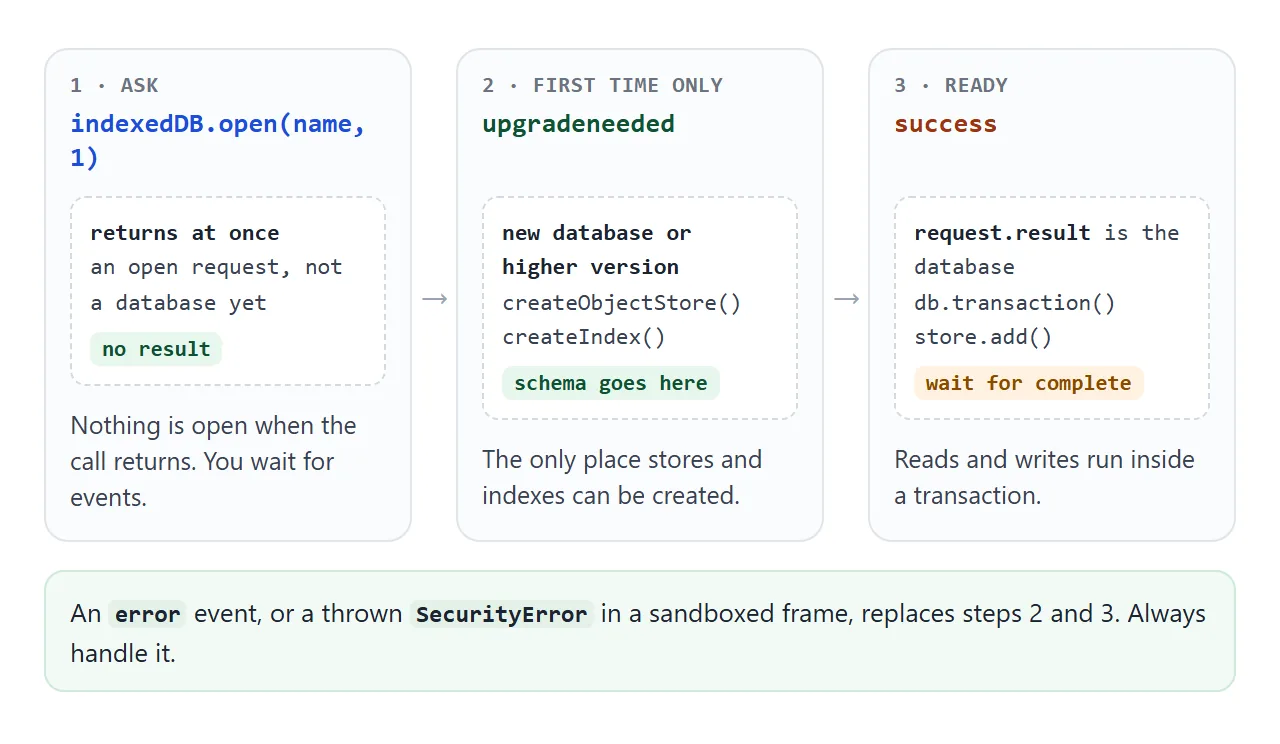
upgradeneeded fires when the database is new or when you ask for a higher version than the stored one. Create your object stores there. Every later visit goes straight to success.
See and delete the data in Chrome
Open Chrome DevTools and choose the Application tab. Chrome's DevTools documentation lists the steps:
- Expand IndexedDB to see the available databases.
- Click a database to see its origin and version number.
- Click an object store to see its key-value pairs.
- Click a cell in the Value column to expand a value.
The panel does not update by itself, so click Refresh after your code writes. Keys and values are not editable there. To remove data, use Delete Selected, Clear object store, Delete database, or Clear site data in the Clear storage pane.
Deleting the database is the quickest way to test the "first visit" path again.
Keys, stores and indexes
An object store holds records as key and value pairs, sorted by key. With keyPath: 'id' and autoIncrement: true, each object gets a number as its key.
Use add to insert. If the key already exists, add fails with a ConstraintError. Use put to insert or overwrite, which is what a "save changes" button needs.
To look records up by a field other than the key, create an index inside upgradeneeded. The next example filters tasks through an index.
<!doctype html>
<html lang="en">
<head>
<meta charset="utf-8">
<meta name="viewport" content="width=device-width, initial-scale=1">
<title>IndexedDB tasks with an index</title>
<style>
  * { box-sizing: border-box; }
  body { margin: 0; padding: 14px; font-family: system-ui, sans-serif; background: #f4f5f7; color: #1d2330; }
  #status { font-size: 13px; line-height: 1.4; padding: 8px 10px; border-radius: 8px; margin-bottom: 10px; }
  #status.ok { background: #e7f6ec; color: #0f5132; }
  #status.warn { background: #fff1e0; color: #8a4b00; }
  form { display: flex; gap: 8px; }
  input[type=text] { flex: 1; min-width: 0; padding: 9px 10px; font: inherit; border: 1px solid #cfd4dc; border-radius: 8px; }
  button { padding: 8px 12px; font: inherit; border: 0; border-radius: 8px; background: #2563eb; color: #fff; cursor: pointer; }
  .tabs { display: flex; gap: 6px; margin: 10px 0; }
  .tabs button { background: #e5e7eb; color: #1d2330; }
  .tabs button.on { background: #1d2330; color: #fff; }
  ul { list-style: none; margin: 0 0 10px; padding: 0; max-height: 170px; overflow: auto; }
  li { display: flex; align-items: center; gap: 8px; background: #fff; border-radius: 8px; padding: 7px 10px; margin-bottom: 6px; box-shadow: 0 1px 3px rgba(0,0,0,.08); font-size: 14px; }
  li span { flex: 1; overflow-wrap: anywhere; }
  li.done span { text-decoration: line-through; color: #6b7280; }
  li button { background: #f3d6d6; color: #7a1d1d; padding: 4px 8px; }
  table { width: 100%; border-collapse: collapse; font-size: 13px; background: #fff; border-radius: 8px; overflow: hidden; }
  td, th { padding: 6px 8px; text-align: left; border-bottom: 1px solid #eceef2; }
  td.n { font-weight: 700; text-align: right; }
</style>
</head>
<body>
<div id="status">Opening the database…</div>
<form id="form">
  <input type="text" id="text" placeholder="New task" required autocomplete="off">
  <button>Add</button>
</form>
<div class="tabs" id="tabs">
  <button data-f="all" class="on" type="button">All</button>
  <button data-f="open" type="button">Open</button>
  <button data-f="done" type="button">Done</button>
</div>
<ul id="list"></ul>
<table>
  <tr><th>Index</th><th>Field holds</th><th>Records in it</th></tr>
  <tr><td>byDone</td><td>0 or 1</td><td class="n" id="c1">-</td></tr>
  <tr><td>byFlag</td><td>false or true</td><td class="n" id="c2">-</td></tr>
</table>

<script>
  function openDb() {
    return new Promise((resolve, reject) => {
      let req;
      try { req = indexedDB.open('tasks-demo', 1); } catch (e) { return reject(e); }
      req.onupgradeneeded = () => {
        const s = req.result.createObjectStore('tasks', { keyPath: 'id', autoIncrement: true });
        s.createIndex('byDone', 'done');   // done is 0 or 1: a valid key
        s.createIndex('byFlag', 'flag');   // flag is true or false: not a valid key
      };
      req.onsuccess = () => resolve(req.result);
      req.onerror = () => reject(req.error);
    });
  }

  function run(db, mode, fn) {
    return new Promise((resolve, reject) => {
      const tx = db.transaction('tasks', mode);
      const req = fn(tx.objectStore('tasks'));
      tx.oncomplete = () => resolve(req.result);
      tx.onerror = tx.onabort = () => reject(tx.error);
    });
  }

  function idbStore(db) {
    return {
      add: (title) => run(db, 'readwrite', (s) => s.add({ title, done: 0, flag: false })),
      list: (f) => run(db, 'readonly', (s) =>
        f === 'all' ? s.getAll() : s.index('byDone').getAll(f === 'done' ? 1 : 0)),
      // get, change, put: put overwrites the record that has the same key
      toggle: (id) => run(db, 'readwrite', (s) => {
        const get = s.get(id);
        get.onsuccess = () => {
          const t = get.result;
          t.done = t.done ? 0 : 1;
          t.flag = !!t.done;
          s.put(t);
        };
        return get;
      }),
      remove: (id) => run(db, 'readwrite', (s) => s.delete(id)),
      counts: async () => [
        await run(db, 'readonly', (s) => s.index('byDone').count()),
        await run(db, 'readonly', (s) => s.index('byFlag').count()),
      ],
    };
  }

  function memoryStore() {
    let rows = [], n = 0;
    return {
      add: async (title) => { rows.push({ id: ++n, title, done: 0 }); },
      list: async (f) => rows.filter((r) => f === 'all' || (f === 'done') === !!r.done),
      toggle: async (id) => { const r = rows.find((x) => x.id === id); r.done = r.done ? 0 : 1; },
      remove: async (id) => { rows = rows.filter((x) => x.id !== id); },
      counts: async () => [rows.length, 'needs IndexedDB'],
    };
  }

  const $ = (id) => document.getElementById(id);
  let store, filter = 'all';

  async function render() {
    const rows = await store.list(filter);
    $('list').replaceChildren(...rows.map((r) => {
      const li = document.createElement('li');
      li.className = r.done ? 'done' : '';
      const box = document.createElement('input');
      box.type = 'checkbox'; box.checked = !!r.done;
      box.addEventListener('change', async () => { await store.toggle(r.id); render(); });
      const span = document.createElement('span'); span.textContent = r.title;
      const del = document.createElement('button'); del.textContent = 'Delete';
      del.addEventListener('click', async () => { await store.remove(r.id); render(); });
      li.append(box, span, del);
      return li;
    }));
    const c = await store.counts();
    $('c1').textContent = c[0]; $('c2').textContent = c[1];
  }

  function setStatus(cls, msg) { $('status').className = cls; $('status').textContent = msg; }

  openDb().then((db) => {
    store = idbStore(db);
    setStatus('ok', 'Using IndexedDB. Filters read the byDone index. Compare the two counts below.');
  }).catch((e) => {
    store = memoryStore();
    setStatus('warn', 'IndexedDB refused here (' + e.name + '). Tasks live in memory, and the second index cannot be shown. Opened as its own page, this page uses IndexedDB.');
  }).then(async () => {
    if (!(await store.list('all')).length) await store.add('Tick me, then open the Done filter');
    render();
  });

  $('form').addEventListener('submit', async (e) => {
    e.preventDefault();
    await store.add($('text').value.trim());
    $('text').value = '';
    render();
  });
  $('tabs').addEventListener('click', (e) => {
    const b = e.target.closest('button');
    if (!b) return;
    filter = b.dataset.f;
    for (const x of $('tabs').children) x.classList.toggle('on', x === b);
    render();
  });
</script>
</body>
</html>
A key can be a string, a date, a number, binary data or an array. A boolean is none of those. IndexedDB does not complain, it simply leaves the record out of that index:
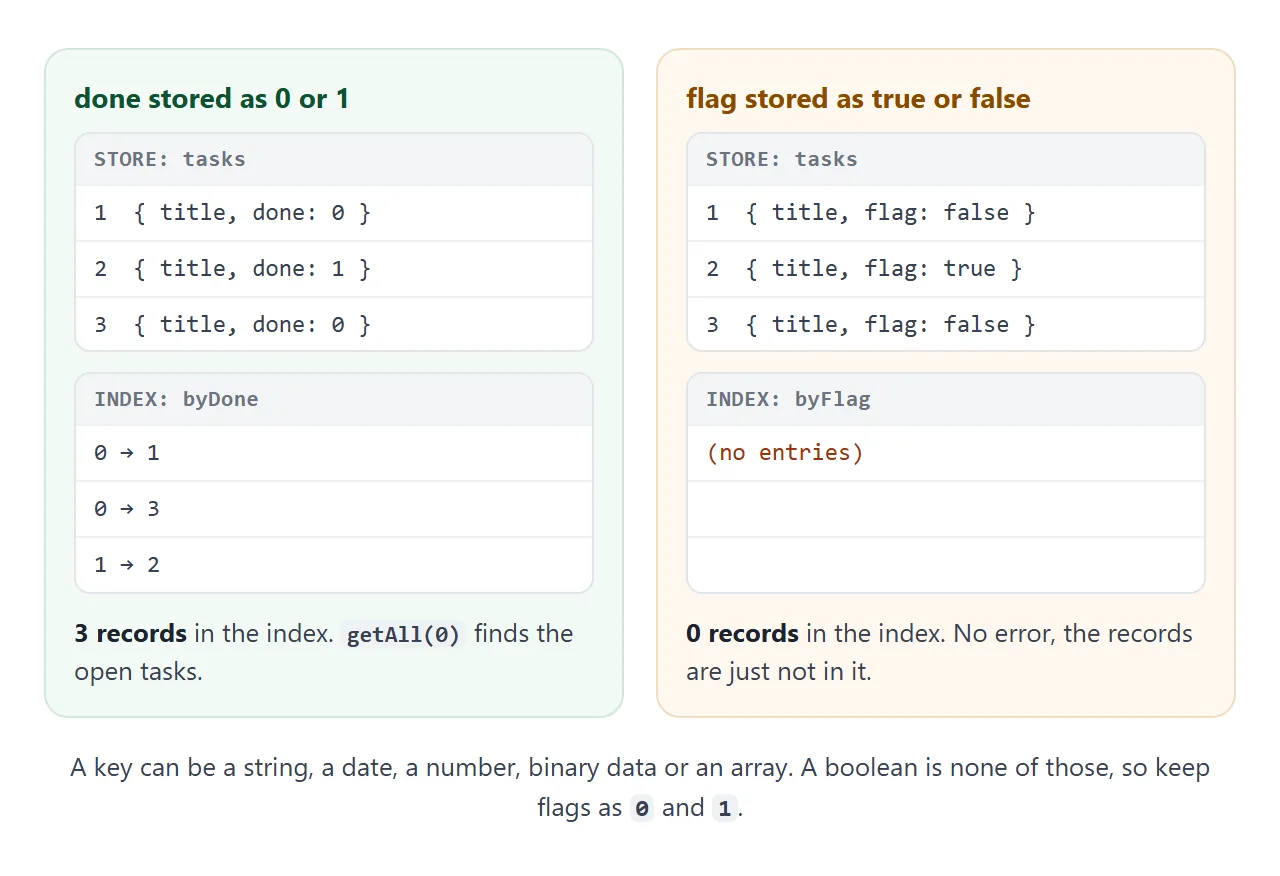
Store a yes or no flag as 0 and 1, then query getAll(1).
Transactions and versions
Every read or write happens in a transaction. The transaction commits by itself when it has no pending requests. Placing a new request after that, for example after waiting on a timer, fails with a TransactionInactiveError.
So keep all the requests of one job together, and wrap the transaction in a promise that resolves on complete, as the demos do. For the promise side, see async and await.
function run(db, mode, fn) {
  return new Promise((resolve, reject) => {
    const tx = db.transaction('notes', mode);
    const req = fn(tx.objectStore('notes'));
    tx.oncomplete = () => resolve(req.result);
    tx.onerror = tx.onabort = () => reject(tx.error);
  });
}
The version number is how you change the structure. To add a store or an index later, raise the number in open. Opening with a lower number than the stored one is an error you must handle.
If another tab still holds the older version, the upgrade waits and the request fires blocked. Close the old connection when the page receives versionchange:
db.onversionchange = () => db.close();
It stays in one browser
Each origin has its own set of databases, inside each browser. The data sits on the visitor's device. A link to your page gives them your code and a new, empty database.
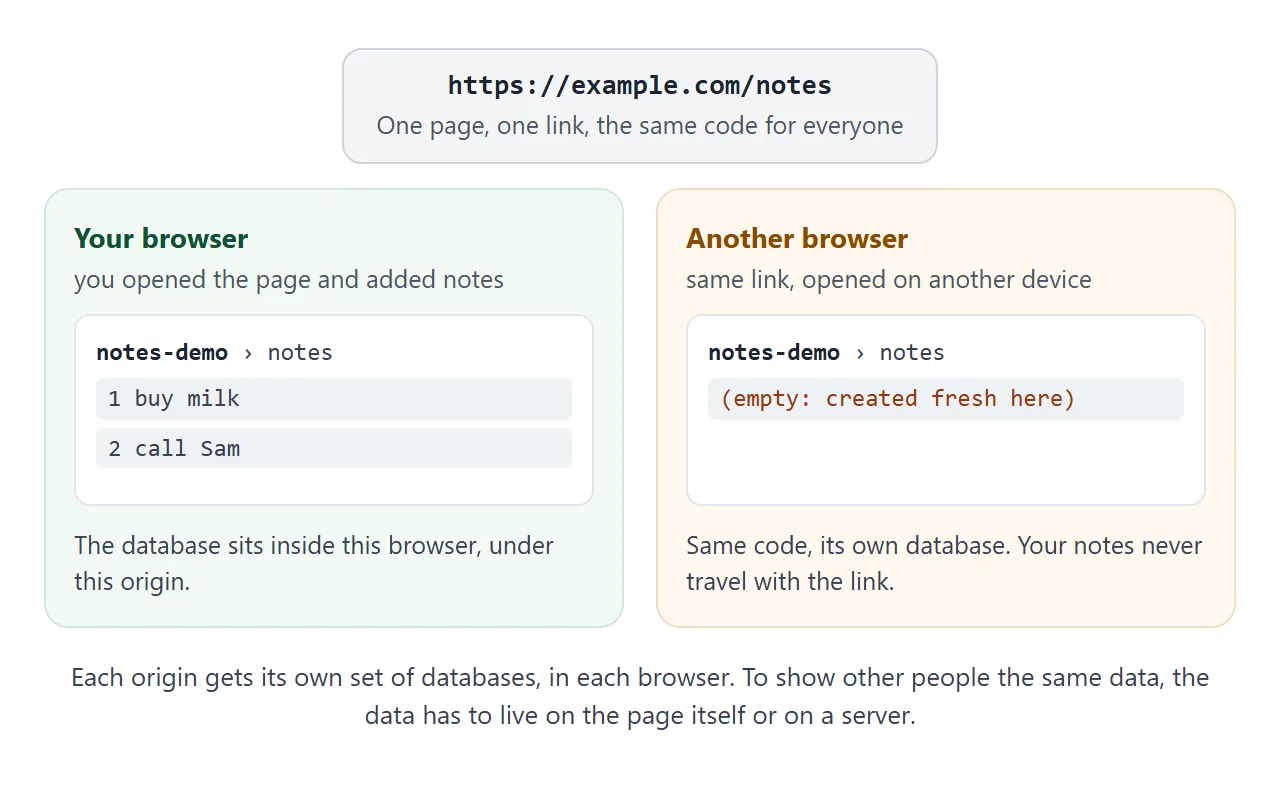
Three more limits to know:
- Best effort. By default the browser may evict stored data under storage pressure. When it does, it removes all of an origin's data at once.
- Private windows. MDN says IndexedDB storage in privacy modes only lasts in memory until the session closes.
- Quota. When an origin fills its quota, writes fail with
QuotaExceededError.navigator.storage.estimate()returns estimated usage and quota. Treat both numbers as estimates.
An origin can also ask for persistent storage with navigator.storage.persist().
Inside a sandboxed frame it throws
The example boxes on this page run in a sandboxed frame without an origin of their own. There, indexedDB.open throws a SecurityError right away, before any event. We tested this in Chromium: the demos catch the error, say so in orange, and switch to memory.
The specification says the same thing in its own terms: if the browser cannot obtain a storage key for the page, open throws SecurityError. So always put open in a try block and keep a fallback. The sandbox attribute explains what such a frame blocks.
A finished example: a sketch pad
Files go into IndexedDB as they are. This pad saves each drawing as a PNG Blob, with no base64 text. The gallery rebuilds its thumbnails from the stored Blobs with object URLs.
<!doctype html>
<html lang="en">
<head>
<meta charset="utf-8">
<meta name="viewport" content="width=device-width, initial-scale=1">
<title>Sketch pad saved in IndexedDB</title>
<style>
  * { box-sizing: border-box; }
  body { margin: 0; padding: 14px; font-family: system-ui, sans-serif; background: #f4f5f7; color: #1d2330; }
  #status { font-size: 13px; line-height: 1.4; padding: 8px 10px; border-radius: 8px; margin-bottom: 10px; }
  #status.ok { background: #e7f6ec; color: #0f5132; }
  #status.warn { background: #fff1e0; color: #8a4b00; }
  canvas { display: block; width: 100%; max-width: 420px; aspect-ratio: 7 / 4; background: #fff; border-radius: 10px; box-shadow: 0 2px 8px rgba(0,0,0,.12); touch-action: none; cursor: crosshair; }
  .row { display: flex; gap: 8px; flex-wrap: wrap; margin: 10px 0; }
  button { padding: 8px 12px; font: inherit; border: 0; border-radius: 8px; background: #2563eb; color: #fff; cursor: pointer; }
  button.plain { background: #e5e7eb; color: #1d2330; }
  #gallery { display: flex; gap: 8px; flex-wrap: wrap; }
  #gallery img { width: 84px; height: 48px; object-fit: cover; background: #fff; border-radius: 6px; box-shadow: 0 1px 4px rgba(0,0,0,.15); }
  #count { font-size: 13px; color: #4b5563; margin-bottom: 6px; }
</style>
</head>
<body>
<div id="status">Opening the database…</div>
<canvas id="pad" width="420" height="240"></canvas>
<div class="row">
  <button id="save" type="button">Save drawing</button>
  <button class="plain" id="wipe" type="button">Clear canvas</button>
  <button class="plain" id="del" type="button">Delete saved</button>
  <button class="plain" id="reload" type="button">Reload page</button>
</div>
<div id="count"></div>
<div id="gallery"></div>

<script>
  function openDb() {
    return new Promise((resolve, reject) => {
      let req;
      try { req = indexedDB.open('sketch-demo', 1); } catch (e) { return reject(e); }
      req.onupgradeneeded = () =>
        req.result.createObjectStore('drawings', { keyPath: 'id', autoIncrement: true });
      req.onsuccess = () => resolve(req.result);
      req.onerror = () => reject(req.error);
    });
  }

  function run(db, mode, fn) {
    return new Promise((resolve, reject) => {
      const tx = db.transaction('drawings', mode);
      const req = fn(tx.objectStore('drawings'));
      tx.oncomplete = () => resolve(req.result);
      tx.onerror = tx.onabort = () => reject(tx.error);
    });
  }

  // A Blob goes straight into the store: IndexedDB can hold files, no base64 needed.
  function idbStore(db) {
    return {
      add: (blob) => run(db, 'readwrite', (s) => s.add({ blob })),
      all: () => run(db, 'readonly', (s) => s.getAll()),
      clear: () => run(db, 'readwrite', (s) => s.clear()),
    };
  }

  function memoryStore() {
    let rows = [], n = 0;
    return {
      add: async (blob) => { rows.push({ id: ++n, blob }); },
      all: async () => rows.slice(),
      clear: async () => { rows = []; },
    };
  }

  const $ = (id) => document.getElementById(id);
  const pad = $('pad'), ctx = pad.getContext('2d');
  let store, urls = [];

  function blank() { ctx.fillStyle = '#fff'; ctx.fillRect(0, 0, pad.width, pad.height); }
  blank();
  ctx.lineWidth = 4; ctx.lineCap = 'round'; ctx.strokeStyle = '#1d2330';

  // Pointer position in canvas pixels, even when CSS shrinks the canvas on a phone.
  function pos(e) {
    const r = pad.getBoundingClientRect();
    return [(e.clientX - r.left) * pad.width / r.width, (e.clientY - r.top) * pad.height / r.height];
  }
  pad.addEventListener('pointerdown', (e) => {
    pad.setPointerCapture(e.pointerId);
    const [x, y] = pos(e);
    ctx.beginPath(); ctx.moveTo(x, y); ctx.lineTo(x + 0.1, y); ctx.stroke();
  });
  pad.addEventListener('pointermove', (e) => {
    if (!pad.hasPointerCapture(e.pointerId)) return;
    const [x, y] = pos(e);
    ctx.lineTo(x, y); ctx.stroke();
  });

  async function render() {
    urls.forEach((u) => URL.revokeObjectURL(u));  // free the old thumbnails
    const rows = await store.all();
    urls = rows.map((r) => URL.createObjectURL(r.blob));
    $('gallery').replaceChildren(...urls.map((u) => {
      const img = new Image(); img.src = u; img.alt = 'Saved drawing';
      return img;
    }));
    $('count').textContent = rows.length + ' saved drawing' + (rows.length === 1 ? '' : 's');
  }

  function setStatus(cls, msg) { $('status').className = cls; $('status').textContent = msg; }

  openDb().then((db) => {
    store = idbStore(db);
    setStatus('ok', 'Draw, press Save, then Reload page: the drawings are still there.');
  }).catch((e) => {
    store = memoryStore();
    setStatus('warn', 'IndexedDB refused here (' + e.name + '). Drawings live in memory and vanish on reload. Opened as its own page, this page uses IndexedDB.');
  }).then(render);

  $('save').addEventListener('click', () => {
    pad.toBlob(async (blob) => { await store.add(blob); render(); }, 'image/png');
  });
  $('wipe').addEventListener('click', blank);
  $('del').addEventListener('click', async () => { await store.clear(); render(); });
  $('reload').addEventListener('click', () => location.reload());
</script>
</body>
</html>
The same three functions as before, add, all and clear, hold the whole data layer. The drawing code uses pointer events, so touch works too.
When it does not work
| Symptom | Cause | Fix |
|---|---|---|
SecurityError as soon as you call open |
Sandboxed frame, or no storage key | Wrap open in try, keep a fallback |
| Transaction cannot find the store | The store was never created | Create it in upgradeneeded, raise the version |
| Error on open after a downgrade | Stored version is higher than yours | Open with the stored version or higher |
| Data missing right after add | You read before the transaction finished | Wait for complete |
| TransactionInactiveError | A request came after the transaction committed | Keep one job's requests together |
| ConstraintError on add | The key already exists | Use put to overwrite |
| Index query returns nothing | A boolean is not a valid key | Store 0 and 1 |
| DataCloneError | The value cannot be structured-cloned | Store plain data |
| Upgrade never finishes | An older tab keeps the old version open | Close the connection on versionchange |
| New record not in DevTools | The panel does not update live | Click Refresh |
| Data disappears later | Best-effort storage, or a private window | Offer an export; ask for persist |
Share it as a link
A page that saves to IndexedDB is easier to show than to describe. An attached .html file may open as plain code on a phone, which is why opening an HTML file on a phone is its own guide.
To send the working version, paste the page into a NOS document and choose Create share link. HTML to link walks through it. The page renders as written and its scripts run, so the people you send it to can add notes and draw themselves.
If you change the code later, the same link shows the new version.
Remember the picture above: each visitor starts with an empty database of their own. If the browser refuses storage where the page runs, the catch branch tells them, as the examples on this page do.