Matter.js is a JavaScript library, a 2D physics engine for the web: you describe bodies such as boxes and circles, and it works out gravity, collisions and bouncing. It runs in a single HTML file with one script tag.
If you searched "how to master JS": no library does that for you. A physics toy is still a good small project, because every line you change shows up on screen and can be dragged.
Try the smallest working page first. Press the button to drop more boxes.
<!doctype html>
<html lang="en">
<head>
<meta charset="utf-8">
<meta name="viewport" content="width=device-width, initial-scale=1">
<title>Matter.js in one HTML file</title>
<style>
  body { margin: 0; padding: 14px; font-family: system-ui, sans-serif; background: #fff; color: #1d2330; }
  #stage { border-radius: 12px; overflow: hidden; background: #f4f5f7; line-height: 0; }
  .bar { display: flex; gap: 10px; align-items: center; margin-top: 12px; flex-wrap: wrap; }
  button { font: inherit; font-size: 15px; padding: 8px 14px; border: 0; border-radius: 8px; background: #1d2330; color: #fff; cursor: pointer; }
  #count { font-size: 14px; color: #5b6270; }
</style>
</head>
<body>
<div id="stage"></div>
<div class="bar">
  <button id="drop">Drop a box</button>
  <span id="count"></span>
</div>

<!-- 1. Load Matter.js first (pinned version) -->
<script src="https://cdn.jsdelivr.net/npm/matter-js@0.20.0/build/matter.min.js"></script>
<!-- 2. Then your own script -->
<script>
  const { Engine, Render, Runner, Bodies, Composite } = Matter;

  const stage = document.getElementById('stage');
  const W = stage.clientWidth, H = 280;   // size the canvas to the page, not the 800x600 default

  const engine = Engine.create();          // the physics world
  const render = Render.create({           // draws the world on a canvas
    element: stage,
    engine: engine,
    options: { width: W, height: H, wireframes: false, background: '#f4f5f7' }
  });

  // x and y are the CENTER of a body, not its top-left corner
  const ground = Bodies.rectangle(W / 2, H - 15, W, 30, { isStatic: true, render: { fillStyle: '#1d2330' } });
  const left   = Bodies.rectangle(-15, H / 2, 30, H * 2, { isStatic: true });
  const right  = Bodies.rectangle(W + 15, H / 2, 30, H * 2, { isStatic: true });

  function addBox(x) {
    const size = 30 + Math.random() * 30;
    Composite.add(engine.world, Bodies.rectangle(x, -size, size, size, {
      restitution: 0.3,
      render: { fillStyle: ['#0f766e', '#2563eb', '#d97706'][Math.floor(Math.random() * 3)] }
    }));
  }

  Composite.add(engine.world, [ground, left, right]);
  for (let i = 0; i < 4; i++) addBox(W * (0.2 + 0.2 * i));

  Render.run(render);                      // paint every frame
  Runner.run(Runner.create(), engine);     // step the physics every frame

  const count = document.getElementById('count');
  function show() { count.textContent = (engine.world.bodies.length - 3) + ' boxes'; }
  document.getElementById('drop').addEventListener('click', () => { addBox(Math.random() * W); show(); });
  show();
</script>
</body>
</html>
What Matter.js does, and what it leaves to you
Matter.js only does the physics. Your page supplies a place to show the result, and the library gives you three pieces that fit together.
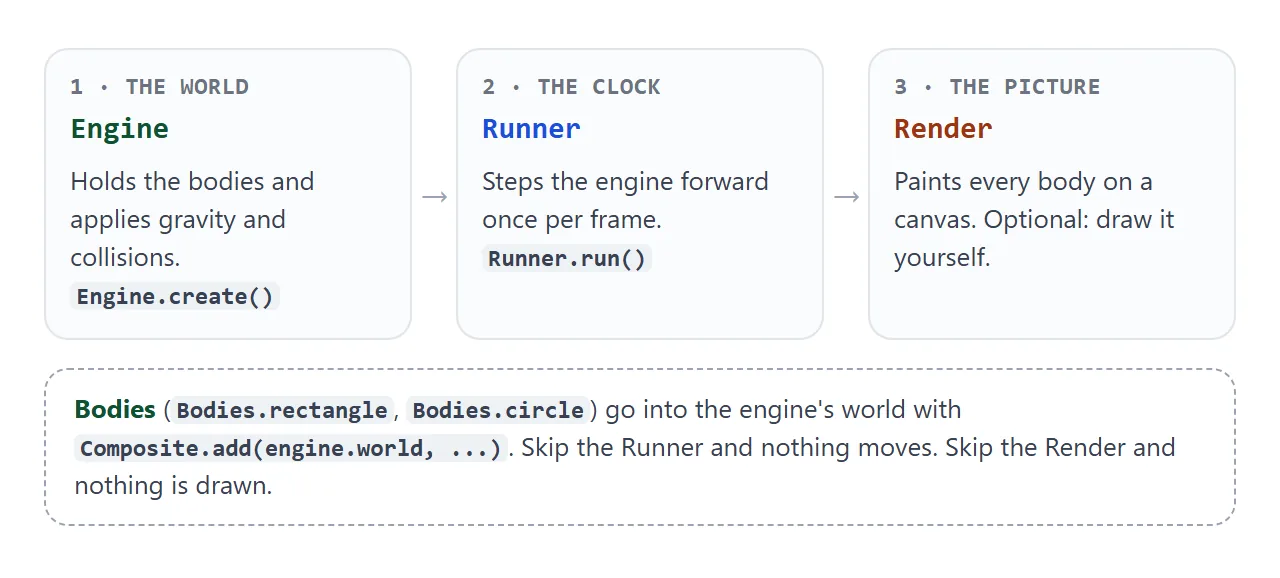
- Engine holds the world. Gravity is on by default, pulling bodies down.
- Runner moves the engine forward once per browser frame. Without it the bodies stay where you put them.
- Render draws every body on a canvas. It is optional: the Runner docs say you can call Engine.update in your own loop instead.
The smallest page, step by step
The example above is the same four steps every time.
- Load the library. Put the Matter.js script tag before your own script. It creates one global variable named Matter.
- Create an engine and a renderer. Pass the renderer a width and a height taken from the page.
- Add bodies. Make a static ground and a few boxes, then put them in the world with Composite.add.
- Start both loops. Call Render.run and Runner.run.
The first line of your script usually unpacks the parts you need, so the rest reads cleanly:
const { Engine, Render, Runner, Bodies, Composite } = Matter;
The script tag for Matter.js must come before the code that uses it. Browsers run classic scripts in the order they appear, so a script placed above the tag runs while Matter does not exist yet.
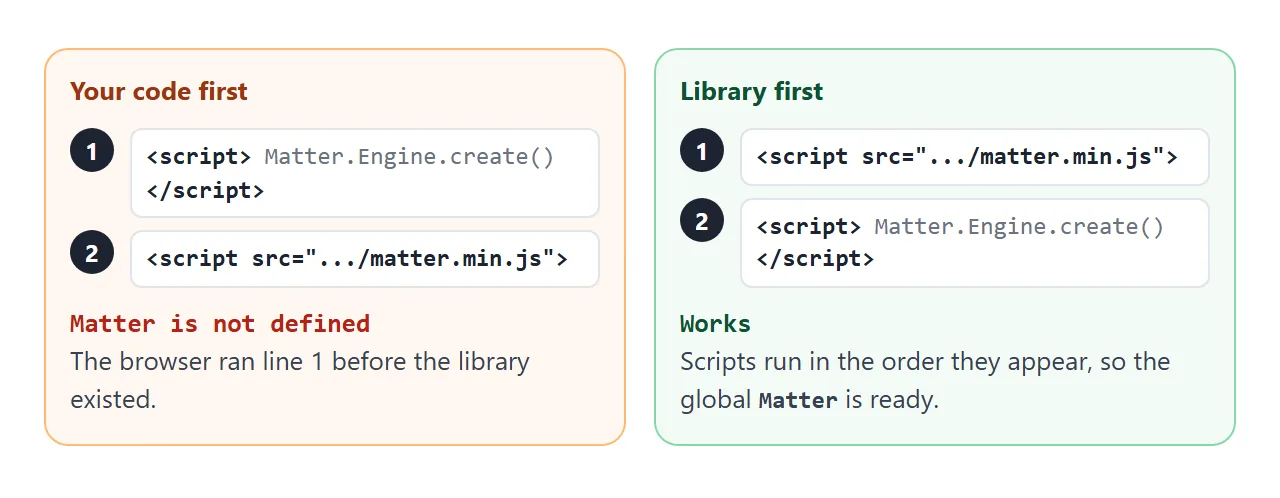
Pin the version in the address, as the examples do with 0.20.0, so a new release cannot change your page. The same build is on cdn.jsdelivr.net and cdnjs.cloudflare.com. For more on pages that stay silent, see when JavaScript does not work in HTML.
npm is for projects that use a bundler, which a plain HTML file does not have:
npm install matter-js
x and y are the center of the body
Bodies.rectangle takes an x and a y, then a width and a height. Those first two numbers are the middle of the shape, not its top-left corner.
An 80 by 40 box placed at 100, 100 covers x from 60 to 140 and y from 80 to 120.
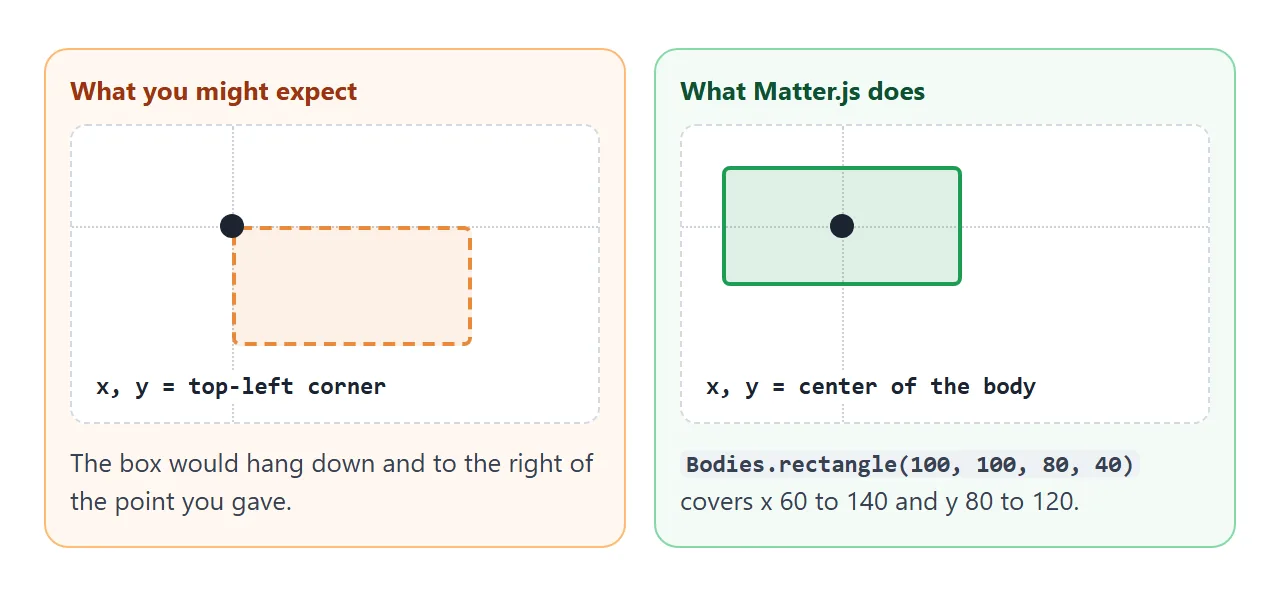
Remember this when you build walls. A ground that should span the bottom of a canvas of width W is centered at W divided by 2, and its height is split around the y you give.
Draw it yourself with your own canvas
The renderer is a convenience. The engine keeps a position and an angle on every body, so you can draw them any way you like.
This example has no Render at all: it steps the engine once per frame and paints circles with plain canvas calls.
<!doctype html>
<html lang="en">
<head>
<meta charset="utf-8">
<meta name="viewport" content="width=device-width, initial-scale=1">
<title>Matter.js with your own canvas</title>
<style>
  body { margin: 0; padding: 14px; font-family: system-ui, sans-serif; background: #fff; color: #1d2330; }
  canvas { display: block; width: 100%; border-radius: 12px; background: #f4f5f7; touch-action: none; }
  p { margin: 10px 0 0; font: 13px/1.4 ui-monospace, Consolas, monospace; color: #374151; }
</style>
</head>
<body>
<canvas id="c" height="260"></canvas>
<p id="out">Drag a ball.</p>

<script src="https://cdn.jsdelivr.net/npm/matter-js@0.20.0/build/matter.min.js"></script>
<script>
  const { Engine, Bodies, Composite, Mouse, MouseConstraint } = Matter;

  const canvas = document.getElementById('c');
  canvas.width = canvas.clientWidth;               // pixel size = CSS size
  const W = canvas.width, H = canvas.height;
  const ctx = canvas.getContext('2d');

  const engine = Engine.create();
  const balls = [];
  for (let i = 0; i < 5; i++) {
    balls.push(Bodies.circle(W * (0.15 + 0.17 * i), 40 + i * 25, 22, { restitution: 0.8 }));
  }
  const walls = [
    Bodies.rectangle(W / 2, H + 25, W, 50, { isStatic: true }),
    Bodies.rectangle(-25, H / 2, 50, H * 2, { isStatic: true }),
    Bodies.rectangle(W + 25, H / 2, 50, H * 2, { isStatic: true })
  ];
  Composite.add(engine.world, [...balls, ...walls]);

  // Let the mouse or a finger grab bodies on this canvas
  const mouse = Mouse.create(canvas);
  Composite.add(engine.world, MouseConstraint.create(engine, {
    mouse: mouse,
    constraint: { stiffness: 0.2, render: { visible: false } }
  }));

  const colors = ['#0f766e', '#2563eb', '#d97706', '#be185d', '#7c3aed'];
  const out = document.getElementById('out');

  function frame() {
    Engine.update(engine, 1000 / 60);              // you run the clock: one physics step per frame
    ctx.clearRect(0, 0, W, H);
    balls.forEach((b, i) => {                      // you draw: read position and angle from each body
      ctx.save();
      ctx.translate(b.position.x, b.position.y);
      ctx.rotate(b.angle);
      ctx.fillStyle = colors[i];
      ctx.beginPath(); ctx.arc(0, 0, 22, 0, Math.PI * 2); ctx.fill();
      ctx.fillStyle = '#fff'; ctx.fillRect(2, -2, 18, 4);   // a mark so you can see it spin
      ctx.restore();
    });
    out.textContent = 'ball 1: x ' + Math.round(balls[0].position.x) + '  y ' + Math.round(balls[0].position.y);
    requestAnimationFrame(frame);
  }
  frame();
</script>
</body>
</html>
The loop is short:
function frame() {
  Engine.update(engine, 1000 / 60);   // one physics step
  // draw each body from body.position and body.angle here
  requestAnimationFrame(frame);
}
This is the natural place to learn how the browser's frame loop works. requestAnimationFrame explains the timing, and canvas particles shows another thing you can draw each frame.
A finished example: a toy box
This page adds what a small physics project usually needs: walls on all four sides, balls and boxes and hexagons, dragging with a mouse or finger, a gravity slider, and a collision counter.
<!doctype html>
<html lang="en">
<head>
<meta charset="utf-8">
<meta name="viewport" content="width=device-width, initial-scale=1">
<title>Toy box with Matter.js</title>
<style>
  * { box-sizing: border-box; }
  body { margin: 0; padding: 14px; font-family: system-ui, sans-serif; background: #fff; color: #1d2330; }
  #stage { border-radius: 12px; overflow: hidden; background: #f4f5f7; line-height: 0; touch-action: none; }
  .bar { display: flex; gap: 8px; align-items: center; margin-top: 12px; flex-wrap: wrap; }
  button { font: inherit; font-size: 14px; padding: 8px 12px; border: 0; border-radius: 8px; background: #1d2330; color: #fff; cursor: pointer; }
  button.alt { background: #e5e7eb; color: #1d2330; }
  label { font-size: 14px; display: flex; align-items: center; gap: 8px; margin-top: 12px; }
  input[type=range] { flex: 1; min-width: 0; }
  #stats { margin-top: 10px; font-size: 14px; color: #374151; }
</style>
</head>
<body>
<div id="stage"></div>
<div class="bar">
  <button id="circle">+ Ball</button>
  <button id="box">+ Box</button>
  <button id="hex">+ Hexagon</button>
  <button id="clear" class="alt">Clear</button>
</div>
<label>Gravity <input id="g" type="range" min="-1" max="1" step="0.1" value="1"> <output id="gv">1</output></label>
<div id="stats"></div>

<script src="https://cdn.jsdelivr.net/npm/matter-js@0.20.0/build/matter.min.js"></script>
<script>
  const { Engine, Render, Runner, Bodies, Body, Composite, Events, Mouse, MouseConstraint } = Matter;

  const stage = document.getElementById('stage');
  const W = stage.clientWidth, H = 300;

  const engine = Engine.create();
  const render = Render.create({
    element: stage, engine: engine,
    options: { width: W, height: H, wireframes: false, background: '#f4f5f7' }
  });

  // Four static walls around the canvas
  const t = 40, wall = { isStatic: true, render: { fillStyle: '#1d2330' } };
  const walls = [
    Bodies.rectangle(W / 2, H + t / 2 - 6, W + t * 2, t, wall),
    Bodies.rectangle(W / 2, -t / 2 + 6, W + t * 2, t, wall),
    Bodies.rectangle(-t / 2 + 6, H / 2, t, H * 2, wall),
    Bodies.rectangle(W + t / 2 - 6, H / 2, t, H * 2, wall)
  ];
  Composite.add(engine.world, walls);

  // Drag with a mouse or a finger
  const mouse = Mouse.create(render.canvas);
  const drag = MouseConstraint.create(engine, { mouse: mouse, constraint: { stiffness: 0.2, render: { visible: false } } });
  Composite.add(engine.world, drag);
  render.mouse = mouse;

  const colors = ['#0f766e', '#2563eb', '#d97706', '#be185d', '#7c3aed'];
  function style() { return { restitution: 0.6, render: { fillStyle: colors[Math.floor(Math.random() * colors.length)] } }; }
  function add(kind, x, y) {
    x = x === undefined ? 30 + Math.random() * (W - 60) : x;
    y = y === undefined ? 40 : y;
    let body;
    if (kind === 'circle') body = Bodies.circle(x, y, 14 + Math.random() * 14, style());
    if (kind === 'box') body = Bodies.rectangle(x, y, 28 + Math.random() * 24, 28 + Math.random() * 24, style());
    if (kind === 'hex') body = Bodies.polygon(x, y, 6, 18 + Math.random() * 10, style());
    Composite.add(engine.world, body);
  }
  ['circle', 'box', 'hex'].forEach((k) => document.getElementById(k).addEventListener('click', () => add(k)));
  add('circle'); add('box'); add('hex');

  document.getElementById('clear').addEventListener('click', () => {
    Composite.allBodies(engine.world).filter((b) => !b.isStatic).forEach((b) => Composite.remove(engine.world, b));
  });

  // Tap on empty space to drop a ball there
  Events.on(drag, 'mousedown', (e) => { if (!drag.body) add('circle', e.mouse.position.x, e.mouse.position.y); });

  // Count collisions that start
  let hits = 0;
  Events.on(engine, 'collisionStart', (e) => { hits += e.pairs.length; });

  const g = document.getElementById('g'), gv = document.getElementById('gv');
  g.addEventListener('input', () => { engine.gravity.y = Number(g.value); gv.textContent = g.value; });

  const stats = document.getElementById('stats');
  Events.on(engine, 'afterUpdate', () => {
    stats.textContent = (Composite.allBodies(engine.world).length - walls.length) + ' bodies, ' + hits + ' collisions';
  });

  Render.run(render);
  Runner.run(Runner.create(), engine);
</script>
</body>
</html>
- Dragging: Mouse.create plus MouseConstraint.create lets a pointer grab bodies. It handles mouse and touch input. For the browser's own model of both, see pointer events.
- Counting hits: Events.on(engine, 'collisionStart', ...) runs when two bodies begin to touch.
- Clearing: Composite.allBodies lists everything, and Composite.remove deletes it.
Five changes to try, one concept each
Edit the toy box in the example above and run it again. Each change practices something you will use outside physics.
- Add a color to the colors array. That is array handling.
- Change restitution from 0.6 to 0.9. That is an options object, and it makes everything bouncier.
- Add a fourth shape button. That is a new function and a new event listener.
- Count collisions per color. That is an object used as a counter.
- Set engine.gravity.x as well as y. That is reading a property and writing it back.
When the canvas takes over the page
When you create a Mouse on a canvas, Matter.js listens for the mouse wheel there and cancels it. In a test, a wheel turn over the canvas did not scroll the page, while the same turn beside it did.
If the canvas fills the screen on a long page, remove that one listener:
const mouse = Mouse.create(canvas);
mouse.element.removeEventListener('wheel', mouse.mousewheel);
On a phone, the same mouse input also listens for touch events on the canvas and cancels them, so leave some page around the canvas for people to scroll with. CSS touch-action covers the browser side of that.
When it does not work
| What you see | Cause | Fix |
|---|---|---|
| Console says Matter is not defined | Your script runs before the library tag | Move the Matter.js script tag above it |
| Bodies appear but never move | Render only draws; nothing steps the engine | Call Runner.run(Runner.create(), engine) |
| Canvas is wider than a phone screen | Render defaults to 800 by 600 | Pass width and height in the options |
| Bodies are thin outlines | wireframes defaults to true | Set wireframes: false |
| The ground falls off the screen | The ground body is not static | Add isStatic: true |
| A box lands in the wrong place | x and y are the center | Place bodies by their middle point |
| Bodies fall out of view | The world has no edges | Add static walls on all four sides |
| Mouse wheel will not scroll the page | Mouse input cancels the wheel over the canvas | Remove the wheel listener |
Share it as a link
A physics page is much better played than described. A screenshot cannot be dragged, and an attached .html file may not open on a phone at all.
To send the working version, paste the page into a NOS document and choose Create share link. HTML to link walks through it.
The page renders as written and its scripts run, and the Matter.js tag loads from the CDN, so the people you send it to can drag the shapes themselves.
If you change the code later, the same link shows the new version. A game made of one HTML file is shared the same way.