A roadmap template is a fixed layout you refill as plans move. Write it as one HTML page and share it as a link, and stakeholders open it in a browser with no tool login. You also skip the export step.
That step is a pain for some people. One person, writing about exporting from Claude, put it this way: "save as pdf, layout shifts. always end up just screenshotting."
A page avoids it. The browser lays the page out for whichever screen opens it. Here is a finished product roadmap with three lanes. Tap a team to filter it.
<!doctype html>
<html lang="en">
<head>
<meta charset="utf-8">
<meta name="viewport" content="width=device-width, initial-scale=1">
<title>Tallybird roadmap</title>
<style>
  * { box-sizing: border-box; }
  body { margin: 0; padding: 18px 14px 28px; font: 16px/1.5 system-ui, sans-serif; color: #1d2330; background: #f4f5f8; }
  .wrap { max-width: 920px; margin: 0 auto; }
  h1 { font-size: 22px; margin: 0 0 2px; }
  .meta { color: #5b6473; font-size: 14px; margin: 0 0 14px; }
  .changes { background: #fff; border: 1px solid #e1e4ea; border-left: 4px solid #2563eb; border-radius: 10px; padding: 10px 14px; margin-bottom: 14px; }
  .changes h2 { font-size: 13px; text-transform: uppercase; letter-spacing: .5px; color: #1d4ed8; margin: 0 0 4px; }
  .changes ul { margin: 0; padding-left: 18px; font-size: 15px; }
  .filters { display: flex; flex-wrap: wrap; gap: 8px; margin-bottom: 14px; }
  .filters button { font: inherit; font-size: 14px; padding: 7px 14px; border-radius: 99px; border: 1px solid #c9cfd9; background: #fff; color: #1d2330; cursor: pointer; }
  .filters button[aria-pressed="true"] { background: #1d2330; color: #fff; border-color: #1d2330; }
  .lanes { display: grid; grid-template-columns: repeat(3, 1fr); gap: 12px; align-items: start; }
  .lane { background: #e9ecf2; border-radius: 12px; padding: 12px; }
  .lane h2 { font-size: 16px; margin: 0 0 2px; }
  .lane .sub { font-size: 13px; color: #5b6473; margin: 0 0 10px; }
  .card { background: #fff; border-radius: 9px; padding: 11px 12px; margin-bottom: 9px; box-shadow: 0 1px 3px rgba(0,0,0,.08); }
  .card h3 { font-size: 15px; margin: 0 0 3px; }
  .card p { font-size: 14px; margin: 0 0 8px; color: #3b4352; }
  .tags { display: flex; flex-wrap: wrap; gap: 6px; }
  .tag { font-size: 12px; font-weight: 600; padding: 3px 8px; border-radius: 99px; background: #eef1f5; color: #3b4352; }
  .st-track { background: #dcfce7; color: #0f5132; }
  .st-risk { background: #ffedd5; color: #9a3412; }
  .st-plan { background: #dbeafe; color: #1e3a8a; }
  .st-idea { background: #f1f5f9; color: #475569; }
  .empty { font-size: 14px; color: #5b6473; padding: 4px 2px; }
  .note { font-size: 13px; color: #5b6473; margin-top: 14px; }
  @media (max-width: 700px) { .lanes { grid-template-columns: 1fr; } }
  @media print {
    body { background: #fff; padding: 0; }
    .filters { display: none; }
    .card, .lane { break-inside: avoid; }
    .tag, .lane { print-color-adjust: exact; -webkit-print-color-adjust: exact; }
  }
</style>
</head>
<body>
<div class="wrap">
  <h1 id="title"></h1>
  <p class="meta" id="meta"></p>

  <div class="changes">
    <h2>Changed since the last update</h2>
    <ul id="changes"></ul>
  </div>

  <div class="filters" id="filters" role="group" aria-label="Filter by team"></div>
  <div class="lanes" id="lanes"></div>
  <p class="note">Dates are not promises. Items in Next and Later can move.</p>
</div>

<script>
  // ---- Change the content here each time. Everything below renders from it. ----
  const PRODUCT = 'Tallybird roadmap';
  const UPDATED = '1 Oct 2026';
  const OWNER = 'Product team';
  const CHANGES = [
    'Moved: Bank sync, from Next to Later (waiting on a partner).',
    'Added: Reminder emails, in Next.',
    'Done: Invoice PDF export.'
  ];
  // lane: now | next | later    status: track | risk | plan | idea
  const LANES = [
    { id: 'now',   name: 'Now',   sub: 'In progress this quarter' },
    { id: 'next',  name: 'Next',  sub: 'Planned, not started' },
    { id: 'later', name: 'Later', sub: 'Ideas we are weighing' }
  ];
  const STATUS = { track: 'On track', risk: 'At risk', plan: 'Planned', idea: 'Idea' };
  const ITEMS = [
    { lane: 'now',   team: 'Design',      status: 'track', title: 'New invoice screen',  note: 'Fewer fields, one tap to send.' },
    { lane: 'now',   team: 'Engineering', status: 'risk',  title: 'Faster client search', note: 'Waiting on a database change.' },
    { lane: 'now',   team: 'Support',     status: 'track', title: 'Help center rewrite',  note: 'Top 20 questions first.' },
    { lane: 'next',  team: 'Engineering', status: 'plan',  title: 'Reminder emails',      note: 'Nudge clients on unpaid invoices.' },
    { lane: 'next',  team: 'Design',      status: 'plan',  title: 'Mobile layout pass',   note: 'Every screen at phone width.' },
    { lane: 'later', team: 'Engineering', status: 'idea',  title: 'Bank sync',            note: 'Match payments automatically.' },
    { lane: 'later', team: 'Support',     status: 'idea',  title: 'In-app chat',          note: 'Only if tickets keep growing.' }
  ];
  // ------------------------------------------------------------------------------

  const teams = ['All'].concat([...new Set(ITEMS.map(i => i.team))]);
  let team = 'All';

  document.getElementById('title').textContent = PRODUCT;
  document.getElementById('meta').textContent = 'Updated ' + UPDATED + ' · ' + OWNER;
  document.title = PRODUCT;

  const changes = document.getElementById('changes');
  CHANGES.forEach(text => {
    const li = document.createElement('li');
    li.textContent = text;
    changes.appendChild(li);
  });

  function el(tag, cls, text) {
    const e = document.createElement(tag);
    if (cls) e.className = cls;
    if (text) e.textContent = text;
    return e;
  }

  function drawFilters() {
    const box = document.getElementById('filters');
    box.textContent = '';
    teams.forEach(t => {
      const b = el('button', '', t);
      b.type = 'button';
      b.setAttribute('aria-pressed', String(t === team));
      b.addEventListener('click', () => { team = t; drawFilters(); drawLanes(); });
      box.appendChild(b);
    });
  }

  function drawLanes() {
    const box = document.getElementById('lanes');
    box.textContent = '';
    LANES.forEach(lane => {
      const col = el('section', 'lane');
      const shown = ITEMS.filter(i => i.lane === lane.id && (team === 'All' || i.team === team));
      col.appendChild(el('h2', '', lane.name + ' (' + shown.length + ')'));
      col.appendChild(el('p', 'sub', lane.sub));
      if (!shown.length) col.appendChild(el('p', 'empty', 'Nothing here for this team.'));
      shown.forEach(i => {
        const c = el('article', 'card');
        c.appendChild(el('h3', '', i.title));
        c.appendChild(el('p', '', i.note));
        const tags = el('div', 'tags');
        tags.appendChild(el('span', 'tag st-' + i.status, STATUS[i.status]));
        tags.appendChild(el('span', 'tag', i.team));
        c.appendChild(tags);
        col.appendChild(c);
      });
      box.appendChild(col);
    });
  }

  drawFilters();
  drawLanes();
</script>
</body>
</html>
What goes on a roadmap page
The example follows one layout. It is an editorial choice, not a standard, and it is meant to be read in under a minute.
- Title and update date – so a reader knows how old it is.
- Changed since the last update – two or three lines, at the top.
- Lanes – Now (in progress), Next (planned), Later (ideas).
- Items – a name, one line of why, a status and a team.
- A note that dates are not promises, if that is true for your team.
Stakeholders mostly want two answers: what changed, and whether their item moved. Put those first. If you track work by week instead of by lane, an HTML Gantt chart is the other common shape, and the second example below uses it.
Make it with AI
Paste this prompt into ChatGPT, Claude or Gemini. Put your own facts at the bottom.
Write ONE self-contained HTML file: a product roadmap page, to be read on a phone.
Rules:
- Plain HTML, CSS and JavaScript in one file. No images, no external files, no form that sends data.
- One column on a phone, three lanes side by side on a wide screen. Add a viewport meta tag. Text at least 14px.
- At the top: the title, the date last updated, and a short list called "Changed since the last update".
- Three lanes: Now, Next, Later. Each item shows a name, one line of why, a status chip and a team.
- Put every item, date and change in one block at the top of the script, with the comment "Change the content here".
- Add a row of buttons that filters the items by team.
- Add a print style: no grey page background, cards do not split across pages.
- If I did not give you a fact, write TODO. Do not invent items, dates, owners or statuses.
My facts:
Product or team: ...
Last updated: ...
What changed since last time: ...
Items, with lane, team, status and one line of why: ...
The block-at-the-top line matters. It turns each update into one edit instead of a hunt through the page.
What to check in the result
An AI is good at layout and loose with facts. Read the page the way a stakeholder will.
- Every date and status. Compare them with your own plan.
- Every owner. A wrong name on a roadmap causes real confusion.
- Every TODO. Replace each one, or delete the line.
- Invented items. Anything you did not give it.
- The phone. Open it on your own phone before you send it.
If the page looks wrong, fixing AI-generated HTML covers the usual causes.
Send it as a link
Paste the HTML into a NOS document and choose Create share link. HTML to link walks through it.
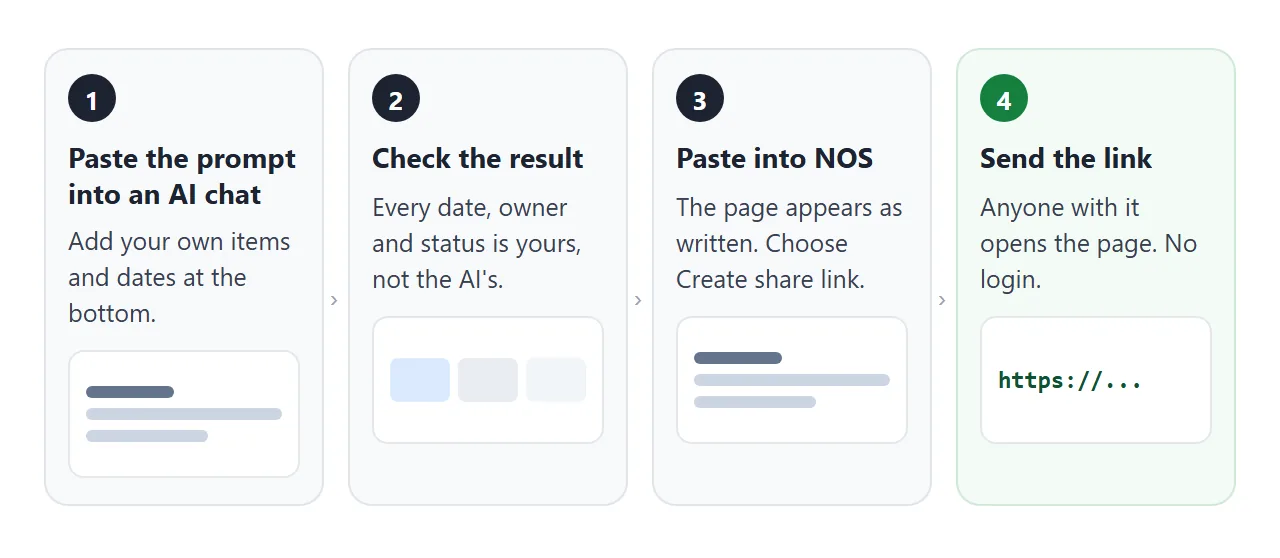
The result is a page anyone with the link can open in a browser, on a phone too, with no account. They can read it but not edit it. The filter buttons still work for them, because the script runs.
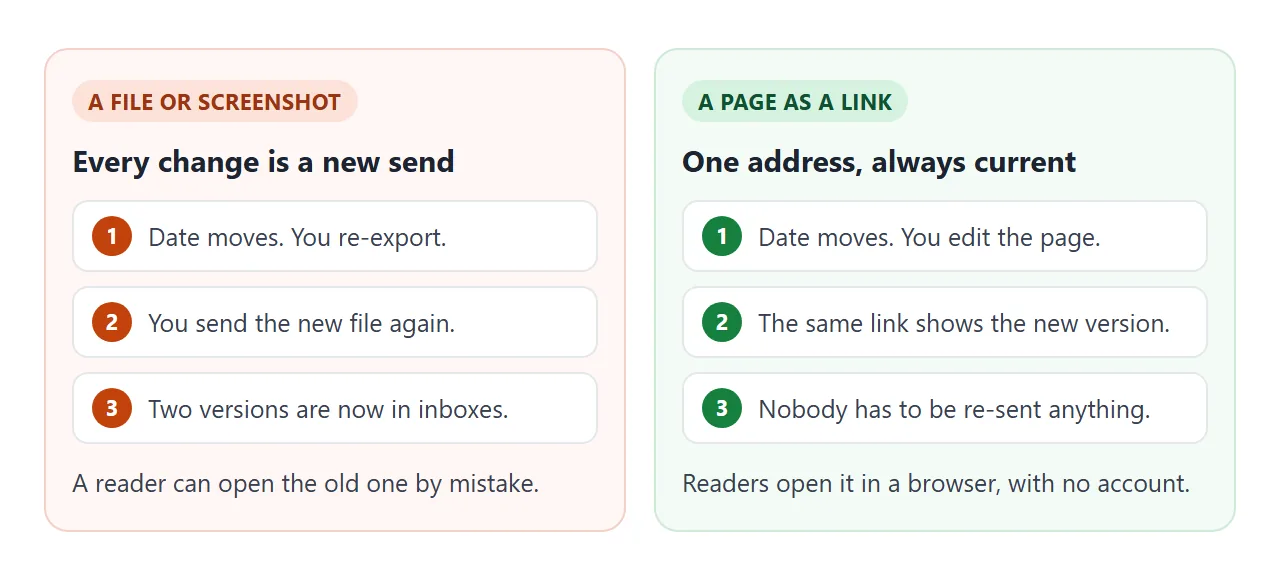
When a date moves, open the page in NOS, change the block at the top of the script and save. The same link shows the new version. Add a line to the changed-since-last-update list, so readers can see what moved without comparing.
Send the address in the body of your email or message, with one line saying what changed. A link is plain text, so it goes anywhere you can paste text. For the chat tools, see sending an HTML file in Slack and sharing in Teams.
A team timeline for the quarter
Lanes show order. A timeline shows when. The second example puts five items on a 13-week quarter. Tap a bar for the owner and the note.
<!doctype html>
<html lang="en">
<head>
<meta charset="utf-8">
<meta name="viewport" content="width=device-width, initial-scale=1">
<title>Platform team Q4 timeline</title>
<style>
  * { box-sizing: border-box; }
  body { margin: 0; padding: 18px 14px 26px; font: 16px/1.5 system-ui, sans-serif; color: #1d2330; background: #f4f5f8; }
  .wrap { max-width: 920px; margin: 0 auto; }
  h1 { font-size: 22px; margin: 0 0 2px; }
  .meta { color: #5b6473; font-size: 14px; margin: 0 0 14px; }
  .board { background: #fff; border: 1px solid #e1e4ea; border-radius: 12px; padding: 12px 14px 8px; }
  .months, .row { display: grid; grid-template-columns: 190px 1fr; gap: 12px; align-items: center; }
  .months { margin-bottom: 6px; }
  .mtrack { display: grid; grid-template-columns: 4fr 5fr 4fr; }
  .mtrack span { font-size: 13px; font-weight: 700; color: #3b4352; border-left: 1px solid #d5d9e0; padding-left: 6px; }
  .row { padding: 7px 0; border-top: 1px solid #eef0f4; }
  .label { font-size: 15px; font-weight: 600; }
  .label small { display: block; font-weight: 400; font-size: 13px; color: #5b6473; }
  .track { position: relative; height: 34px; background: repeating-linear-gradient(to right, #f1f3f7 0, #f1f3f7 calc(100% / 13 - 1px), #fff calc(100% / 13 - 1px), #fff calc(100% / 13)); border-radius: 6px; }
  .bar { position: absolute; top: 3px; height: 28px; border: 0; border-radius: 6px; font: inherit; font-size: 13px; font-weight: 600; text-align: left; padding: 0 8px; cursor: pointer; color: #fff; overflow: hidden; white-space: nowrap; text-overflow: ellipsis; }
  .bar:focus-visible { outline: 3px solid #1d2330; outline-offset: 1px; }
  .bar[aria-pressed="true"] { box-shadow: 0 0 0 3px #1d2330; }
  .s-done { background: #15803d; }
  .s-go { background: #1d4ed8; }
  .s-plan { background: #475569; }
  .s-risk { background: #b45309; }
  .detail { margin-top: 12px; background: #fff; border: 1px solid #e1e4ea; border-radius: 12px; padding: 12px 14px; min-height: 84px; }
  .detail h2 { font-size: 16px; margin: 0 0 2px; }
  .detail p { margin: 0; font-size: 15px; color: #3b4352; }
  .legend { display: flex; flex-wrap: wrap; gap: 6px 14px; font-size: 13px; color: #3b4352; margin-top: 10px; }
  .legend i { display: inline-block; width: 11px; height: 11px; border-radius: 3px; margin-right: 5px; vertical-align: -1px; }
  @media (max-width: 640px) {
    .months, .row { grid-template-columns: 1fr; gap: 4px; }
    .months .spacer { display: none; }
    .row { padding: 9px 0; }
  }
  @media print { body { background: #fff; } .bar { print-color-adjust: exact; -webkit-print-color-adjust: exact; } .row { break-inside: avoid; } }
</style>
</head>
<body>
<div class="wrap">
  <h1 id="title"></h1>
  <p class="meta" id="meta"></p>
  <div class="board">
    <div class="months"><div class="spacer"></div><div class="mtrack"><span>Oct</span><span>Nov</span><span>Dec</span></div></div>
    <div id="rows"></div>
  </div>
  <div class="legend">
    <span><i class="s-done"></i>Done</span><span><i class="s-go"></i>In progress</span><span><i class="s-plan"></i>Planned</span><span><i class="s-risk"></i>At risk</span>
  </div>
  <div class="detail" id="detail" aria-live="polite"><p>Tap a bar to see what it is and who owns it.</p></div>
</div>

<script>
  // ---- Change the content here each time. Week 1 is the week of 5 Oct. ----
  const TITLE = 'Platform team, Q4 2026';
  const UPDATED = '1 Oct 2026';
  const WEEKS = 13;
  // status: done | go | plan | risk   (start and end are week numbers, 1 to 13)
  const ITEMS = [
    { name: 'Move logins to the new service', owner: 'Priya N.',  start: 1, end: 5,  status: 'go',   note: 'Old logins keep working until week 6.' },
    { name: 'Retire the old report server',   owner: 'Tomas W.',  start: 3, end: 8,  status: 'risk', note: 'Two teams still read from it. Waiting on their dates.' },
    { name: 'Backup restore test',            owner: 'Lena K.',   start: 2, end: 3,  status: 'done', note: 'Restored a full copy in a test space. It worked.' },
    { name: 'Faster build pipeline',          owner: 'Sam O.',    start: 6, end: 10, status: 'plan', note: 'Goal: builds that wait less for each other.' },
    { name: 'Holiday on-call plan',           owner: 'Priya N.',  start: 10, end: 13, status: 'plan', note: 'Cover for the last two weeks of December.' }
  ];
  // ------------------------------------------------------------------------

  const NAMES = { done: 'Done', go: 'In progress', plan: 'Planned', risk: 'At risk' };
  document.getElementById('title').textContent = TITLE;
  document.getElementById('meta').textContent = 'Updated ' + UPDATED + ' · Week 1 = week of 5 Oct';
  document.title = TITLE;

  const rows = document.getElementById('rows');
  const detail = document.getElementById('detail');
  const buttons = [];

  ITEMS.forEach((it) => {
    const row = document.createElement('div');
    row.className = 'row';

    const label = document.createElement('div');
    label.className = 'label';
    label.textContent = it.name;
    const small = document.createElement('small');
    small.textContent = it.owner;
    label.appendChild(small);

    const track = document.createElement('div');
    track.className = 'track';
    const bar = document.createElement('button');
    bar.type = 'button';
    bar.className = 'bar s-' + it.status;
    bar.style.left = ((it.start - 1) / WEEKS * 100) + '%';
    bar.style.width = ((it.end - it.start + 1) / WEEKS * 100) + '%';
    bar.textContent = 'W' + it.start + (it.end > it.start ? '–' + it.end : '');
    bar.setAttribute('aria-pressed', 'false');
    bar.setAttribute('aria-label', it.name + ', ' + NAMES[it.status] + ', weeks ' + it.start + ' to ' + it.end);
    bar.addEventListener('click', () => {
      buttons.forEach(b => b.setAttribute('aria-pressed', String(b === bar)));
      detail.textContent = '';
      const h = document.createElement('h2');
      h.textContent = it.name + ' – ' + NAMES[it.status];
      const p = document.createElement('p');
      p.textContent = 'Weeks ' + it.start + ' to ' + it.end + ' · Owner: ' + it.owner + ' · ' + it.note;
      detail.appendChild(h);
      detail.appendChild(p);
    });
    buttons.push(bar);
    track.appendChild(bar);

    row.appendChild(label);
    row.appendChild(track);
    rows.appendChild(row);
  });
</script>
</body>
</html>
On a phone, each label moves above its bar, so nothing is squeezed. If you want a longer view with milestones, see a timeline as a link.
File, screenshot or page: how they compare
| PDF attached | Screenshot | Page as a link | |
|---|---|---|---|
| Layout on a phone | Fixed page size | Fixed picture | Fits the screen |
| A date moves | New export, new send | New picture, new send | Edit the page, same link |
| Needs a tool login to read | No | No | No |
| Old versions | Pile up in inboxes | Pile up in chats | One address, one current version |
For personal Gmail accounts, Google's help page says the attachment limit is 25 MB, and Gmail adds a larger file as a Drive link instead (as of October 2026).
A one-page roadmap is far below that, so size is rarely the issue. The issue is what happens when a date moves after you sent it. See email vs link for documents.
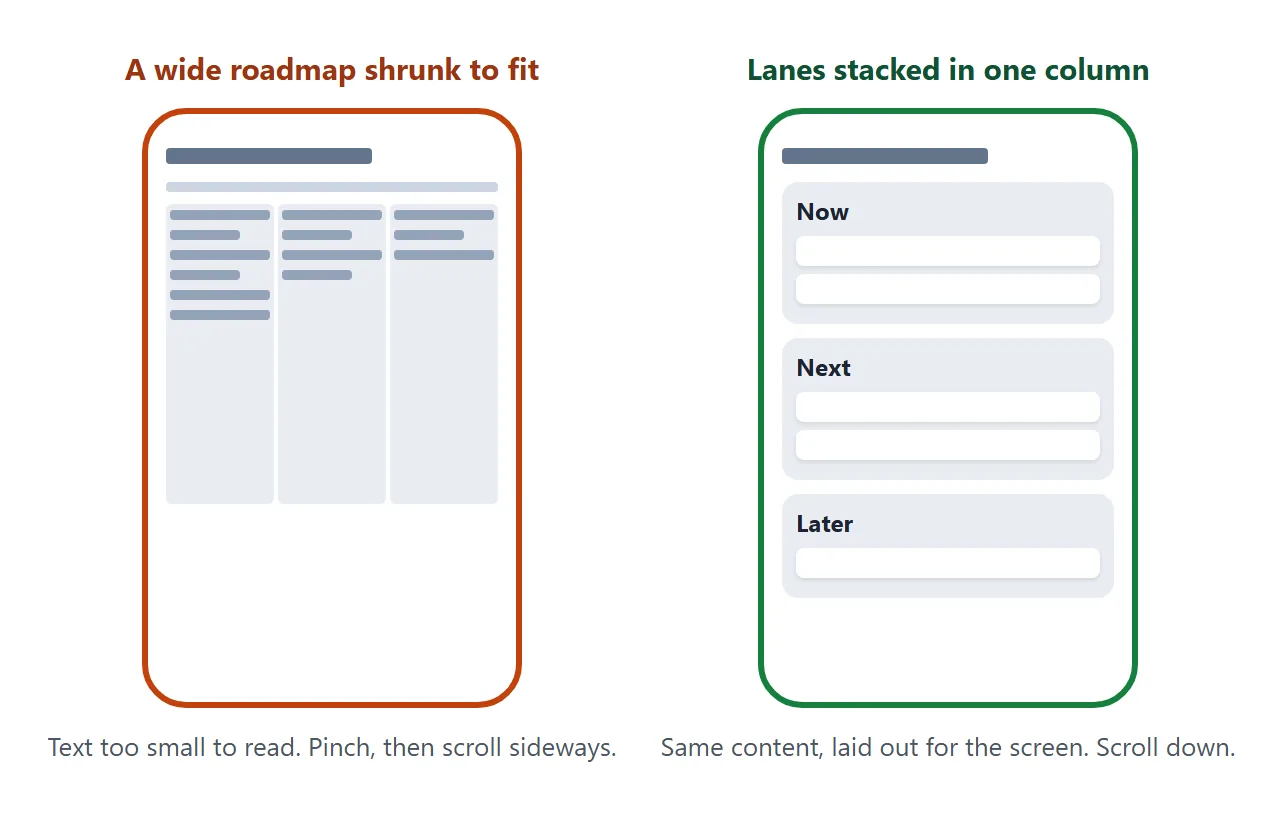
The phone layout needs a viewport meta tag. MDN says some mobile devices render pages in a virtual window wider than the screen and shrink the result, and that width=device-width avoids that.
The prompt above already asks for it.
When it does not work
| What you see | Cause | Fix |
|---|---|---|
| The chat shows raw code, not a page | You copied the chat text, not the code block | Copy only the code, from the doctype line to the last html tag |
| A logo or screenshot is missing | Images from other sites are blocked | Ask for no images, or a logo drawn in SVG |
| A date or owner is wrong | The AI guessed or filled a gap | Compare with your plan and fix it in the script block |
| A feedback form does nothing | Forms cannot send to a server from the link | Write your email address as plain text |
| A stakeholder quotes an old date | They opened an old file or an old link | Send only the link, never a file copy |
| The text is tiny on a phone | No viewport meta tag | Ask the AI to add one, and a 14px base size |
| Three lanes are squeezed on a phone | The layout does not stack | Ask for one column below 700px |
Related reading. For a weekly rhythm, HTML for weekly updates shows a page you refill each Friday, and sharing a dashboard with your team covers the live-numbers case.