A save-the-date website template is one short page with three things on it: the date, the place and a note about what comes next. You send it as a link before the formal invitations go out.
One Quora question asks how to make a digital wedding invitation card for a wedding. A save-the-date is the lighter version of that job. It asks for no reply and carries no schedule. It only lets people hold the date.
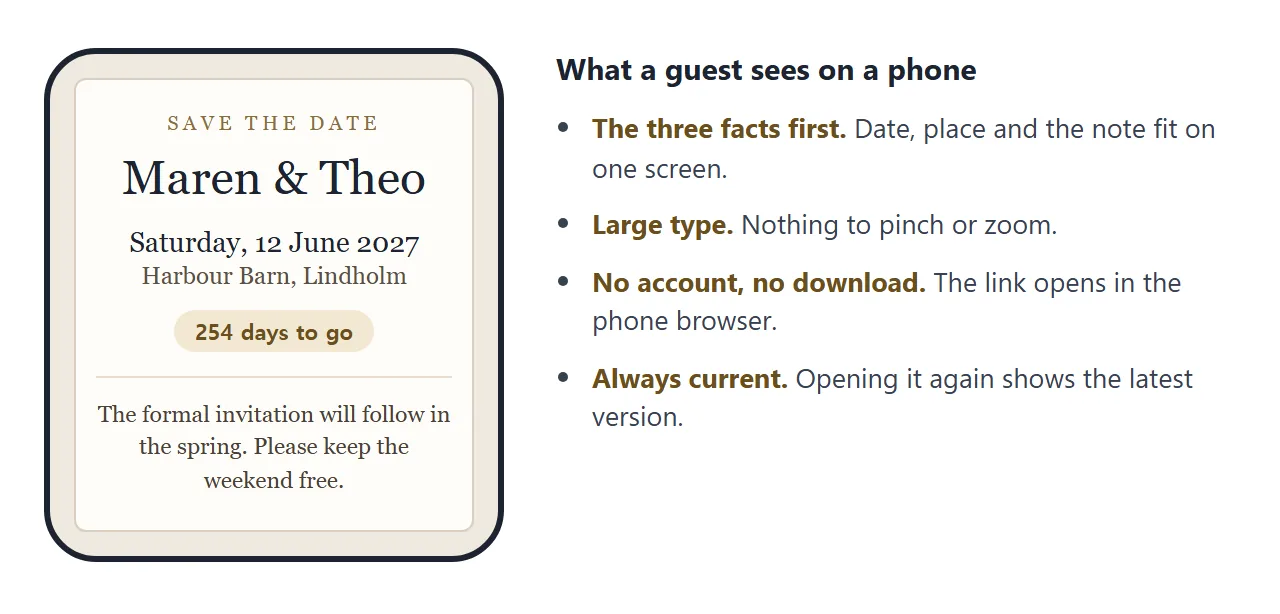
Here is a page of that kind, for a made-up couple. The number of days to go is worked out when the page opens, and every line comes from one block near the bottom of the code.
<!doctype html>
<html lang="en">
<head>
<meta charset="utf-8">
<meta name="viewport" content="width=device-width, initial-scale=1">
<title>Save the date: Maren and Theo, 12 June 2027</title>
<style>
  * { box-sizing: border-box; }
  body { margin: 0; min-height: 100vh; display: flex; align-items: center; justify-content: center; padding: 16px; background: #efe9df; font-family: Georgia, "Times New Roman", serif; color: #2f2a24; }
  .card { width: 100%; max-width: 440px; background: #fffdf8; border: 1px solid #d9cfbf; border-radius: 6px; padding: 30px 24px 26px; text-align: center; box-shadow: 0 2px 14px rgba(60, 45, 20, .1); }
  .kicker { margin: 0; font-size: 13px; letter-spacing: .28em; text-transform: uppercase; color: #8a6d3b; }
  svg { display: block; margin: 12px auto; }
  h1 { margin: 0; font-size: 38px; font-weight: 400; line-height: 1.15; }
  .when { margin: 18px 0 2px; font-size: 22px; }
  .where { margin: 0; font-size: 17px; color: #5b5146; }
  .left { display: inline-block; margin: 16px 0 0; padding: 4px 14px; border-radius: 999px; background: #f2e8d3; font: 600 13px system-ui, sans-serif; color: #6b4f1d; }
  .note { margin: 20px 0 0; padding-top: 16px; border-top: 1px solid #e6dccb; font-size: 16px; line-height: 1.5; color: #4a4137; }
  .small { margin: 12px 0 0; font: 13px system-ui, sans-serif; color: #7a7064; }
  @media (max-width: 400px) { h1 { font-size: 32px; } .when { font-size: 19px; } }
</style>
</head>
<body>
<main class="card">
  <p class="kicker">Save the date</p>
  <svg width="120" height="18" viewBox="0 0 120 18" aria-hidden="true"><path d="M2 9h46M72 9h46" stroke="#c9b48a" stroke-width="1.5"/><path d="M60 2c3 4 6 5 8 7-2 2-5 3-8 7-3-4-6-5-8-7 2-2 5-3 8-7z" fill="#c9b48a"/></svg>
  <h1 id="names"></h1>
  <p class="when"><time id="date"></time></p>
  <p class="where" id="place"></p>
  <p class="left" id="left" hidden></p>
  <p class="note" id="note"></p>
  <p class="small" id="small"></p>
</main>

<script>
  // Edit these lines. Everything on the page comes from here.
  const EVENT = {
    names: 'Maren & Theo',
    date: '2027-06-12',               // year-month-day
    place: 'Harbour Barn, Lindholm',
    note: 'The formal invitation will follow in the spring. For now, please keep the weekend free.',
    small: 'Questions? Reply to the message this link came in.'
  };

  const day = new Date(EVENT.date + 'T12:00:00');
  document.getElementById('names').textContent = EVENT.names;
  const dateEl = document.getElementById('date');
  dateEl.setAttribute('datetime', EVENT.date);
  dateEl.textContent = day.toLocaleDateString('en-GB', { weekday: 'long', day: 'numeric', month: 'long', year: 'numeric' });
  document.getElementById('place').textContent = EVENT.place;
  document.getElementById('note').textContent = EVENT.note;
  document.getElementById('small').textContent = EVENT.small;

  // Days to go, counted by calendar day (hidden once the date has passed)
  const now = new Date();
  const today = Date.UTC(now.getFullYear(), now.getMonth(), now.getDate());
  const target = Date.UTC(day.getFullYear(), day.getMonth(), day.getDate());
  const days = Math.round((target - today) / 86400000);
  if (days > 0) {
    const left = document.getElementById('left');
    left.textContent = days + (days === 1 ? ' day to go' : ' days to go');
    left.hidden = false;
  }
</script>
</body>
</html>
What goes on the page
Keep it to what a guest needs in order to keep a day free. Anything more makes the later invitation feel repeated.
- The date with the weekday. Write out the month. A number such as 12/06 reads as two different days in different countries.
- The place. A town or venue name is enough at this stage.
- One line about what happens next. For example, when the formal invitation will arrive.
- A way to ask questions. Tell people to reply to the message the link came in.
The example marks its date with a time element, which holds the date in a machine-readable form. MDN describes the datetime attribute as a way to give dates in a format machines can process.
Make it with AI
Paste your facts into ChatGPT, Claude or Gemini with this prompt.
Make one HTML page, a save-the-date for guests. Show the names,
the date with the weekday, the place and a short note, centred on
one card with a soft background and a serif font. Put all the text
in one JavaScript object near the bottom of the code so I can edit
it. Show how many days remain, and hide that once the date has
passed. Large text, works on a phone. No outside libraries,
images, fonts or forms. Do not save data anywhere.

Names: [your names]
Date: [year-month-day]
Place: [venue and town]
Note: [one line about the invitation]
Then check the result before you send it:
- The date and its weekday. Look at a calendar. An AI can pair a date with the wrong weekday without saying so.
- Every name. A misspelt name is the one mistake guests notice.
- Anything outside. Images and fonts loaded from other sites will not appear on a shared page. Ask for a version without them.
- Phone width. Make the browser window narrow. The card should still sit on one screen.
For help changing details afterwards, see editing AI-generated HTML without code.
Send it as a link
- Copy all of the code the AI returned.
- Paste it into a NOS document. The page renders and its scripts run, so you can check the countdown.
- Choose Create share link and copy the address. HTML to link walks through it.
- Paste the address into a message, an email or a group chat.
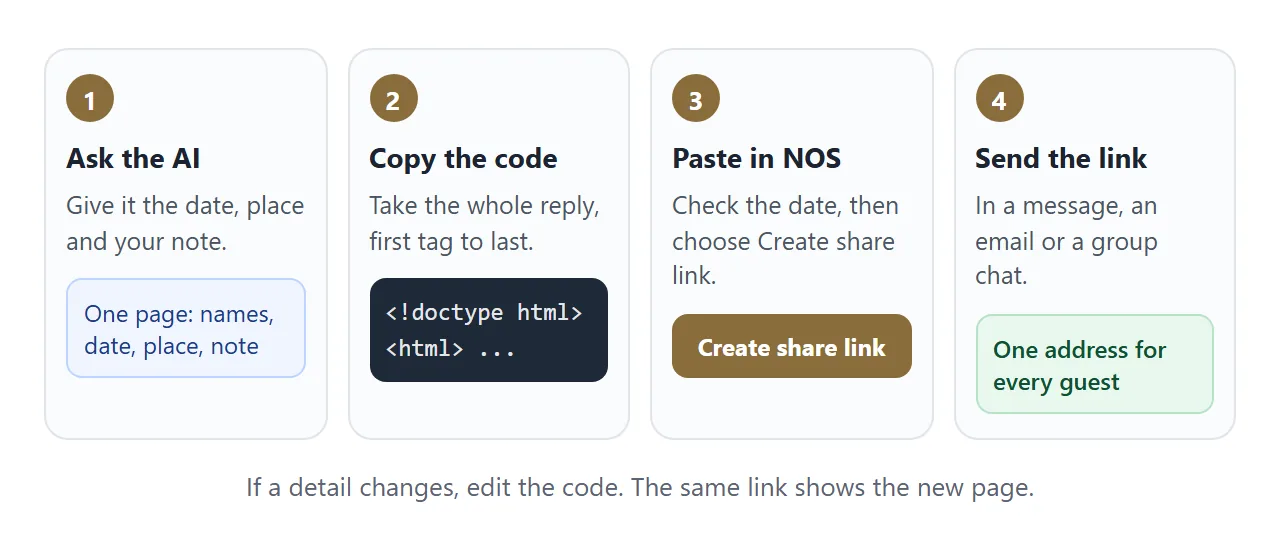
Anyone with the link can open the page in a browser, on a phone or a laptop, without an account. They cannot edit it.
If a phone shows a sent file as plain text instead of a page, see opening an HTML file on a phone.
For a paper card, print the link as a QR code. QR code link explains why a printed code stays useful when the page behind it changes. The invitation itself is a different job, covered in wedding invitation HTML.
Ways to send a save-the-date compared
| Image in a message | Text only | Link to a page | |
|---|---|---|---|
| What guests hold | A copy | A copy of the words | An address |
| After the date changes | Send a new image | Send a new message | Edit once, same link |
| Guest can reopen the latest | No | No | Yes |
| Works with a paper card | Printed once | Printed once | A QR code on the card |
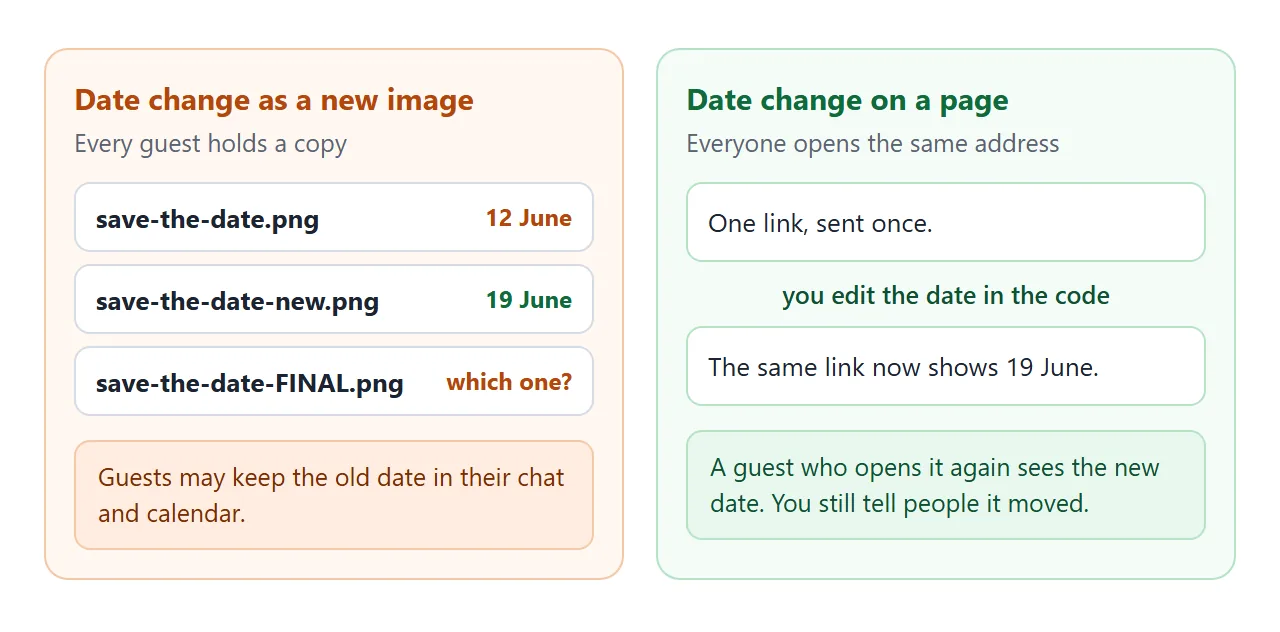
A link does not tell guests that anything changed. If the date moves, send a short message as well, and let the page be the place they confirm it.
When some details are not settled yet
Not every event has a venue when you want people to hold a weekend. This second page, for a made-up family weekend, shows what is settled and what is open.
Each line has a tag, and you change the tag when the detail is decided.
<!doctype html>
<html lang="en">
<head>
<meta charset="utf-8">
<meta name="viewport" content="width=device-width, initial-scale=1">
<title>Save the date: Aldous family weekend, August 2027</title>
<style>
  * { box-sizing: border-box; }
  body { margin: 0; padding: 16px; background: #e8f1ee; font-family: system-ui, "Segoe UI", sans-serif; color: #1d2b27; line-height: 1.5; }
  main { max-width: 480px; margin: 0 auto; background: #fff; border-radius: 14px; overflow: hidden; box-shadow: 0 2px 12px rgba(0, 0, 0, .08); }
  header { background: #1f5d52; color: #fff; padding: 22px 20px 20px; }
  header p { margin: 0; font-size: 13px; letter-spacing: .12em; text-transform: uppercase; opacity: .85; }
  header h1 { margin: 6px 0 2px; font-size: 26px; line-height: 1.2; }
  header .dates { margin: 0; font-size: 18px; font-weight: 600; }
  section { padding: 16px 20px 20px; }
  h2 { margin: 0 0 8px; font-size: 15px; }
  ul { list-style: none; margin: 0; padding: 0; }
  li { display: flex; gap: 10px; align-items: baseline; padding: 9px 0; border-bottom: 1px solid #e6eeea; font-size: 15px; }
  li:last-child { border-bottom: 0; }
  .tag { flex: none; min-width: 78px; text-align: center; padding: 2px 8px; border-radius: 999px; font-size: 12px; font-weight: 700; }
  .set .tag { background: #d9f0e3; color: #0f5132; }
  .open .tag { background: #fdecc8; color: #7a5200; }
  .label { font-weight: 700; display: block; }
  .val { color: #4a5a55; }
  .hold { margin: 0; padding: 12px 20px 18px; font-size: 15px; background: #f5faf8; border-top: 1px solid #dbe8e3; }
</style>
</head>
<body>
<main>
  <header>
    <p>Save the date</p>
    <h1>Aldous family weekend</h1>
    <p class="dates" id="dates"></p>
  </header>
  <section>
    <h2>What we know, and what we are still sorting out</h2>
    <ul id="items"></ul>
  </section>
  <p class="hold" id="hold"></p>
</main>

<script>
  // Edit these lines. "open: true" shows a yellow tag, remove it once the detail is settled.
  const WEEKEND = {
    title: 'Friday 20 to Sunday 22 August 2027',
    hold: 'Please keep the whole weekend free. We will send a reply date once the venue is confirmed.',
    items: [
      { label: 'Place', value: 'Near Karlsvik, by the lake', open: false },
      { label: 'Where to sleep', value: 'Cabins and a campsite are being compared', open: true },
      { label: 'Food', value: 'Saturday dinner for everyone, other meals shared', open: false },
      { label: 'Cost', value: 'Not decided yet', open: true },
      { label: 'Children', value: 'Welcome. Activities for all ages', open: false }
    ]
  };

  document.getElementById('dates').textContent = WEEKEND.title;
  document.getElementById('hold').textContent = WEEKEND.hold;
  const list = document.getElementById('items');
  WEEKEND.items.forEach((it) => {
    const li = document.createElement('li');
    li.className = it.open ? 'open' : 'set';
    const tag = document.createElement('span');
    tag.className = 'tag';
    tag.textContent = it.open ? 'To be set' : 'Settled';
    const box = document.createElement('span');
    const label = document.createElement('span');
    label.className = 'label';
    label.textContent = it.label;
    const val = document.createElement('span');
    val.className = 'val';
    val.textContent = it.value;
    box.append(label, val);
    li.append(tag, box);
    list.appendChild(li);
  });
</script>
</body>
</html>
Ask for it with the same prompt, changed to: "a list of details, each marked settled or to be set, plus a line asking guests to keep the whole weekend free." People then see what is still open without a second announcement from you.
Because the link stays the same, you can send this page months early and keep it up to date. For a fuller picture of one address that holds all event details, see event link and sharing wedding details with guests.
When it does not work
| Symptom | Cause | Fix |
|---|---|---|
| Guests see code, not a page | The file was sent as an attachment and opened as text | Send the link, not the file |
| The weekday does not match the date | The AI paired them wrongly | Check a calendar and fix the date line |
| A picture or font is missing | It comes from another website, which a shared page blocks | Ask for a version with no outside images or fonts |
| A reply form does nothing | NOS blocks forms that send data to a server | Ask guests to reply in your message |
| Guests still have the old date | They saw the first message and never reopened the link | Send a short note that the date changed |
| You cannot see who opened it | NOS does not record who opens a link | Ask guests to confirm in your message |
If you want the guest to add the day to a calendar, calendar invite link covers that step. Share AI-generated HTML explains what to check before you send any page an AI wrote.