SolidJS is a JavaScript library for building user interfaces, and you can run it from one plain .html file with no build step. Solid ships an html template function for exactly that.
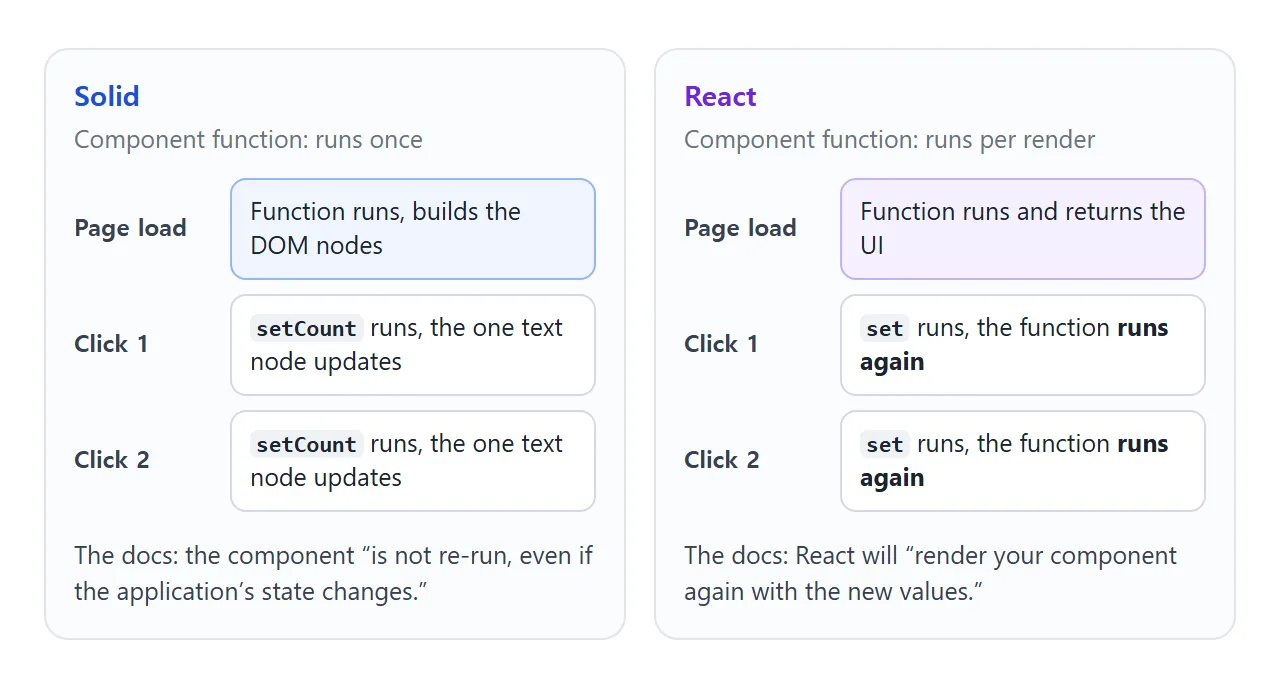
Unlike React, a Solid component function runs once. Small pieces of state called signals update the page after that.
Try it first. Click the button and watch the numbers. The last line counts how many times the component function ran.
<!doctype html>
<html lang="en">
<head>
<meta charset="utf-8">
<meta name="viewport" content="width=device-width, initial-scale=1">
<title>Solid counter in one HTML file</title>
<style>
  body { margin: 0; padding: 20px; font-family: system-ui, sans-serif; background: #f4f5f7; color: #1d2330; }
  .card { max-width: 340px; padding: 18px 20px; border-radius: 12px; background: #fff; box-shadow: 0 6px 20px rgba(0, 0, 0, .1); }
  .big { font-size: 40px; font-weight: 700; margin: 4px 0 2px; }
  .row { display: flex; gap: 8px; margin: 12px 0; }
  button { font: inherit; padding: 8px 16px; border: 0; border-radius: 8px; background: #2563eb; color: #fff; cursor: pointer; }
  button.alt { background: #e5e7eb; color: #1d2330; }
  p { margin: 4px 0; font-size: 14px; color: #4b5563; }
  b { color: #0f5132; }
</style>
</head>
<body>
<div id="app"></div>

<script type="module">
  // Three imports, pinned to one version so they share one copy of Solid
  import { createSignal } from "https://cdn.jsdelivr.net/npm/solid-js@1.9.15/+esm";
  import { render } from "https://cdn.jsdelivr.net/npm/solid-js@1.9.15/web/+esm";
  import html from "https://cdn.jsdelivr.net/npm/solid-js@1.9.15/html/+esm";

  let runs = 0;  // how many times the component function is called

  function Counter() {
    runs++;
    const [count, setCount] = createSignal(0);
    const double = () => count() * 2;  // derived value: just a function

    // Pass the signal itself (count), not its value (count())
    return html`
      <div class="card">
        <div class="big">${count}</div>
        <p>Double: <b>${double}</b></p>
        <div class="row">
          <button onClick=${() => setCount((c) => c + 1)}>Add 1</button>
          <button class="alt" onClick=${() => setCount(0)}>Reset</button>
        </div>
        <p>Component function ran <b>${runs}</b> time(s) so far.</p>
      </div>`;
  }

  render(Counter, document.getElementById("app"));
</script>
</body>
</html>
SolidJS vs React: what actually differs
The two differ in what happens after the first render. The Solid docs say a component "is only run once, when it is first rendered into the DOM" and "is not re-run, even if the application's state changes."
The React docs describe the other model: calling the set function stores the next state and will "render your component again with the new values."
The Solid README adds that, instead of a virtual DOM, it "compiles its templates to real DOM nodes and updates them with fine-grained reactions."
That is why the counter above never re-runs its function. In the README's words, when state changes "only the code that depends on it will rerun."
The three imports that replace a build
A normal Solid project writes JSX and compiles it. The README recommends babel-preset-solid for that, and its quick start uses a Vite template. A browser cannot read JSX, so a single file needs another route.
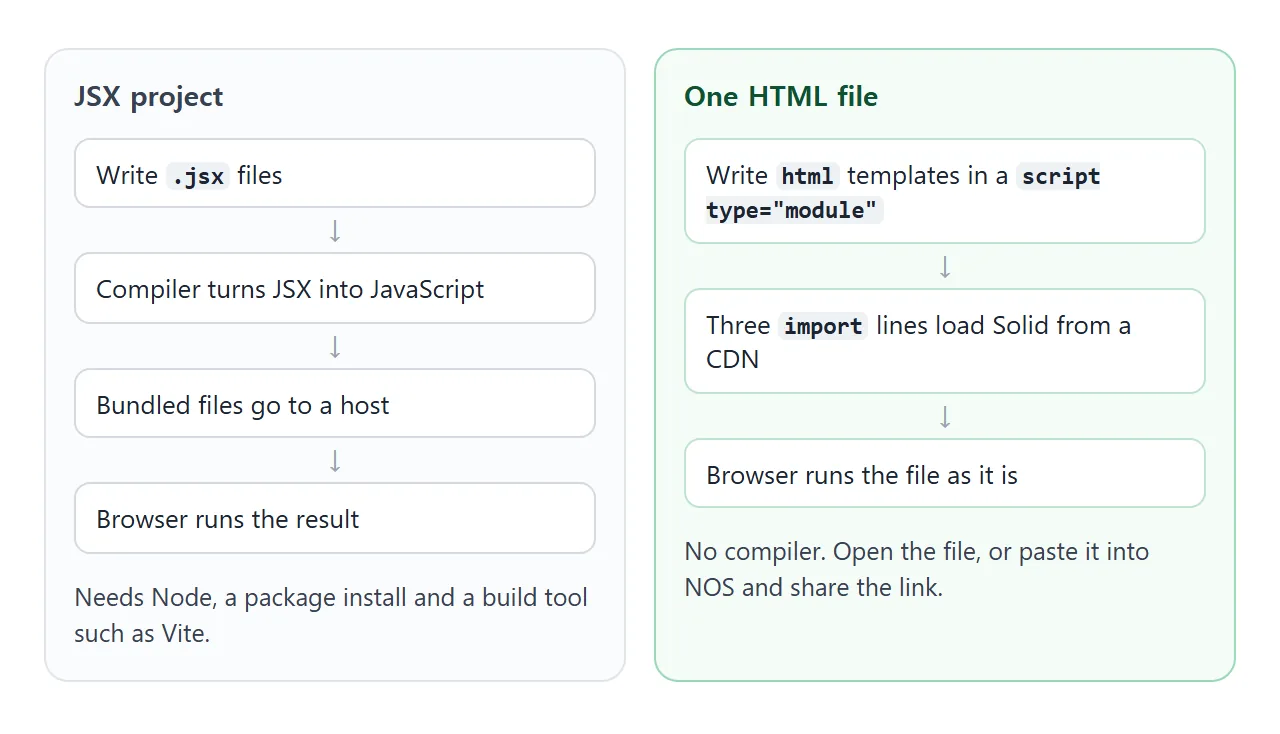
The route is solid-js/html, which the Solid repo describes as useful "to use Solid in non-compiled environments." Load it with the core and the DOM helper as modules:
<div id="app"></div>
<script type="module">
  import { createSignal } from "https://cdn.jsdelivr.net/npm/solid-js@1.9.15/+esm";
  import { render } from "https://cdn.jsdelivr.net/npm/solid-js@1.9.15/web/+esm";
  import html from "https://cdn.jsdelivr.net/npm/solid-js@1.9.15/html/+esm";
</script>
Module scripts are deferred automatically, so the div is ready when the code runs. The +esm suffix asks jsDelivr for a ready-to-import module. Use the same version on all three lines, as the next section explains.
Signals: pass the function, not the value
A signal is a pair from createSignal. The first item is a getter you call with no arguments to read the value, and the second is a setter.
In the docs' words, a signal called inside a tracking scope adds the caller as a subscriber, and it notifies subscribers when the value changes.
In an html template there is no compiler to spot those calls, so you mark them yourself. The README says reactive expressions "must be manually wrapped in functions." Three ways to print the same signal behave differently:
<!doctype html>
<html lang="en">
<head>
<meta charset="utf-8">
<meta name="viewport" content="width=device-width, initial-scale=1">
<title>Stuck vs live values in Solid html templates</title>
<style>
  body { margin: 0; padding: 16px; font-family: system-ui, sans-serif; background: #f4f5f7; color: #1d2330; }
  .grid { display: grid; grid-template-columns: repeat(auto-fit, minmax(150px, 1fr)); gap: 10px; }
  .box { padding: 12px 14px; border-radius: 12px; background: #fff; border: 2px solid #e5e7eb; }
  .box.bad { border-color: #f59e0b; }
  .box.good { border-color: #22a06b; }
  .tag { font-size: 12px; font-weight: 700; letter-spacing: .3px; }
  .bad .tag { color: #b45309; }
  .good .tag { color: #0f5132; }
  .val { font-size: 32px; font-weight: 700; margin: 4px 0; }
  code { font: 12px ui-monospace, Consolas, monospace; background: #eef1f5; border-radius: 4px; padding: 1px 4px; }
  .row { display: flex; gap: 8px; align-items: center; margin-bottom: 12px; flex-wrap: wrap; }
  button { font: inherit; padding: 8px 16px; border: 0; border-radius: 8px; background: #2563eb; color: #fff; cursor: pointer; }
  .parity { margin-top: 10px; padding: 8px 12px; border-radius: 8px; font-size: 14px; }
  .parity.odd { background: #fde9c8; }
  .parity.even { background: #d6f2e4; }
  @media (max-width: 560px) {
    .grid { grid-template-columns: repeat(3, 1fr); gap: 6px; }
    .box { padding: 8px; }
    .box p { display: none; }
    .val { font-size: 26px; }
    code { font-size: 10px; word-break: break-all; }
  }
</style>
</head>
<body>
<div id="app"></div>

<script type="module">
  import { createSignal } from "https://cdn.jsdelivr.net/npm/solid-js@1.9.15/+esm";
  import { render } from "https://cdn.jsdelivr.net/npm/solid-js@1.9.15/web/+esm";
  import html from "https://cdn.jsdelivr.net/npm/solid-js@1.9.15/html/+esm";

  function App() {
    const [count, setCount] = createSignal(0);

    return html`
      <div class="row">
        <button onClick=${() => setCount((c) => c + 1)}>Add 1</button>
        <span>Same signal, three ways to print it</span>
      </div>
      <div class="grid">
        <div class="box bad">
          <div class="tag">STUCK</div>
          <div class="val">${count()}</div>
          <code>\${count()}</code>
          <p>Read once, while the template is built.</p>
        </div>
        <div class="box good">
          <div class="tag">LIVE</div>
          <div class="val">${count}</div>
          <code>\${count}</code>
          <p>Pass the signal. Solid calls it for you.</p>
        </div>
        <div class="box good">
          <div class="tag">LIVE</div>
          <div class="val">${() => count() * 10}</div>
          <code>\${() => count() * 10}</code>
          <p>Wrap any expression in a function.</p>
        </div>
      </div>
      <div class=${() => "parity " + (count() % 2 ? "odd" : "even")}>
        Attributes too: this box switches class when the count is odd or even.
      </div>`;
  }

  render(App, document.getElementById("app"));
</script>
</body>
</html>
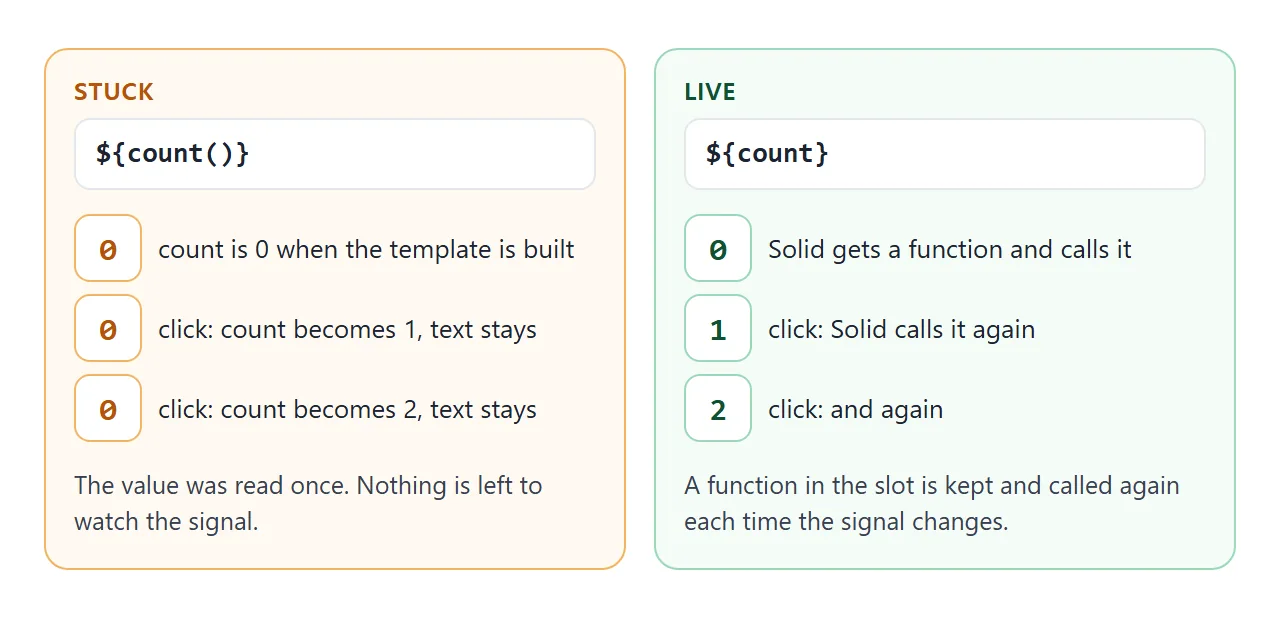
- Pass the signal: write
${count}and Solid calls it for you. - Wrap an expression: write
${() => count() * 10}. The same works for attributes, such as a class that follows the count. - Do not call it in the slot:
${count()}runs once and is never read again.
Components, lists and forms
A small app needs components, a list and a form. The same pattern covers all three. Components are plain functions that return an html template, and you place one with <${Name}> and close it with <//>.
For lists, Solid has a For component. Its docs describe it as a looping component that renders from an array, designed for when "the order and length of the list may change frequently."
<!doctype html>
<html lang="en">
<head>
<meta charset="utf-8">
<meta name="viewport" content="width=device-width, initial-scale=1">
<title>Todo list with Solid in one HTML file</title>
<style>
  body { margin: 0; padding: 16px; font-family: system-ui, sans-serif; background: #f4f5f7; color: #1d2330; }
  .card { max-width: 420px; padding: 16px 18px; border-radius: 12px; background: #fff; box-shadow: 0 6px 20px rgba(0, 0, 0, .1); }
  h1 { font-size: 18px; margin: 0 0 10px; }
  form { display: flex; gap: 8px; margin-bottom: 10px; }
  input[type=text] { flex: 1; min-width: 0; font: inherit; padding: 8px 10px; border: 1px solid #d5d9e0; border-radius: 8px; }
  button { font: inherit; padding: 8px 14px; border: 0; border-radius: 8px; background: #2563eb; color: #fff; cursor: pointer; }
  button.link { background: none; color: #6b7280; padding: 2px 8px; }
  ul { list-style: none; margin: 0; padding: 0; }
  li { display: flex; align-items: center; gap: 8px; padding: 8px 0; border-top: 1px solid #eef0f3; }
  li label { flex: 1; cursor: pointer; }
  li.done label { color: #9aa3b2; text-decoration: line-through; }
  .count { margin: 10px 0 0; font-size: 14px; color: #4b5563; }
</style>
</head>
<body>
<div id="app"></div>

<script type="module">
  import { createSignal } from "https://cdn.jsdelivr.net/npm/solid-js@1.9.15/+esm";
  import { render, For } from "https://cdn.jsdelivr.net/npm/solid-js@1.9.15/web/+esm";
  import html from "https://cdn.jsdelivr.net/npm/solid-js@1.9.15/html/+esm";

  function App() {
    const [todos, setTodos] = createSignal([
      { id: 1, text: "Open this page", done: true },
      { id: 2, text: "Add a task below", done: false },
    ]);
    let nextId = 3;
    const left = () => todos().filter((t) => !t.done).length;

    const add = (e) => {
      e.preventDefault();  // handled inside the page, nothing is sent anywhere
      const input = e.target.elements.task;
      const text = input.value.trim();
      if (!text) return;
      setTodos([...todos(), { id: nextId++, text, done: false }]);
      input.value = "";
    };
    // Replace the array with a changed copy; Solid updates only the rows that differ
    const toggle = (id) =>
      setTodos(todos().map((t) => (t.id === id ? { ...t, done: !t.done } : t)));
    const remove = (id) => setTodos(todos().filter((t) => t.id !== id));

    return html`
      <div class="card">
        <h1>Tasks</h1>
        <form onSubmit=${add}>
          <input type="text" name="task" placeholder="What needs doing?" autocomplete="off">
          <button type="submit">Add</button>
        </form>
        <ul>
          <${For} each=${todos}>${(t) => html`
            <li class=${t.done ? "done" : ""}>
              <input type="checkbox" id=${"t" + t.id} checked=${t.done} onChange=${() => toggle(t.id)}>
              <label for=${"t" + t.id}>${t.text}</label>
              <button type="button" class="link" onClick=${() => remove(t.id)}>Remove</button>
            </li>`}<//>
        </ul>
        <p class="count">${() => left() + " of " + todos().length + " left"}</p>
      </div>`;
  }

  render(App, document.getElementById("app"));
</script>
</body>
</html>
Two details in that code matter. First, the signal holds an array, and signals compare values with === by default, so push into the old array and nothing updates. Replace it with a copy: setTodos([...todos(), item]).
Second, the form handler calls e.preventDefault() and reads the field itself, so the page stays put. This is the same form handling as plain JavaScript, covered in a single-file todo list without a library.
JSX or html templates
Both write the same kind of component. The README for the html module lists what changes, and the table repeats it.
| JSX in a project | html in one file |
|
|---|---|---|
| Compiler needed | Yes | No |
| Reactive expressions | Detected for you | Wrap in a function |
| Efficiency | More efficient | Slightly less efficient |
| Runtime size | Smaller | Larger, not tree-shakeable |
| Where it runs | After a build | As written, in the browser |
The README's own wording is that html is "slightly less efficient than JSX" and "requires a larger runtime that isn't treeshakeable."
For a small page you want to share, that cost is easy to accept. If the page grows into an app, a build is the next step. Host a built front end as static files covers the output of one.
Pin the version
The three URLs above contain 1.9.15, which was the latest release in the npm registry on the day this was written. Keep a version in the URL.
The jsDelivr docs call omitting the version, or using latest, "not recommended for production usage" because new major versions can bring breaking changes.
There is a second reason in a single file. In a test for this article, a signal from one version and render from another showed no error, and the number never changed after a click.
Each URL loads its own copy of Solid, so all three need the same version.
When it does not work
| Symptom | Cause | Fix |
|---|---|---|
| The number never changes | The template calls the signal: ${count()} |
Write ${count} or ${() => count()} |
| Console says Unexpected token '<' | JSX in a plain file, with no compiler | Use html and backticks |
| A click does nothing, no error | Imports use different versions | Same pinned version on all three |
| List does not update after push | The array is the same object | Set a new array with [...list, item] |
| A component's click handler fires wildly | A function with no arguments in a component prop is wrapped as a getter | Write (e) => ... |
| Blank page, failed module request | Offline, or the CDN is blocked | Check the network and the URL |
The handler row comes from the README: the html tag wraps argument-free functions passed to component props, so give them a parameter.
In the test for this article, the argument-free version made the count jump and logged Maximum call stack size exceeded. Plain elements such as button did not need it.
For other script problems, HTML JavaScript not working goes through the causes in order.
Share it as a link
A Solid page is worth sending as a working page. A screenshot cannot be clicked.
Opened from a shared link, the scripts run and the Solid imports load from the CDN, so the person you send it to can click the counter and add tasks themselves.
To send the working version, paste the page into a NOS document and choose Create share link. HTML to link walks through it.
Anyone with the link can open it without an account, and if you change the code later, the same link shows the new version.