A tribute page is one web page that says thank you to a person, or remembers them. It holds a name, a short message, a few memories from other people and, if there is a gathering, the details of it.
You do not need a website for that. Have an AI write one HTML file and send it as one link.
People ask "What is the best (free or cheap) site builder to create a simple, one-page website for personal use?" For a page like this, a builder is optional. A single file is enough.
Here is a page you can copy, for a retirement party. It is plain HTML and CSS, with a small drawing and no images to upload. Open the folded questions at the bottom.
<!doctype html>
<html lang="en">
<head>
<meta charset="utf-8">
<meta name="viewport" content="width=device-width, initial-scale=1">
<title>A tribute to Helen Marsh</title>
<style>
  * { box-sizing: border-box; }
  body { margin: 0; font-family: Georgia, "Times New Roman", serif; color: #2b2622; background: #faf6ef; line-height: 1.6; }
  .wrap { max-width: 640px; margin: 0 auto; padding: 0 20px 40px; }
  header { text-align: center; padding: 36px 0 24px; }
  header svg { width: 96px; height: 96px; }
  h1 { font-size: 30px; line-height: 1.2; margin: 14px 0 6px; }
  .sub { color: #7a6a5a; font-size: 16px; margin: 0; }
  h2 { font-size: 20px; margin: 34px 0 12px; color: #6b3f2a; }
  blockquote { margin: 0; padding: 14px 18px; background: #fff; border-left: 4px solid #c98b5e; border-radius: 0 10px 10px 0; font-size: 17px; }
  blockquote p { margin: 0; }
  figure { margin: 0 0 14px; }
  figcaption { font: 14px system-ui, sans-serif; color: #7a6a5a; margin-top: 6px; padding-left: 4px; }
  ol.years { list-style: none; margin: 0; padding: 0; border-left: 2px solid #e3d3bf; }
  ol.years li { position: relative; padding: 0 0 16px 22px; }
  ol.years li::before { content: ""; position: absolute; left: -7px; top: 8px; width: 12px; height: 12px; border-radius: 50%; background: #c98b5e; }
  ol.years time { display: block; font: 700 14px system-ui, sans-serif; color: #6b3f2a; }
  .box { background: #fff; border-radius: 12px; padding: 16px 18px; box-shadow: 0 1px 4px rgba(0,0,0,.08); font-family: system-ui, sans-serif; font-size: 16px; }
  .box p { margin: 0 0 10px; }
  .btn { display: inline-block; padding: 12px 18px; border-radius: 10px; background: #6b3f2a; color: #fff; text-decoration: none; font: 600 16px system-ui, sans-serif; }
  details { background: #fff; border-radius: 10px; padding: 12px 16px; margin-bottom: 8px; font-family: system-ui, sans-serif; font-size: 16px; }
  summary { font-weight: 600; cursor: pointer; }
  details p { margin: 8px 0 0; }
</style>
</head>
<body>
<div class="wrap">
  <header>
    <svg viewBox="0 0 96 96" role="img" aria-label="Open book drawing">
      <circle cx="48" cy="48" r="46" fill="#f1e2cf"/>
      <path d="M48 30 C38 24 26 24 18 28 V66 C26 62 38 62 48 68 Z" fill="#c98b5e"/>
      <path d="M48 30 C58 24 70 24 78 28 V66 C70 62 58 62 48 68 Z" fill="#a8693f"/>
      <path d="M48 30 V68" stroke="#faf6ef" stroke-width="2"/>
    </svg>
    <h1>Thank you, Helen Marsh</h1>
    <p class="sub">32 years in the Ashgrove School library<br>Retirement party: <time datetime="2026-12-12">Saturday, 12 December 2026</time></p>
  </header>

  <h2>What we will remember</h2>
  <figure>
    <blockquote><p>She never said "shh". She said "find the book that makes you forget to talk".</p></blockquote>
    <figcaption>Dev, Year 7 teacher</figcaption>
  </figure>
  <figure>
    <blockquote><p>Every lost library card ended up in her top drawer, with a note and a sticker.</p></blockquote>
    <figcaption>Priya, front office</figcaption>
  </figure>

  <h2>Thirty-two years</h2>
  <ol class="years">
    <li><time datetime="1994">1994</time>Joins as library assistant with one cart of donated books.</li>
    <li><time datetime="2003">2003</time>Starts the Friday story hour that is still running.</li>
    <li><time datetime="2012">2012</time>Moves the library into the sunny room on the first floor.</li>
    <li><time datetime="2026">2026</time>Hands over the keys, and the top drawer.</li>
  </ol>

  <h2>Add your memory</h2>
  <div class="box">
    <p>Write one or two lines and send them to the organiser. They will be added to this page before the party.</p>
    <a class="btn" href="mailto:library-party@example.com?subject=A%20memory%20of%20Helen">Email a memory</a>
  </div>

  <h2>The day</h2>
  <details open><summary>When and where</summary><p>Saturday 12 December, 3:00 PM, Ashgrove School library. Cake at 3:30.</p></details>
  <details><summary>Can I bring my children?</summary><p>Yes. There will be a story corner.</p></details>
  <details><summary>Cannot come?</summary><p>Email a memory, and it will be read out.</p></details>
</div>
</body>
</html>
The page reads from top to bottom: who it is for, what people remember, the years, how to add a memory, and the plan for the day.
Make it with AI
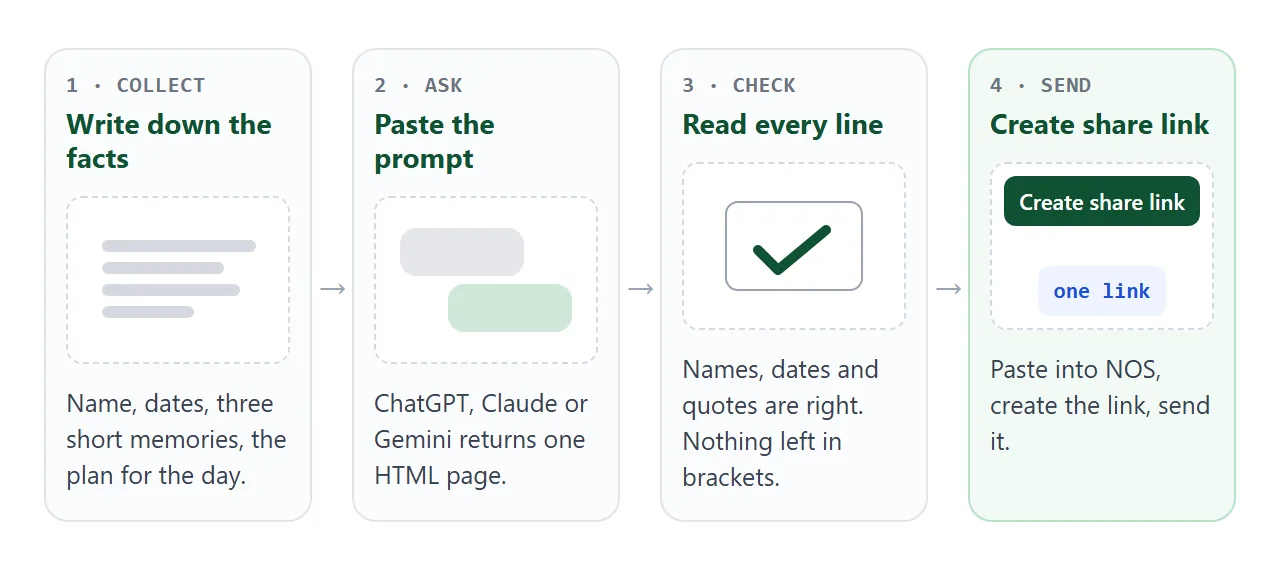
An AI writes the page well when you give it real material. Gather the facts first, and keep each memory to a line or two. People read a tribute on a phone, often in a quiet moment, and short lines are easier to take in.
Fill in the brackets and paste this into ChatGPT, Claude or Gemini:
Make a one-page tribute as a single HTML file.
It must work on a phone and use no external images or fonts.
Sections, in this order:
1. Header: "Thank you, [name]", a one-line subtitle ([what
   they did, for how long]), and a simple drawing in inline SVG
2. "What we will remember": three short quotes from
   [name 1, role], [name 2, role], [name 3, role]
3. A timeline of [4 years and what happened in each]
4. "Add your memory": a button that opens an email to [email]
5. "The day": folding questions about [when and where],
   [children], [cannot come]
Use a warm, quiet look in [colors]. Keep the wording simple and
kind. Give me only the HTML, from the doctype to the closing
html tag.
Then check the result before you paste it anywhere:
- The name, the dates and the years are spelled and counted right.
- Each quote is attributed to the right person, and they agreed to be quoted.
- The email button opens a message to the right address.
- Nothing is left in brackets, and no sample text remains.
- It reads well on a narrow screen. If the text is tiny, ask the AI to add the viewport meta tag.
If something is wrong, say so in the chat and ask for the full page again.
Send it as a link
Paste the HTML into a NOS document and choose Create share link. HTML to link walks through it.
The result is a normal web page. Anyone with the link can open it in a browser, a phone included, with no account. People who open it cannot edit it.
Editing the code later keeps the same link. Add a memory, save, and everyone who opens the link sees the new version.
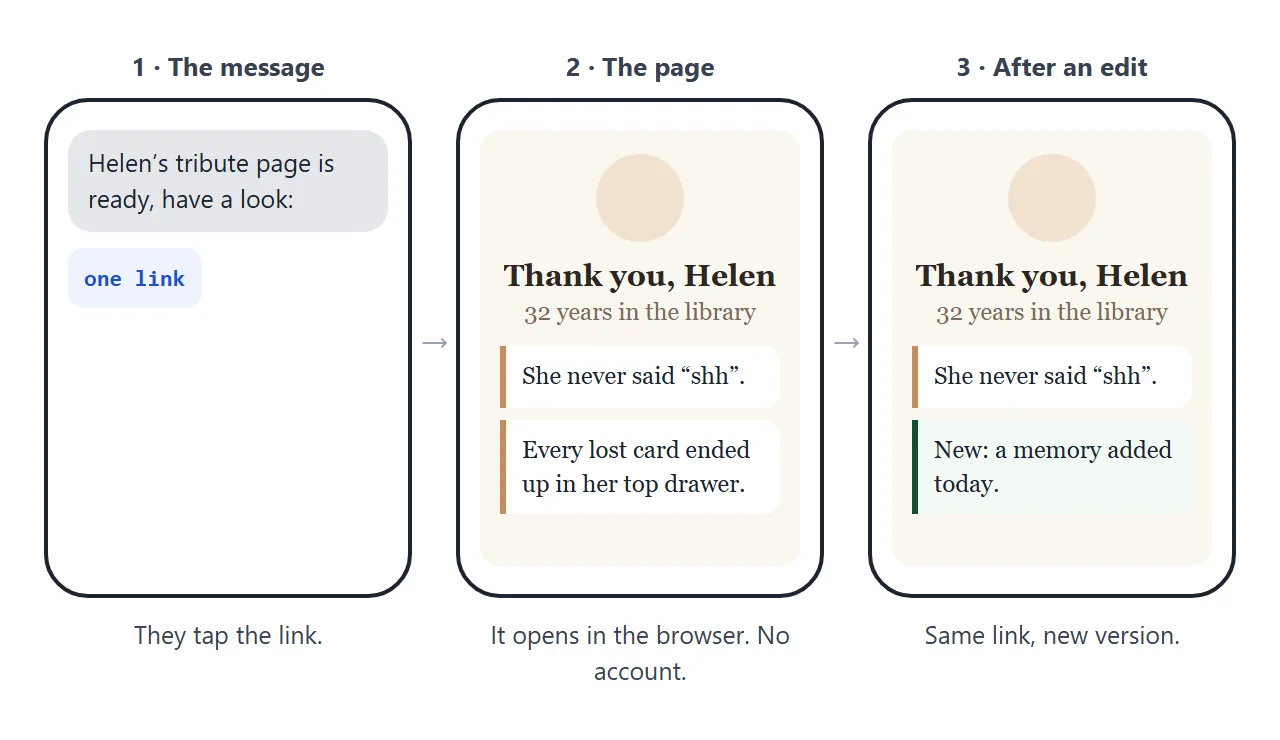
You can send the link by email, in a group chat or on a printed card. For a QR code on paper, QR code link explains why the printed code can keep working after you change the page.
Tribute page, file or link
| Way | What the person does | Fits | Watch for |
|---|---|---|---|
| Message with the text typed in | Reads the message | A very short thank-you | Long memories get lost in the chat |
| Picture or PDF of a card | Opens the attachment | A card to keep | A change means sending a new file |
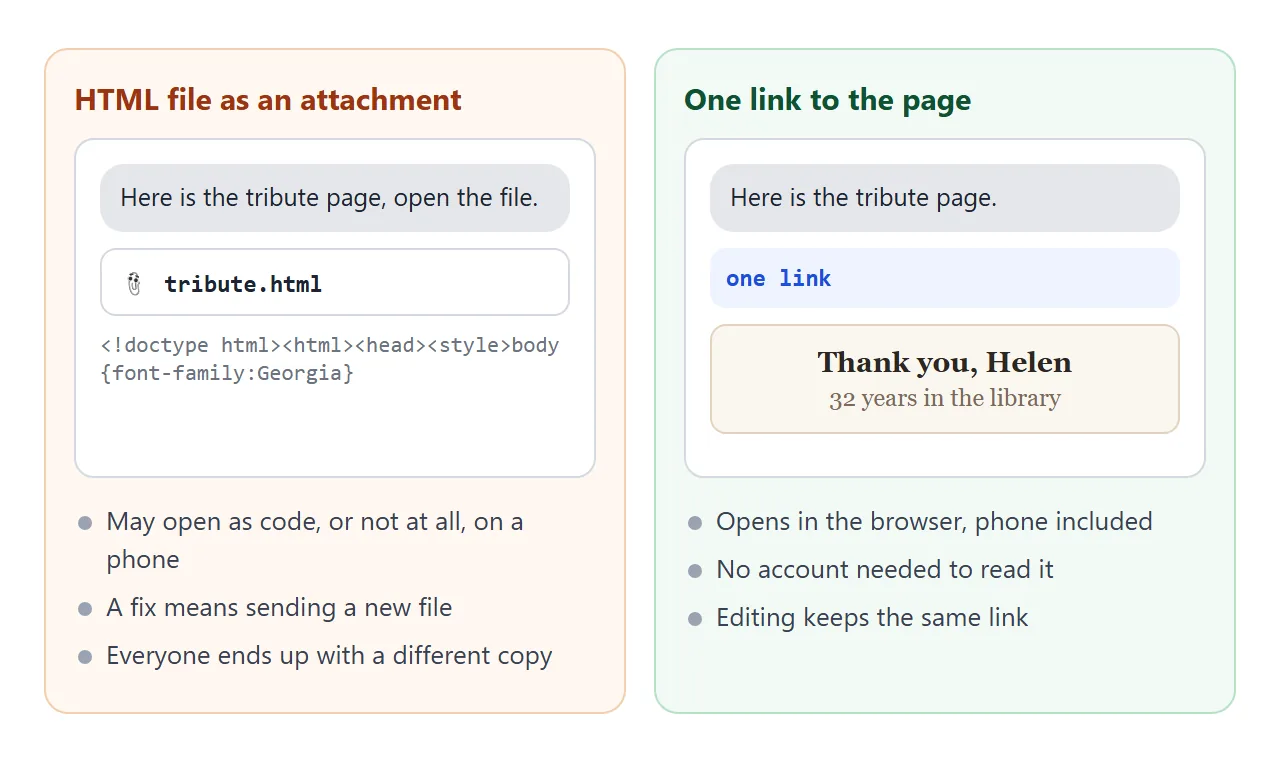
| HTML file as an attachment | Downloads, then opens it | Rarely the best choice | May open as code or not at all on a phone |
| One link to a page | Taps and reads in the browser | Memories, years and plan together | Anyone with the link can open it |
| QR code on a printed program | Scans the code | A gathering with paper | Test the code before printing |
On the attachment question, why links beat attachments and opening an HTML file on a phone explain what goes wrong.
A page that grows with the memories
A tribute is rarely finished on the first day. People remember things when they see what others wrote. This second example keeps the memories as cards that visitors can filter by who wrote them, with a button for larger text.
<!doctype html>
<html lang="en">
<head>
<meta charset="utf-8">
<meta name="viewport" content="width=device-width, initial-scale=1">
<title>In memory of Walter Reyes</title>
<style>
* { box-sizing: border-box; }
body { margin: 0; font-family: Georgia, "Times New Roman", serif; background: #f3f5f7; color: #232a31; line-height: 1.6; }
body.big { font-size: 1.2em; }
.wrap { max-width: 640px; margin: 0 auto; padding: 0 20px 40px; }
header { text-align: center; padding: 34px 0 18px; }
header svg { width: 84px; height: 84px; }
h1 { font-size: 28px; line-height: 1.2; margin: 12px 0 4px; font-weight: 600; }
.dates { color: #5d6b78; margin: 0; }
.intro { text-align: center; margin: 14px 0 20px; }
.bar { display: flex; flex-wrap: wrap; gap: 8px; align-items: center; margin-bottom: 16px; font-family: system-ui, sans-serif; }
.bar button { border: 1px solid #b9c4cf; background: #fff; color: #232a31; border-radius: 999px; padding: 9px 16px; font-size: 15px; cursor: pointer; }
.bar button[aria-pressed="true"] { background: #2f4b63; border-color: #2f4b63; color: #fff; }
.bar .size { margin-left: auto; }
.memory { background: #fff; border-radius: 12px; padding: 16px 18px; margin: 0 0 12px; box-shadow: 0 1px 4px rgba(0,0,0,.07); }
.memory p { margin: 0 0 8px; }
.memory footer { font: 14px system-ui, sans-serif; color: #5d6b78; }
.memory[hidden] { display: none; }
.note { font: 15px system-ui, sans-serif; color: #5d6b78; text-align: center; margin-top: 24px; }
.note a { color: #2f4b63; }
</style>
</head>
<body>
<div class="wrap">
<header>
<svg viewBox="0 0 84 84" role="img" aria-label="Simple tree drawing">
<circle cx="42" cy="42" r="40" fill="#e1e8ee"/>
<rect x="39" y="44" width="6" height="22" fill="#7a5c43"/>
<circle cx="42" cy="34" r="16" fill="#6f9a7d"/>
<circle cx="33" cy="42" r="9" fill="#82ab8f"/>
<circle cx="51" cy="42" r="9" fill="#82ab8f"/>
</svg>
<h1>In memory of Walter Reyes</h1>
<p class="dates"><time datetime="1948-03-02">2 March 1948</time> – <time datetime="2026-09-18">18 September 2026</time></p>
</header>
<p class="intro">Walter kept bees, fixed bicycles and answered every question with a story. These are some of the ones his family and friends told.</p>
<div class="bar" role="group" aria-label="Show memories from">
<button type="button" data-who="all" aria-pressed="true">All</button>
<button type="button" data-who="family" aria-pressed="false">Family</button>
<button type="button" data-who="friends" aria-pressed="false">Friends</button>
<button type="button" data-who="neighbours" aria-pressed="false">Neighbours</button>
<button type="button" class="size" id="size" aria-pressed="false">Larger text</button>
</div>
<div id="list">
<article class="memory" data-who="family"><p>He taught me to ride a bicycle by running behind me and then, quietly, not running.</p><footer>Lena, granddaughter</footer></article>
<article class="memory" data-who="friends"><p>Forty years of Thursday chess. I won eleven games and he remembered every one.</p><footer>Tomas, friend</footer></article>
<article class="memory" data-who="neighbours"><p>Every June a jar of honey appeared on our step, with a label in his careful handwriting.</p><footer>The Okafor family, next door</footer></article>
<article class="memory" data-who="family"><p>He signed every birthday card "Your favourite uncle", even the ones to his own children.</p><footer>Marco, son</footer></article>
<article class="memory" data-who="friends"><p>If your bike squeaked within a mile of his garage, he heard it and came out with oil.</p><footer>Ines, friend from the cycling club</footer></article>
</div>
<p class="note">Have a memory to add? <a href="mailto:memories@example.com?subject=A%20memory%20of%20Walter">Email it to the family</a> and it will be added to this page.</p>
</div>
<script>
const buttons = document.querySelectorAll('.bar button[data-who]');
const cards = document.querySelectorAll('.memory');
buttons.forEach((b) => b.addEventListener('click', () => {
buttons.forEach((x) => x.setAttribute('aria-pressed', x === b ? 'true' : 'false'));
cards.forEach((c) => { c.hidden = b.dataset.who !== 'all' && c.dataset.who !== b.dataset.who; }); // show matching cards
}));
const size = document.getElementById('size');
size.addEventListener('click', () => {
const on = document.body.classList.toggle('big'); // bigger text for older readers
size.setAttribute('aria-pressed', on);
size.textContent = on ? 'Normal text' : 'Larger text';
});
</script>
</body>
</html>
To add a memory, copy one card in the code and change its text and name. Or paste the new memory into the AI chat with the earlier page and say: "Add this to the page and give me the full HTML again."
Ask permission before you quote someone, and read the finished page aloud once. Names, dates and spellings matter most to the people who knew them.
When it does not work
| What you see | Cause | Fix |
|---|---|---|
| The page shows as plain text after pasting | The AI added explanation around the code | Paste only from the doctype line to the closing html tag |
| The email button does nothing | The device may have no email app set up | Also write the address as text on the page |
| Text is tiny on a phone | No viewport meta tag | Ask the AI to add one |
| A name or date is wrong | The AI guessed a detail you did not give | Correct it in the chat and ask for the full page again |
| A quote has been reworded | The AI polished the wording | Paste the exact words and tell it not to change them |
| A form on the page does not reach you | Sending a form to a server is blocked | Use an email link, or link to a form made elsewhere |
Before you send it
Open the link on your own phone, not only on the computer. Tap every button once. Then send it to one person who knew them and ask what is missing. That one question usually brings the best memory on the page.