A graduation party website can be one page: the time, the place with a map button, a few lines on parking, and a plan of the day. Send it as one link, and guests stop asking you the same three questions.
People often ask for the "best free online invitation maker". For this job you do not need a maker. You need a page with the facts in the right order, and an AI can write that page for you.
Here is a page you can copy. It has no outside images and no script. Tap the buttons and open the folded questions.
<!doctype html>
<html lang="en">
<head>
<meta charset="utf-8">
<meta name="viewport" content="width=device-width, initial-scale=1">
<title>Jonah's graduation party</title>
<style>
* { box-sizing: border-box; }
body {
margin: 0; padding: 16px; background: #eef1f8;
font-family: system-ui, -apple-system, "Segoe UI", sans-serif;
color: #1f2740; line-height: 1.5;
}
.page { max-width: 520px; margin: 0 auto; background: #fff; border-radius: 18px; overflow: hidden; box-shadow: 0 8px 28px rgba(31, 39, 64, .14); }
.hero { background: #1f2f6b; color: #fff; padding: 26px 22px 22px; text-align: center; }
.hero svg { display: block; margin: 0 auto 8px; }
.hero .kicker { margin: 0; font-size: 13px; letter-spacing: .08em; text-transform: uppercase; color: #f3cf6b; }
.hero h1 { margin: 6px 0 4px; font-size: 28px; line-height: 1.2; }
.hero p { margin: 0; color: #d6dcf2; }
section { padding: 18px 22px; border-top: 1px solid #e7eaf3; }
h2 { margin: 0 0 8px; font-size: 16px; color: #2c3f8f; }
p { margin: 0 0 8px; }
.big { font-size: 20px; font-weight: 700; margin: 0; }
a { color: #1f2f6b; }
.btn {
display: block; text-align: center; text-decoration: none;
background: #1f2f6b; color: #fff; padding: 13px 16px;
border-radius: 10px; font-weight: 700; margin-top: 10px;
}
.btn.alt { background: #fff; color: #1f2f6b; border: 2px solid #1f2f6b; }
.plan { list-style: none; margin: 0; padding: 0; }
.plan li { display: flex; gap: 12px; padding: 7px 0; border-bottom: 1px dashed #dfe3ef; }
.plan li:last-child { border-bottom: 0; }
.plan b { flex: 0 0 74px; color: #2c3f8f; }
.note { background: #fff8e1; border-left: 4px solid #f3cf6b; padding: 8px 12px; border-radius: 6px; margin: 10px 0 0; }
details { border: 1px solid #dfe3ef; border-radius: 10px; padding: 10px 12px; margin-bottom: 8px; background: #f7f8fc; }
summary { cursor: pointer; font-weight: 600; }
details p { margin: 8px 0 0; }
.foot { text-align: center; font-size: 13px; color: #5c6685; padding: 14px 22px 20px; }
</style>
</head>
<body>
<main class="page">
<header class="hero">
<!-- inline SVG: graduation cap, no image file needed -->
<svg width="84" height="56" viewBox="0 0 84 56" aria-hidden="true">
<polygon points="42,4 80,22 42,40 4,22" fill="#f3cf6b"/>
<path d="M20 31v10c0 5 10 10 22 10s22-5 22-10V31l-22 10z" fill="#d9b24a"/>
<line x1="76" y1="24" x2="76" y2="44" stroke="#f3cf6b" stroke-width="3"/>
<circle cx="76" cy="46" r="4" fill="#f3cf6b"/>
</svg>
<p class="kicker">You are invited</p>
<h1>Jonah's graduation party</h1>
<p>Class of 2026, Brightwater College</p>
</header>
<section>
<h2>When</h2>
<p class="big"><time datetime="2026-12-12T13:00">Saturday, 12 December 2026</time></p>
<p>1:00 pm to 5:00 pm. Come any time in those hours.</p>
</section>
<section>
<h2>Where</h2>
<p>Pine Ridge Park Pavilion<br>88 Orchard Road, Fairview</p>
<a class="btn" href="https://www.google.com/maps/search/?api=1&query=88%20Orchard%20Road%20Fairview" target="_blank" rel="noopener">Open in Maps</a>
</section>
<section>
<h2>Parking</h2>
<p>Use the free lot off Orchard Road. It is a two-minute walk to the pavilion along the lit path.</p>
<p>If the lot is full, park on Birch Street. Do not park on the grass.</p>
<p class="note">Step-free access: the three spaces nearest the pavilion are kept for guests who need them.</p>
<a class="btn alt" href="https://www.google.com/maps/dir/?api=1&destination=88%20Orchard%20Road%20Fairview&travelmode=driving" target="_blank" rel="noopener">Directions by car</a>
</section>
<section>
<h2>Plan of the day</h2>
<ul class="plan">
<li><b>1:00 pm</b><span>Doors open, food is out</span></li>
<li><b>2:30 pm</b><span>Photo slideshow and a few words</span></li>
<li><b>3:30 pm</b><span>Cake</span></li>
<li><b>5:00 pm</b><span>We tidy up, thank you for coming</span></li>
</ul>
</section>
<section>
<h2>Please reply by 28 November</h2>
<p>Tell Maria if you are coming and how many of you there will be.</p>
<a class="btn" href="mailto:maria@example.com?subject=Graduation%20party%20RSVP">Reply by email</a>
<a class="btn alt" href="tel:+15555550142">Call or text Maria</a>
</section>
<section>
<h2>Good to know</h2>
<details>
<summary>Is it indoors or outdoors?</summary>
<p>Under the pavilion roof, open on two sides. Bring a jacket.</p>
</details>
<details>
<summary>Is there food?</summary>
<p>Yes, a buffet lunch. Tell Maria about allergies when you reply.</p>
</details>
<details>
<summary>Do I need to bring a gift?</summary>
<p>No. Cards are welcome, and there is a box by the door.</p>
</details>
</section>
<p class="foot">Made for Jonah by the Reyes family</p>
</main>
</body>
</html>
The order follows how guests ask: when, where, parking, what happens, how to reply.
What guests ask, and where the page answers
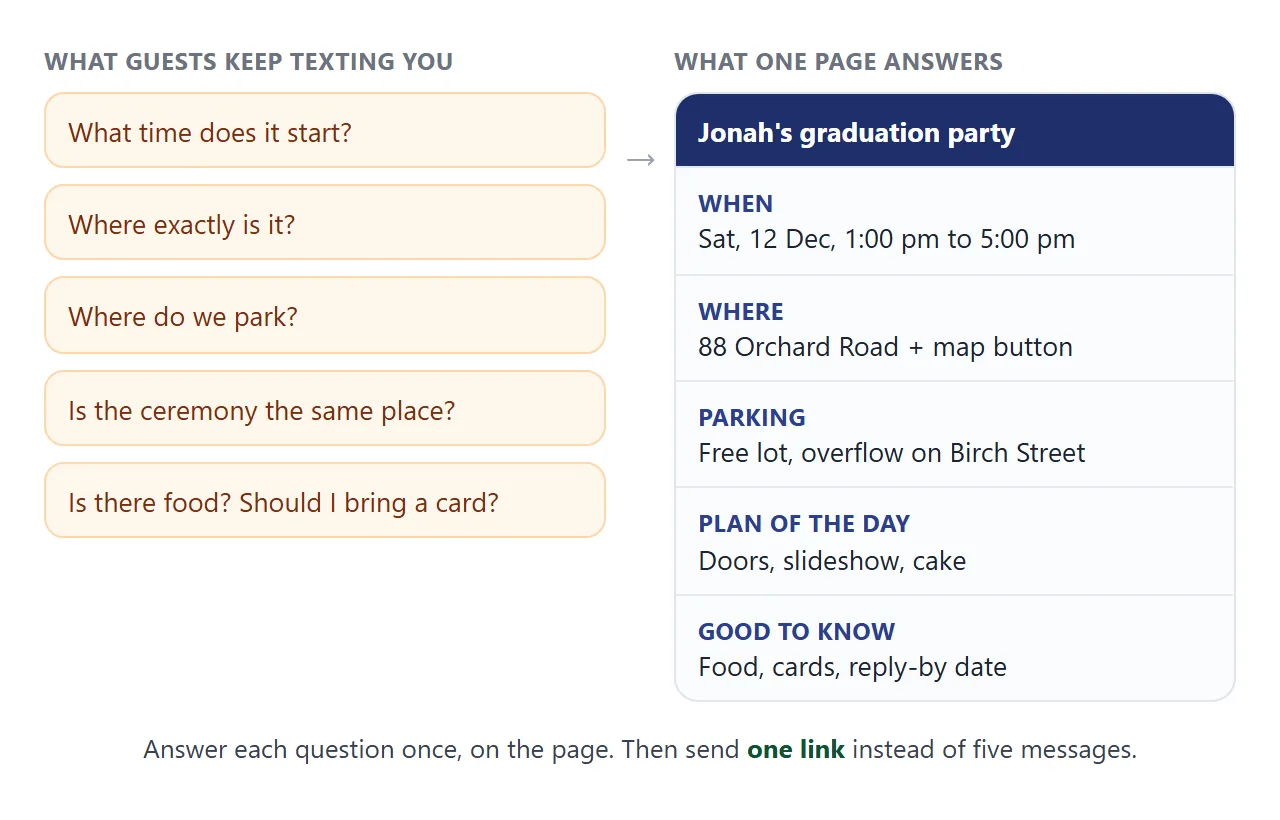
Keep every part to one or two lines. A guest opens the link once, on a phone, often while already on the way.
- Time. Write the weekday and the end time as well as the start. The page marks the date with the HTML
<time>element. - Place and a map button. A Google Maps search link needs no API key, and one tap opens the map. See HTML link to a map location.
- Parking. Say which lot, how far it is to walk, and what to do when it is full.
- Plan of the day. Three or four times are enough: doors, a few words, cake, the end.
- Reply. An email link and a phone link both work. See HTML link phone number.
Make it with AI
Ask for one file, name the parts, and give the facts in brackets. Replace every bracket before you send.
Make a one-page graduation party invitation as a single HTML file.
It must work on a phone and use no external images or fonts.
Sections, in this order:
1. Header: "[Graduate's name]'s graduation party", [school, year]
2. When: [weekday, date, start and end time]
3. Where: [venue name, street address], with an "Open in Maps"
   button that links to a Google Maps search for the address
4. Parking: [which lot, walk time, overflow parking, access spaces]
5. Plan of the day: a short list of times: [time and event]
6. Reply by [date]: a button that opens an email to [email]
   and a button that calls [phone]
7. "Good to know": folding questions about [indoors or outdoors],
   [food and allergies], [cards and gifts]
Use [color] colors. Keep the text short and friendly.
Give me only the HTML, from the doctype to the closing html tag.
Then check the result before you paste it anywhere:
- The date, weekday and times match your plan.
- The map button opens the right place, not a similar street.
- The parking lines say what you meant.
- Nothing is left in brackets, and no sample text such as "Lorem ipsum" remains.
- It reads well on a narrow screen. If the text is tiny, ask the AI to add the viewport meta tag.
If anything is wrong, say so in the chat and ask for the full page again.
Send it as a link
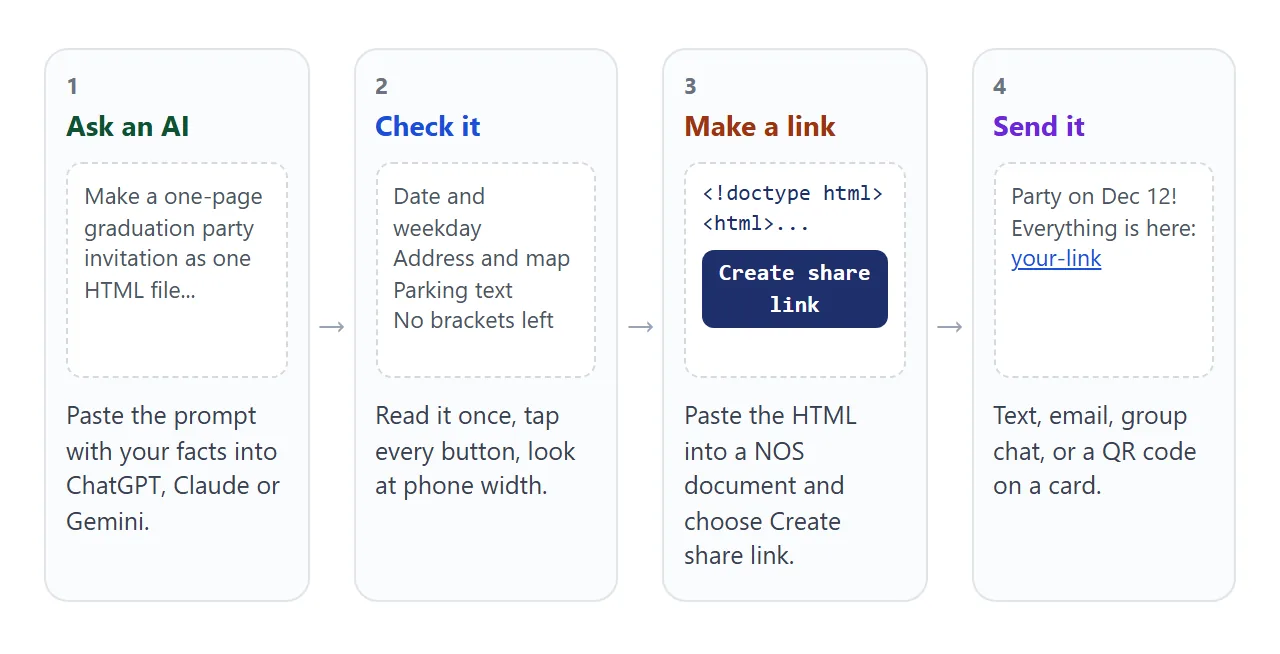
Paste the HTML into a NOS document and choose Create share link. HTML to link walks through it.
The result is a normal web page. Anyone with the link can open it in a browser, a phone included, with no account. Guests cannot edit it.
Editing the code later keeps the same link. If the start time moves from 1:00 to 2:00, save the change and everyone who opens the link sees 2:00.
Anyone with the link can open the page, and NOS has no password setting. Send it only to the people you invite.
Ways to send the details
| Way | What the guest does | Fits | Watch for |
|---|---|---|---|
| Details typed in a text | Reads the message | A very small party | Map and parking get buried in the chat |
| Picture or PDF of a card | Opens the attachment | A card to keep | A change means sending a new file |
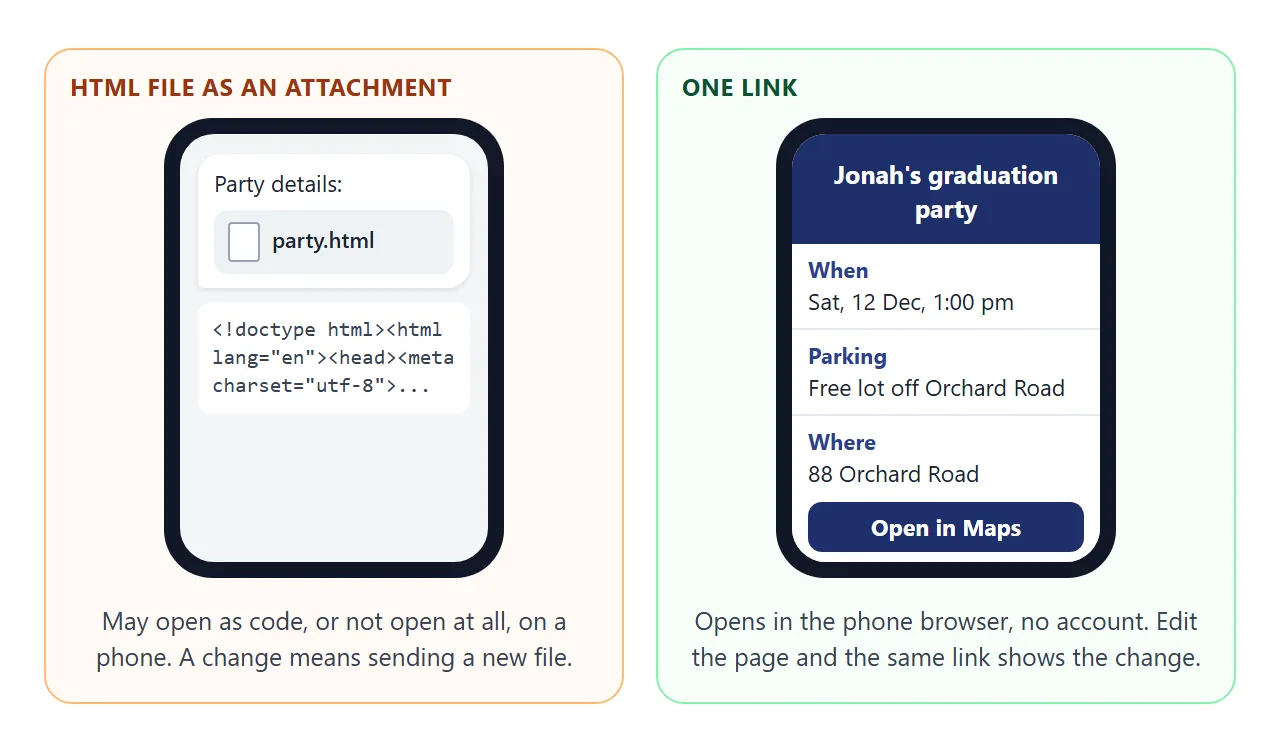
| HTML file as an attachment | Downloads, then opens it | Rarely the best choice | May open as code or not at all on a phone |
| One link to a page | Taps and reads in the browser | Time, map and parking together | Anyone with the link can open it |
| QR code on a printed card | Scans the code | Announcements and invitation cards | Be sure the link is final before you print |
For the file question, see why links beat attachments and opening an HTML file on a phone.
A printed announcement can carry a QR code that points to the page. QR code link explains how, and the page behind it can still be edited.
When the ceremony and the party are in different places
Many graduations have a ceremony in the morning and a party in the afternoon, at two addresses with two parking situations. Guests then ask which one you mean. The second page gives each part its own buttons.
<!doctype html>
<html lang="en">
<head>
<meta charset="utf-8">
<meta name="viewport" content="width=device-width, initial-scale=1">
<title>Graduation day: ceremony and party</title>
<style>
* { box-sizing: border-box; }
body {
margin: 0; padding: 16px; background: #eef1f8;
font-family: system-ui, -apple-system, "Segoe UI", sans-serif;
color: #1f2740; line-height: 1.5;
}
.page { max-width: 520px; margin: 0 auto; background: #fff; border-radius: 18px; overflow: hidden; box-shadow: 0 8px 28px rgba(31, 39, 64, .14); }
header { background: #1f2f6b; color: #fff; padding: 20px 22px 16px; }
header p { margin: 0; font-size: 13px; letter-spacing: .08em; text-transform: uppercase; color: #f3cf6b; }
header h1 { margin: 4px 0 0; font-size: 24px; line-height: 1.25; }
.tabs { display: flex; gap: 8px; padding: 14px 22px 0; }
.tabs button {
flex: 1; font: inherit; font-weight: 700; padding: 11px 8px; cursor: pointer;
border: 2px solid #1f2f6b; background: #fff; color: #1f2f6b; border-radius: 10px;
}
.tabs button[aria-pressed="true"] { background: #1f2f6b; color: #fff; }
.panel { padding: 16px 22px 22px; }
.panel h2 { margin: 0 0 4px; font-size: 20px; }
.panel p { margin: 0 0 8px; }
dl { margin: 12px 0 0; }
dt { font-size: 13px; font-weight: 700; color: #2c3f8f; text-transform: uppercase; letter-spacing: .05em; margin-top: 10px; }
dd { margin: 2px 0 0; }
.btn {
display: block; text-align: center; text-decoration: none;
background: #1f2f6b; color: #fff; padding: 13px 16px;
border-radius: 10px; font-weight: 700; margin-top: 16px;
}
</style>
</head>
<body>
<main class="page">
<header>
<p>Saturday, 12 December 2026</p>
<h1>Jonah graduates: two parts, one day</h1>
</header>
<div class="tabs">
<button type="button" id="b-ceremony" aria-pressed="true">Ceremony</button>
<button type="button" id="b-party" aria-pressed="false">Party</button>
</div>
<div class="panel" id="p-ceremony">
<h2>Ceremony, 10:00 am</h2>
<p>Brightwater College, Main Hall. Doors open at 9:00 am.</p>
<dl>
<dt>Where</dt><dd>Main Hall, 5 College Way, Fairview</dd>
<dt>Parking</dt><dd>Visitor lot C, free on Saturdays. Follow the signs for Main Hall.</dd>
<dt>Good to know</dt><dd>Seats are not reserved. The ceremony ends around 11:30 am.</dd>
</dl>
<a class="btn" href="https://www.google.com/maps/search/?api=1&query=5%20College%20Way%20Fairview" target="_blank" rel="noopener">Open ceremony in Maps</a>
</div>
<div class="panel" id="p-party" hidden>
<h2>Party, 1:00 pm</h2>
<p>Pine Ridge Park Pavilion. Come as you are, no need to dress up.</p>
<dl>
<dt>Where</dt><dd>88 Orchard Road, Fairview</dd>
<dt>Parking</dt><dd>Free lot off Orchard Road. Overflow parking on Birch Street.</dd>
<dt>Good to know</dt><dd>Food is served from 1:00 pm. Cake at 3:30 pm.</dd>
</dl>
<a class="btn" href="https://www.google.com/maps/search/?api=1&query=88%20Orchard%20Road%20Fairview" target="_blank" rel="noopener">Open party in Maps</a>
</div>
</main>
<script>
const parts = [
{ button: document.getElementById('b-ceremony'), panel: document.getElementById('p-ceremony') },
{ button: document.getElementById('b-party'), panel: document.getElementById('p-party') },
];
parts.forEach((part) => {
part.button.addEventListener('click', () => {
// show the chosen panel, hide the other, and mark the pressed button
parts.forEach((p) => {
const on = p === part;
p.panel.hidden = !on;
p.button.setAttribute('aria-pressed', on ? 'true' : 'false');
});
});
});
</script>
</body>
</html>
A few lines of JavaScript show one part and hide the other. If you do not want any script, ask the AI to put both parts on the page, one under the other.
Invitation to link covers other kinds of invitation. For a calendar entry guests can save, see calendar invite link.
When it does not work
| What you see | Cause | Fix |
|---|---|---|
| The page shows as plain text after pasting | The AI added explanation around the code | Paste only from the doctype line to the closing html tag |
| The map button opens the wrong place | The address in the link differs from the page | Fix the address after "query=" and tap the button yourself |
| Guests park in the wrong lot | Parking lines are vague | Name the lot, the street and the walk time |
| Text is tiny on a phone | No viewport meta tag | Ask the AI to add one |
| Guests have the wrong time | The time was also typed in an older message | Keep the time on the page, or send a short correction |
| The email button does nothing | The device may have no email app set up | Also write the address as text on the page |
Before you send it
Open the link on your own phone, not only on the computer. Tap every button once. Then send it to one friend and ask what they could not find. That single question shows what is missing.