A one page resume website is a single HTML file that shows your resume as a web page: your name, your target, your projects and your contact buttons. Have an AI assistant write it, paste it into NOS, and send the link.
A common question is which free or cheap site builder to use for a simple personal page. For one page of text you can skip the builder.
Here is a page you can copy and use. Tick the box, add a project row, tap the buttons.
<!doctype html>
<html lang="en">
<head>
<meta charset="utf-8">
<meta name="viewport" content="width=device-width, initial-scale=1">
<title>Mina Hartley - Computer Science student</title>
<style>
* { box-sizing: border-box; }
body {
margin: 0; background: #f3f5f8; color: #1b2430;
font: 16px/1.55 system-ui, -apple-system, "Segoe UI", sans-serif;
}
.page { max-width: 720px; margin: 0 auto; padding: 20px 16px 32px; }
header { background: #fff; border-radius: 14px; padding: 20px; box-shadow: 0 1px 4px rgba(0,0,0,.08); }
.who { display: flex; gap: 14px; align-items: center; }
.avatar {
flex: none; width: 56px; height: 56px; border-radius: 50%;
background: linear-gradient(135deg, #2563eb, #0f766e); color: #fff;
display: grid; place-items: center; font-weight: 700; font-size: 20px;
}
h1 { margin: 0; font-size: 1.5rem; line-height: 1.2; }
.role { margin: 2px 0 0; color: #4b5563; }
.status {
display: flex; align-items: center; gap: 10px; margin: 16px 0 0;
padding: 10px 12px; border-radius: 10px; background: #e7f6ee; color: #14532d;
font-weight: 600; min-height: 44px;
}
.status.off { background: #eef0f3; color: #4b5563; }
.status input { width: 22px; height: 22px; accent-color: #15803d; }
.contact { display: flex; flex-wrap: wrap; gap: 10px; margin-top: 14px; }
.btn {
display: inline-flex; align-items: center; justify-content: center;
min-height: 44px; padding: 0 16px; border-radius: 10px;
background: #2563eb; color: #fff; text-decoration: none; font-weight: 600;
}
.btn.alt { background: #fff; color: #1d4ed8; border: 1.5px solid #2563eb; }
section { background: #fff; border-radius: 14px; padding: 16px 20px; margin-top: 14px; box-shadow: 0 1px 4px rgba(0,0,0,.08); }
h2 { margin: 0 0 8px; font-size: .85rem; letter-spacing: .08em; text-transform: uppercase; color: #475569; }
h3 { margin: 0; font-size: 1rem; }
.meta { color: #64748b; font-size: .9rem; }
ul { margin: 6px 0 0; padding-left: 1.1rem; }
li { margin: 3px 0; }
table { width: 100%; border-collapse: collapse; }
td { padding: 8px 0; border-top: 1px solid #e5e7eb; vertical-align: top; }
tr:first-child td { border-top: 0; }
td:first-child { width: 36%; font-weight: 600; padding-right: 10px; }
td small { display: block; color: #64748b; font-weight: 400; }
.add { margin-top: 10px; min-height: 44px; padding: 0 14px; border-radius: 10px; border: 1.5px dashed #94a3b8; background: #fff; color: #334155; font: inherit; font-weight: 600; cursor: pointer; }
.chips { display: flex; flex-wrap: wrap; gap: 8px; margin: 0; padding: 0; list-style: none; }
.chips li { margin: 0; padding: 4px 12px; border-radius: 999px; background: #eef2ff; color: #3730a3; font-size: .92rem; }
[contenteditable]:focus { outline: 2px solid #2563eb; outline-offset: 2px; }
@media print { body { background: #fff; } .btn, .add, .status input { display: none; } header, section { box-shadow: none; } }
</style>
</head>
<body>
<div class="page">
<header>
<div class="who">
<div class="avatar" aria-hidden="true">MH</div>
<div>
<h1>Mina Hartley</h1>
<p class="role">Computer Science student, Northvale College. Graduating May 2027.</p>
</div>
</div>
<label class="status" id="status">
<input type="checkbox" id="open" checked>
<span id="statusText">Open to summer 2027 internships</span>
</label>
<div class="contact">
<a class="btn" href="mailto:mina.hartley@example.com">Email me</a>
<a class="btn alt" href="tel:+15550100">Call</a>
<a class="btn alt" href="#projects">See projects</a>
</div>
</header>
<section id="projects">
<h2>Projects</h2>
<table id="projTable">
<tr><td>Study Planner<small>Python, SQLite</small></td><td>Command-line planner that turns exam dates into a weekly plan. Used by 6 classmates.</td></tr>
<tr><td>Campus Bus Board<small>HTML, JavaScript</small></td><td>One page showing the next three buses from a stop. Loads on a phone in one tap.</td></tr>
<tr><td>Recipe Scaler<small>JavaScript</small></td><td>Rescales a recipe to any number of servings and keeps the units tidy.</td></tr>
</table>
<button class="add" id="addRow" type="button">+ Add a project</button>
</section>
<section>
<h2>Experience</h2>
<h3>Library desk assistant, Northvale College</h3>
<div class="meta">Sep 2025 to present</div>
<ul>
<li>Help about 20 students a shift find and check out course reserves.</li>
<li>Wrote the desk's one-page guide to the printer and scanner.</li>
</ul>
</section>
<section>
<h2>Education</h2>
<h3>B.S. Computer Science, Northvale College</h3>
<div class="meta">2023 to 2027 · Courses: Data Structures, Databases, Web Development</div>
</section>
<section>
<h2>Skills</h2>
<ul class="chips"><li>Python</li><li>JavaScript</li><li>HTML and CSS</li><li>SQL</li><li>Git</li></ul>
</section>
</div>
<script>
// Tick box: switches the status line between "open" and "not looking"
const open = document.getElementById('open');
const status = document.getElementById('status');
const statusText = document.getElementById('statusText');
open.addEventListener('change', () => {
status.classList.toggle('off', !open.checked);
statusText.textContent = open.checked
? 'Open to summer 2027 internships'
: 'Not looking right now';
});
// Add a row: a new editable project line appears in the table
const table = document.getElementById('projTable');
document.getElementById('addRow').addEventListener('click', () => {
const tr = table.insertRow();
tr.innerHTML = '<td contenteditable="true">New project<small>Tools</small></td>' +
'<td contenteditable="true">One sentence on what it does.</td>';
tr.cells[0].focus();
});
</script>
</body>
</html>
The page is one file with its styles inside. It needs no images and no outside files, so nothing can go missing on the way to the recruiter.
Make it with AI
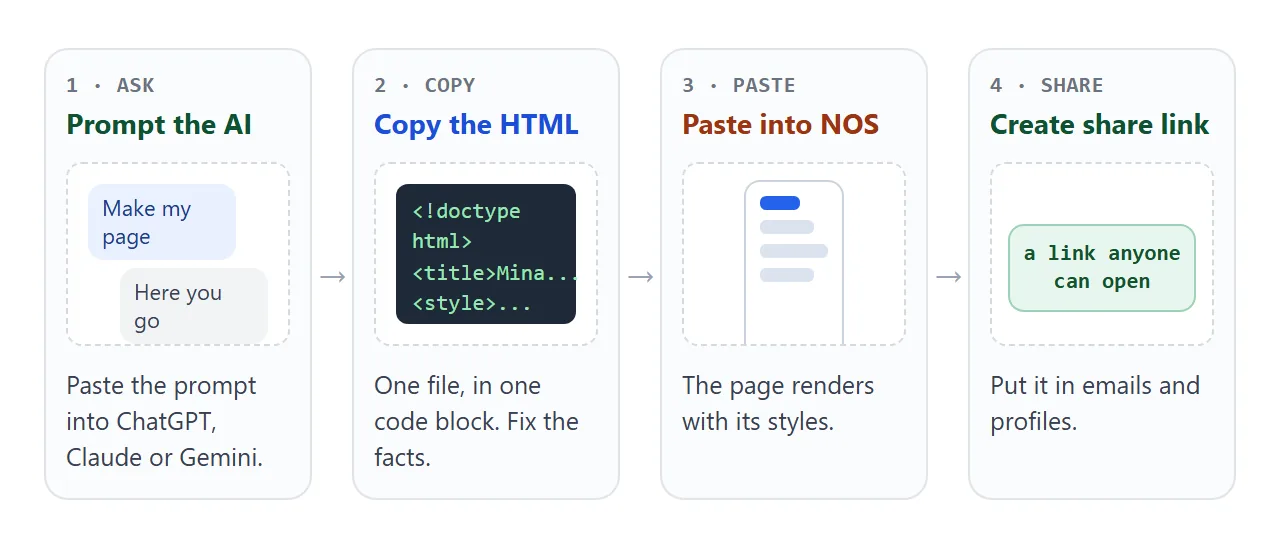
Paste this into ChatGPT, Claude or Gemini. Then replace the facts at the bottom with your own.
Make a one-page resume website as ONE HTML file.
- Start with a doctype, a charset line and a viewport meta tag.
- Put all CSS in one style block. No images, fonts or frameworks.
- Design for a phone first: one column, 16px text, buttons 44px tall.
- Top: my name, what I study, what I am looking for.
- Right below: an Email button (mailto link) and a Call button (tel link).
- Then sections, each with a heading: Projects, Experience, Education, Skills.
- Short enough to print on one page.
- Use only the facts below. If a fact is missing, write [ADD THIS].
Name: ...  Study: ...  Looking for: ...  Email: ...  Phone: ...
Projects: ...  Experience: ...  Skills: ...
Reply with the code block only.
You are the one who knows the real facts, so read every line. Check the following before you go on.
- Facts: names, dates, grades and numbers match your real resume. Search the page for [ADD THIS].
- Contact buttons: the email and the phone number are yours, with no typos.
- Nothing from outside: no image links, no web fonts, no script from another site.
- Length: you can reach the end of the page in a few swipes on a phone.
If something is off, ask the assistant for that one change. The guide to editing AI-generated HTML without code covers the other options.
Send it as a link
Paste the HTML into a NOS document and choose Create share link. HTML to link walks through it. The page renders as written, with its styles and scripts running.
Anyone with the link can open it in a browser, on a phone too, without an account. They can read the page but cannot edit it.
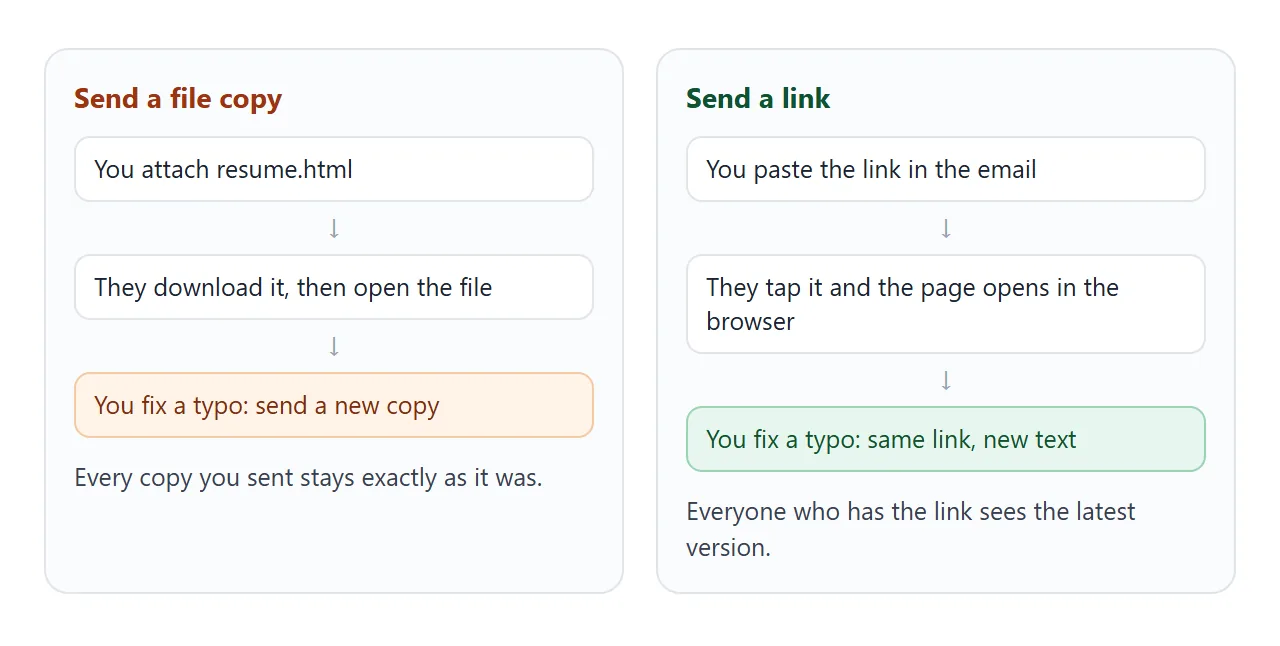
Later changes keep the same link. If you fix a date or add a project in the code, everyone who already has the link sees the new version. You do not send a second file.
The page can also change by clicking. When you, the owner, tick a box or add a row in View mode, NOS saves it. A visitor's ticks and rows are not saved.
That is why the status tick in the demo suits a resume: you flip it, they only read it.
A form that posts to a server is blocked, and so are outside images, iframes and fetch calls to other sites. For contact, use an email link and a phone link.
Both are plain HTML. MDN's page on the anchor element lists them among the supported URL schemes.
Make the first screen work on a phone
The first screen decides whether the recruiter keeps scrolling. Put your name, your target and the two contact buttons there, as in the phone view below.
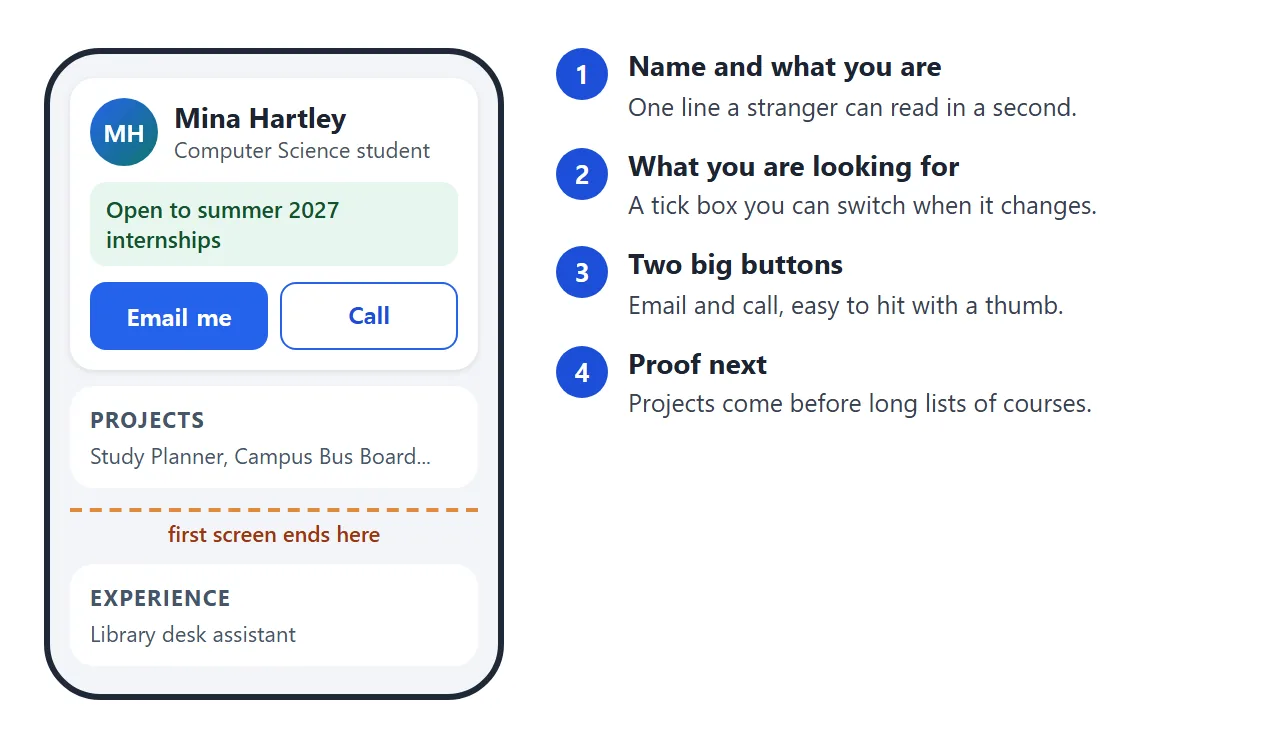
Two things make that possible. First, the viewport tag, which tells the phone to use its real width. MDN describes the value device-width as the physical size of the device screen in CSS pixels. See the viewport meta tag.
Second, make buttons easy to hit. WCAG 2.2 asks that pointer targets be at least 24 by 24 CSS pixels, with some exceptions. The demos use 44 pixels or more, because thumbs are bigger than cursors.
Here is a variant for a career fair. It has three numbers at the top, jump links, and a contact bar fixed to the bottom, so the buttons stay in reach.
<!doctype html>
<html lang="en">
<head>
<meta charset="utf-8">
<meta name="viewport" content="width=device-width, initial-scale=1">
<title>Diego Ferreira - Marketing student</title>
<style>
* { box-sizing: border-box; }
html { scroll-behavior: smooth; }
body {
margin: 0; color: #20242c; background: #fff;
font: 16px/1.55 system-ui, -apple-system, "Segoe UI", sans-serif;
padding-bottom: 76px; /* room for the bottom bar */
}
.hero { padding: 28px 18px 22px; color: #fff; background: linear-gradient(135deg, #7c2d12, #c2410c); }
.hero h1 { margin: 0; font-size: 1.7rem; line-height: 1.15; }
.hero p { margin: 6px 0 0; max-width: 34em; }
.three { display: grid; grid-template-columns: repeat(3, 1fr); gap: 8px; margin: 16px 0 0; padding: 0; list-style: none; }
.three li { background: rgba(255,255,255,.16); border-radius: 10px; padding: 8px 6px; text-align: center; font-size: .82rem; line-height: 1.3; }
.three b { display: block; font-size: 1.25rem; }
nav { display: flex; gap: 6px; padding: 10px 12px; border-bottom: 1px solid #e5e7eb; overflow-x: auto; }
nav a { flex: none; min-height: 44px; display: inline-flex; align-items: center; padding: 0 14px; border-radius: 999px; background: #fff7ed; color: #9a3412; text-decoration: none; font-weight: 600; }
main { max-width: 680px; margin: 0 auto; padding: 4px 18px; }
section { padding: 14px 0; border-bottom: 1px solid #eceef2; scroll-margin-top: 4px; }
h2 { margin: 0 0 6px; font-size: 1.1rem; }
.meta { color: #6b7280; font-size: .9rem; }
ul { margin: 6px 0 0; padding-left: 1.1rem; }
.bar {
position: fixed; left: 0; right: 0; bottom: 0; display: flex; gap: 10px;
padding: 10px 12px; background: #fff; border-top: 1px solid #e5e7eb;
}
.bar a { flex: 1; min-height: 48px; display: grid; place-items: center; border-radius: 12px; text-decoration: none; font-weight: 700; }
.bar .mail { background: #c2410c; color: #fff; }
.bar .tel { background: #fff; color: #9a3412; border: 2px solid #c2410c; }
</style>
</head>
<body>
<div class="hero">
<h1>Diego Ferreira</h1>
<p>Marketing student at Eastbrook University. Looking for a 2027 summer role in social media or campaign analytics.</p>
<ul class="three">
<li><b>12k</b>views on a class campaign video</li>
<li><b>3.8</b>GPA</li>
<li><b>2</b>internship-style projects</li>
</ul>
</div>
<nav aria-label="Sections">
<a href="#work">Work</a>
<a href="#school">School</a>
<a href="#skills">Skills</a>
</nav>
<main>
<section id="work">
<h2>Work</h2>
<b>Social media lead, Eastbrook Film Club</b>
<div class="meta">Jan 2026 to present</div>
<ul>
<li>Posted three times a week and doubled the club's newsletter sign-ups.</li>
<li>Built a one-page calendar of screenings that members open on their phones.</li>
</ul>
</section>
<section id="school">
<h2>School</h2>
<b>B.A. Marketing, Eastbrook University</b>
<div class="meta">2024 to 2028 · Consumer Behaviour, Data for Marketers</div>
</section>
<section id="skills">
<h2>Skills</h2>
<ul>
<li>Short video editing, caption writing, A/B test summaries</li>
<li>Spreadsheets, basic SQL, presenting to a room of 30</li>
</ul>
</section>
</main>
<div class="bar">
<a class="mail" href="mailto:diego.ferreira@example.com">Email Diego</a>
<a class="tel" href="tel:+15550111">Call</a>
</div>
</body>
</html>
The call button uses a tel link. MDN notes that its behaviour depends on the device: a phone autodials, and other devices may open a calling app or save the number. See phone links in HTML.
Ways to send it compared
| HTML file attached | Share link from NOS | |
|---|---|---|
| What the reader does | Downloads the file, then opens it | Taps the link and the page opens in the browser |
| You fix a typo by | Sending a new file | Editing the page, same link |
| Reader needs an account | No | No |
| Reader can edit it | They have their own copy | No |
For a plain one-file layout, see the simple HTML resume. For more on sharing, see share my resume as a link.
What to put on the one page
These are suggestions, not rules. Keep what helps a stranger decide in a few seconds.
- Top: name, field of study, graduation date, and what you are looking for.
- Projects first: if you have little work experience, projects show what you can do. Give each one a sentence and the tools you used.
- Experience: part-time jobs and clubs count. Say what you did and, where you can, a number you know to be true.
- Education and skills: short lines. Do not list every course.
- Headings: give each section a heading. MDN advises that sections should always have one.
Check the print layout as well. A short print block hides the buttons and removes shadows. See print styles for how it works, and use print preview to confirm that the page fits one sheet.
When it does not work
| What you see | Cause | Fix |
|---|---|---|
| Text is tiny on a phone | The viewport tag is missing | Add the viewport meta line to the head |
| The page scrolls sideways | A wide table or fixed width | Use one column and let tables wrap |
| An image is missing | It loads from another site | Draw it with CSS or inline SVG, or drop it |
| The contact form does nothing | Sending to a server is blocked | Use an email link and a phone link |
| A visitor's tick did not stay | Only the owner's View-mode changes are saved | Make changes yourself, or edit the code |
| A recruiter has an old version | They saved a copy of the HTML file | Send the link, not the file |
| [ADD THIS] still shows | The assistant left a gap | Search the page and fill each one |