A tour package brochure does not have to be a designed PDF. It can be one web page: each package with its length, departure dates and from-price, plus a button to ask.
You build the page once and send the link to every enquiry. When a date or price moves, you change the page.
Here is a page you can copy. Filter by season, then tap Ask about this tour. The company and the figures are made up.
<!doctype html>
<html lang="en">
<head>
<meta charset="utf-8">
<meta name="viewport" content="width=device-width, initial-scale=1">
<title>Larkspur Tours - 2027 packages</title>
<style>
  * { box-sizing: border-box; }
  body { margin: 0; font-family: system-ui, -apple-system, "Segoe UI", sans-serif; color: #1d2733; background: #f4f1ea; line-height: 1.45; }
  header { background: #1f4d4a; color: #fff; padding: 20px 18px 16px; }
  header h1 { margin: 0 0 4px; font-size: 22px; }
  header p { margin: 0; font-size: 14px; opacity: .9; }
  main { max-width: 820px; margin: 0 auto; padding: 14px 14px 24px; }
  .chips { display: flex; gap: 8px; flex-wrap: wrap; margin: 4px 0 14px; }
  .chips button { font: inherit; font-size: 14px; padding: 7px 14px; border-radius: 999px; border: 1px solid #b9c4c2; background: #fff; color: #1d2733; cursor: pointer; }
  .chips button[aria-pressed="true"] { background: #1f4d4a; border-color: #1f4d4a; color: #fff; }
  .pkg { display: flex; gap: 14px; background: #fff; border-radius: 12px; padding: 12px; margin-bottom: 12px; box-shadow: 0 1px 4px rgba(0,0,0,.08); }
  .pkg[hidden] { display: none; }
  .art { flex: 0 0 150px; border-radius: 8px; overflow: hidden; }
  .art svg { display: block; width: 100%; height: 100%; min-height: 150px; }
  .info { flex: 1; min-width: 0; }
  .info h2 { margin: 0; font-size: 18px; }
  .meta { margin: 2px 0 8px; font-size: 14px; color: #52606d; }
  .dates { display: flex; gap: 6px; flex-wrap: wrap; margin: 0 0 10px; padding: 0; list-style: none; }
  .dates li { font-size: 13px; background: #e7f0ee; color: #1f4d4a; padding: 3px 9px; border-radius: 6px; }
  .row { display: flex; align-items: center; gap: 12px; flex-wrap: wrap; }
  .price { font-size: 20px; font-weight: 700; }
  .price small { font-size: 13px; font-weight: 400; color: #52606d; }
  .ask { display: inline-block; background: #d9622b; color: #fff; text-decoration: none; padding: 9px 14px; border-radius: 8px; font-size: 14px; font-weight: 600; }
  .call { font-size: 14px; color: #1f4d4a; }
  footer { font-size: 12.5px; color: #52606d; margin-top: 6px; }
  @media (max-width: 520px) {
    .pkg { flex-direction: column; }
    .art { display: none; }
  }
</style>
</head>
<body>
<header>
  <h1>Larkspur Tours - 2027 small-group packages</h1>
  <p>Groups of 6 to 12. Prices per person, sample figures. Last updated 1 October 2026.</p>
</header>
<main>
  <div class="chips" role="group" aria-label="Filter by season">
    <button type="button" data-season="all" aria-pressed="true">All</button>
    <button type="button" data-season="spring" aria-pressed="false">Spring</button>
    <button type="button" data-season="summer" aria-pressed="false">Summer</button>
    <button type="button" data-season="autumn" aria-pressed="false">Autumn</button>
  </div>

  <article class="pkg" data-season="spring">
    <div class="art" aria-hidden="true">
      <svg viewBox="0 0 150 150" preserveAspectRatio="xMidYMid slice"><rect width="150" height="150" fill="#f6c28b"/><circle cx="108" cy="42" r="20" fill="#fff3d6"/><path d="M0 110 L40 70 L70 100 L105 60 L150 105 V150 H0Z" fill="#d9622b"/><rect y="118" width="150" height="32" fill="#1f4d4a"/></svg>
    </div>
    <div class="info">
      <h2>Lisbon and Sintra</h2>
      <p class="meta">5 days - hotel, breakfast, a local guide, day trip to Sintra</p>
      <ul class="dates"><li>14 Mar</li><li>11 Apr</li><li>9 May</li></ul>
      <div class="row">
        <span class="price">from $890 <small>per person</small></span>
        <a class="ask" href="mailto:hello@larkspur-tours.example?subject=Question%20about%20Lisbon%20and%20Sintra">Ask about this tour</a>
        <a class="call" href="tel:+15550100">Call +1 555 0100</a>
      </div>
    </div>
  </article>

  <article class="pkg" data-season="summer">
    <div class="art" aria-hidden="true">
      <svg viewBox="0 0 150 150" preserveAspectRatio="xMidYMid slice"><rect width="150" height="150" fill="#bfe0ee"/><path d="M0 120 L35 55 L60 90 L90 30 L130 100 L150 80 V150 H0Z" fill="#5d7f8c"/><path d="M90 30 L78 52 L90 46 L100 54Z" fill="#fff"/><rect y="124" width="150" height="26" fill="#3b7a57"/></svg>
    </div>
    <div class="info">
      <h2>Dolomites hut to hut</h2>
      <p class="meta">7 days - mountain huts, half board, walking guide, luggage transfer</p>
      <ul class="dates"><li>20 Jun</li><li>4 Jul</li><li>18 Jul</li></ul>
      <div class="row">
        <span class="price">from $1,490 <small>per person</small></span>
        <a class="ask" href="mailto:hello@larkspur-tours.example?subject=Question%20about%20Dolomites%20hut%20to%20hut">Ask about this tour</a>
        <a class="call" href="tel:+15550100">Call +1 555 0100</a>
      </div>
    </div>
  </article>

  <article class="pkg" data-season="autumn">
    <div class="art" aria-hidden="true">
      <svg viewBox="0 0 150 150" preserveAspectRatio="xMidYMid slice"><rect width="150" height="150" fill="#f3d9c4"/><circle cx="40" cy="38" r="16" fill="#c0392b"/><rect x="62" y="60" width="52" height="8" fill="#7a2e1f"/><rect x="58" y="52" width="60" height="8" fill="#7a2e1f"/><rect x="68" y="68" width="6" height="52" fill="#7a2e1f"/><rect x="102" y="68" width="6" height="52" fill="#7a2e1f"/><rect y="120" width="150" height="30" fill="#8a5a44"/></svg>
    </div>
    <div class="info">
      <h2>Kyoto in autumn</h2>
      <p class="meta">8 days - ryokan and hotel stays, temple visits, rail pass</p>
      <ul class="dates"><li>31 Oct</li><li>7 Nov</li></ul>
      <div class="row">
        <span class="price">from $2,380 <small>per person</small></span>
        <a class="ask" href="mailto:hello@larkspur-tours.example?subject=Question%20about%20Kyoto%20in%20autumn">Ask about this tour</a>
        <a class="call" href="tel:+15550100">Call +1 555 0100</a>
      </div>
    </div>
  </article>

  <footer>Larkspur Tours is a made-up company used for this example. Dates and prices are samples.</footer>
</main>

<script>
  // Show only the packages for the chosen season
  const chips = document.querySelectorAll('.chips button');
  const cards = document.querySelectorAll('.pkg');

  chips.forEach((chip) => {
    chip.addEventListener('click', () => {
      chips.forEach((c) => c.setAttribute('aria-pressed', c === chip ? 'true' : 'false'));
      cards.forEach((card) => {
        card.hidden = chip.dataset.season !== 'all' && card.dataset.season !== chip.dataset.season;
      });
    });
  });
</script>
</body>
</html>
Below: how to get a page like this from an AI chat, how to send it, and what to do when it misbehaves. For the general idea of a brochure at an address, see brochure link.
What a package page needs
Keep it to what a person weighing up a trip looks for. For each package: the name, the number of days, what is included, the departure dates and a from-price. Say whether the price is per person.
Add the date you last checked the figures near the top. A customer opening the link in January should be able to see how current it is.
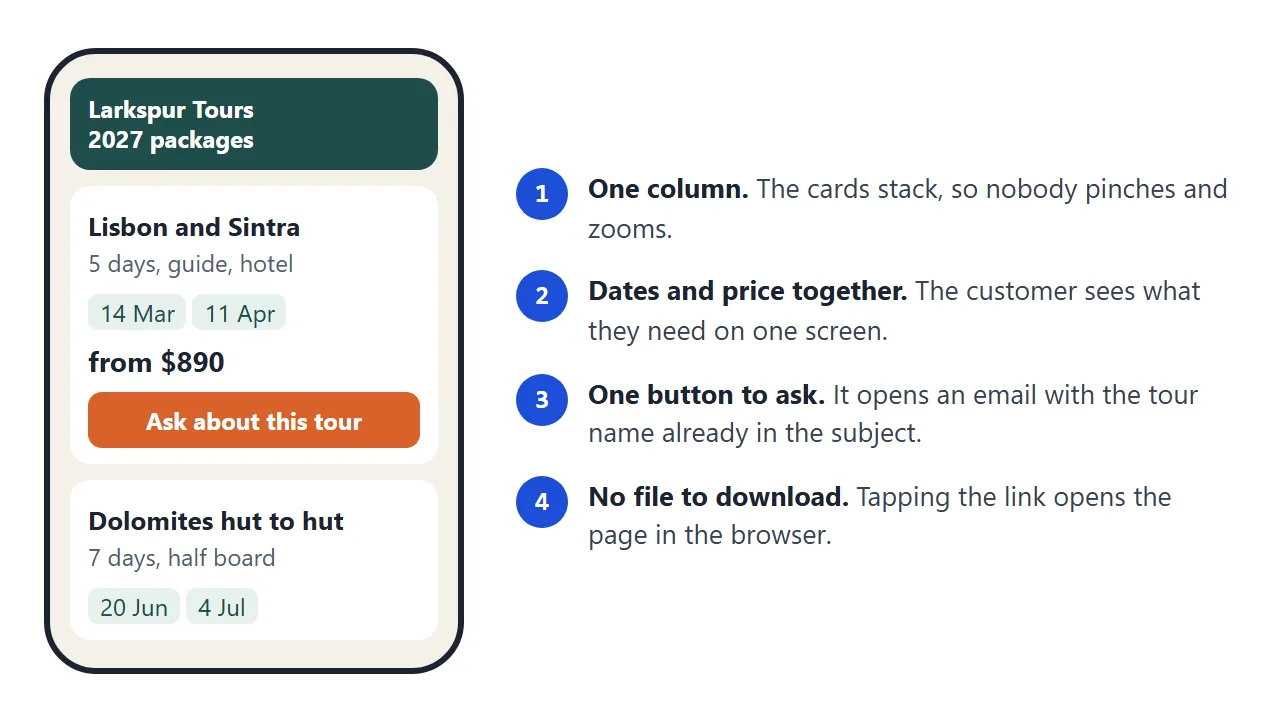
A customer may open the link on a phone, so a single column of cards works better than a wide table.
Put the contact route inside every card, not only at the bottom of the page. That way the customer never scrolls back up to find it.
Make it with AI
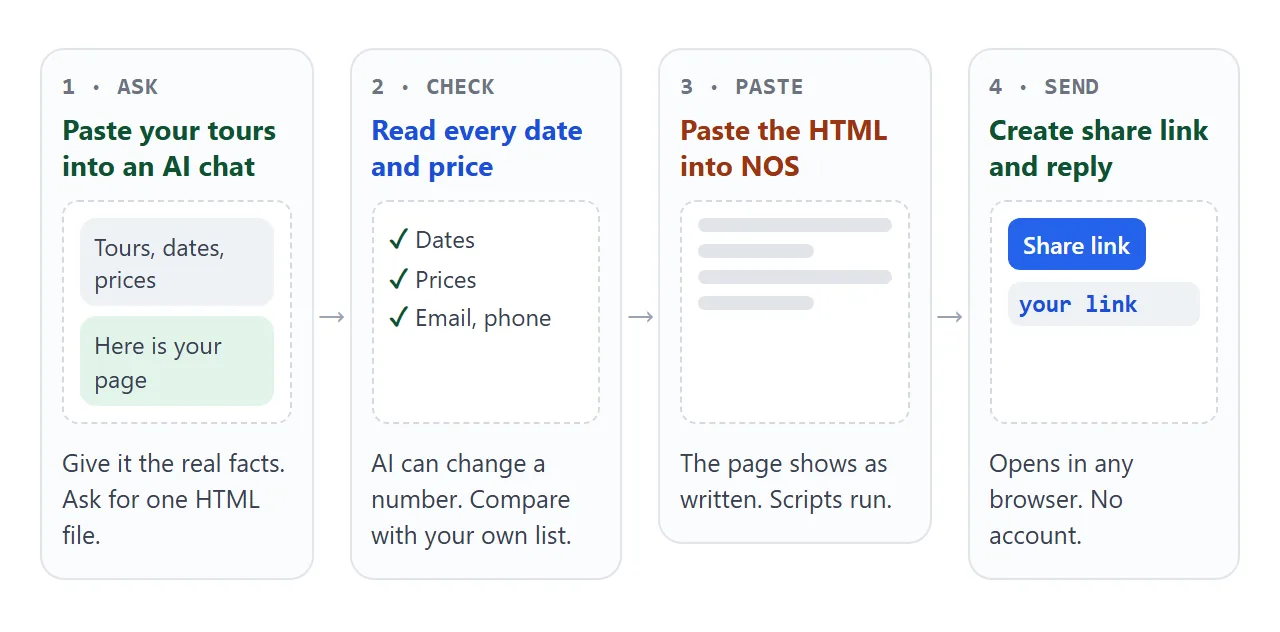
You do not have to write HTML. Give an AI chat your own list of packages and ask for the page. Replace the bracketed parts and paste this into ChatGPT, Claude or Gemini:
Make a single HTML file: a brochure for my tour company, [company name].
Use only the packages below, with exactly these dates and prices.
Show each package as a card: name, number of days, what is included,
departure dates, and the from-price per person. Put "Last updated [date]"
at the top. Add a button to filter by season.
Under each card add an email link that opens an email with the tour name
already in the subject, and a phone link. Email: [address]. Phone: [number].
Mobile first, one column on a phone. No forms that post to a server,
no external images or fonts: use colour blocks or inline SVG.
Packages:
[paste your list here]
Then check the result before you send it:
- Every date and price matches your list. A number can be mistyped or changed when the page is written.
- The email address and phone number are yours, with no placeholder left.
- Each email link names the right tour in its subject.
- The page works on a phone. Open it there before you send it.
Send it as a link
Copy the HTML from the chat. Paste it into a NOS document, then choose Create share link. HTML to link walks through it, and sharing HTML from Claude shows the same steps from a Claude chat.
The page renders as written and its scripts run, so the season filter works for the customer. Anyone with the link can open it in a browser, on a phone or a computer, without an account. They cannot edit your page.
When a price changes, edit the code in NOS. The link stays the same, so people who saved it see the new version.
Paste the link into an email or message reply to an enquiry. For a printed flyer, put it on a QR code; QR code link covers that.
Links, files and print compared
| PDF attachment | Link to a page | Printed brochure | |
|---|---|---|---|
| After a price changes | Old copies keep the old price | Edit once, same link shows the new price | Reprint |
| Opens on a phone | As a file the customer has to open | In the browser, no account | Not applicable |
| Can the customer edit it | They can save their own copy | No, they can only read it | No |
| Contact route | Written text | A tap to email or call | A number to type |
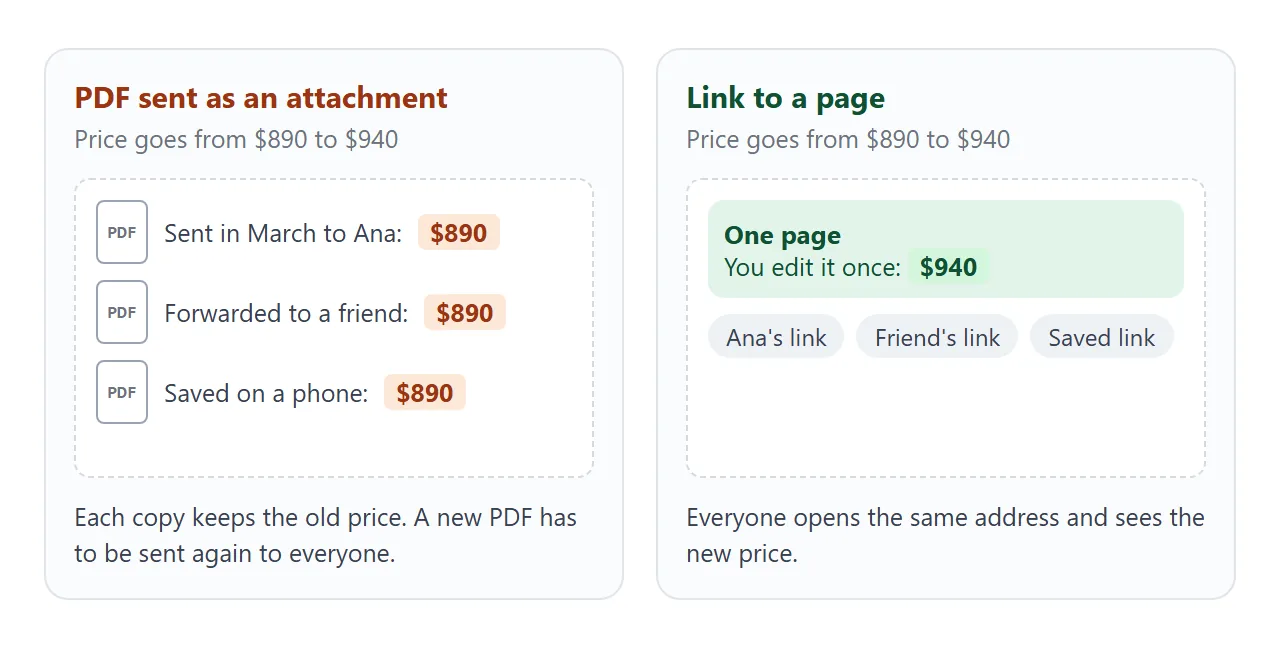
This is why a link suits a brochure with changing dates. Why links beat attachments goes into it further. For an overall view of brochures at an address, digital brochure and travel brochure look at the same idea from other angles.
Answering an enquiry with a link
Your enquiry button can be a normal email link. The subject goes after a question mark in the link, and spaces are written as %20. Here is the pattern:
<a href="mailto:hello@example.com?subject=Question%20about%20Lisbon">
  Ask about this tour
</a>
A phone link works the same way with the number after the tel: prefix. On a phone that can make calls, tapping it usually dials, though what happens varies with the device. Test both on your own phone before you send the page.
The second example goes one step further. The visitor picks a tour and a group size, sees an estimated total, and the email button fills in those details for them.
<!doctype html>
<html lang="en">
<head>
<meta charset="utf-8">
<meta name="viewport" content="width=device-width, initial-scale=1">
<title>Larkspur Tours - dates and price check</title>
<style>
  * { box-sizing: border-box; }
  body { margin: 0; padding: 16px; font-family: system-ui, -apple-system, "Segoe UI", sans-serif; color: #1d2733; background: #f4f1ea; line-height: 1.45; }
  .wrap { max-width: 760px; margin: 0 auto; }
  h1 { margin: 0 0 4px; font-size: 20px; }
  .sub { margin: 0 0 14px; font-size: 14px; color: #52606d; }
  table { width: 100%; border-collapse: collapse; background: #fff; border-radius: 10px; overflow: hidden; font-size: 14px; }
  th, td { text-align: left; padding: 9px 10px; border-bottom: 1px solid #e6e2d8; }
  th { background: #1f4d4a; color: #fff; font-weight: 600; }
  tr:last-child td { border-bottom: 0; }
  .few { color: #b3471a; font-weight: 600; }
  .check { margin-top: 14px; background: #fff; border-radius: 10px; padding: 14px; }
  .check h2 { margin: 0 0 10px; font-size: 16px; }
  .fields { display: flex; gap: 12px; flex-wrap: wrap; }
  label { display: flex; flex-direction: column; gap: 4px; font-size: 13px; color: #52606d; flex: 1 1 150px; }
  select, input[type="number"] { font: inherit; font-size: 15px; padding: 8px; border: 1px solid #b9c4c2; border-radius: 8px; background: #fff; color: #1d2733; }
  .single { flex-direction: row; align-items: center; gap: 8px; margin: 12px 0 0; font-size: 14px; }
  .total { margin: 14px 0 10px; font-size: 14px; color: #52606d; }
  .total strong { display: block; font-size: 26px; color: #1d2733; }
  .ask { display: inline-block; background: #d9622b; color: #fff; text-decoration: none; padding: 10px 16px; border-radius: 8px; font-size: 15px; font-weight: 600; }
  .note { font-size: 12.5px; color: #52606d; margin-top: 10px; }
  @media (max-width: 520px) { th:nth-child(3), td:nth-child(3) { display: none; } }
</style>
</head>
<body>
<div class="wrap">
  <h1>Dates, seats and prices</h1>
  <p class="sub">Larkspur Tours (made-up company, sample figures). Checked 1 October 2026.</p>

  <table>
    <thead><tr><th>Tour</th><th>Departs</th><th>Length</th><th>Seats</th></tr></thead>
    <tbody>
      <tr><td>Lisbon and Sintra</td><td>14 Mar 2027</td><td>5 days</td><td>Open</td></tr>
      <tr><td>Lisbon and Sintra</td><td>11 Apr 2027</td><td>5 days</td><td class="few">3 left</td></tr>
      <tr><td>Dolomites hut to hut</td><td>20 Jun 2027</td><td>7 days</td><td>Open</td></tr>
      <tr><td>Kyoto in autumn</td><td>31 Oct 2027</td><td>8 days</td><td class="few">2 left</td></tr>
    </tbody>
  </table>

  <form class="check" id="check" onsubmit="return false">
    <h2>Check a price for your group</h2>
    <div class="fields">
      <label>Tour
        <select id="tour">
          <option value="890">Lisbon and Sintra - $890</option>
          <option value="1490">Dolomites hut to hut - $1,490</option>
          <option value="2380">Kyoto in autumn - $2,380</option>
        </select>
      </label>
      <label>Travellers
        <input id="people" type="number" min="1" max="12" value="2">
      </label>
    </div>
    <label class="single"><input id="single" type="checkbox"> Single room (adds $240 in total)</label>
    <p class="total">Estimated total <strong id="total">$1,780</strong></p>
    <a class="ask" id="ask" href="#">Send this as an enquiry</a>
    <p class="note">The estimate is a guide, not a booking. The button opens the visitor's own email app with the details filled in.</p>
  </form>
</div>

<script>
  const tour = document.getElementById('tour');
  const people = document.getElementById('people');
  const single = document.getElementById('single');
  const total = document.getElementById('total');
  const ask = document.getElementById('ask');
  const SINGLE_ROOM = 240;

  function update() {
    const n = Math.min(12, Math.max(1, parseInt(people.value, 10) || 1));
    const sum = Number(tour.value) * n + (single.checked ? SINGLE_ROOM : 0);
    total.textContent = '$' + sum.toLocaleString('en-US');

    // Build the enquiry email so the visitor only has to press send
    const name = tour.options[tour.selectedIndex].text.split(' - ')[0];
    const body = 'Hello, I would like to ask about ' + name + ' for ' + n + ' traveller(s)' +
      (single.checked ? ', one single room' : '') + '. Estimated total: ' + total.textContent + '.';
    ask.href = 'mailto:hello@larkspur-tours.example?subject=' + encodeURIComponent('Enquiry: ' + name) +
      '&body=' + encodeURIComponent(body);
  }

  [tour, people, single].forEach((el) => el.addEventListener('input', update));
  update();
</script>
</body>
</html>
This replaces a contact form. A form that sends data to a server is blocked on a NOS page, so use an email or phone link for the first contact.
The estimate is only a guide. Keep the real quote and the booking in your own process.
When it does not work
| What you see | Cause | Fix |
|---|---|---|
| A price on the page is not the one you gave the AI | A number was mistyped or changed when the page was written | Compare with your list and ask for a correction, or edit the code yourself |
| Photos show as empty boxes | Images from other websites are blocked | Use colour blocks or inline SVG shapes |
| The enquiry button does nothing | No email app is set up on that device | Show the address as text as well as a link |
| A form on the page never arrives | Sending a form to a server is blocked | Use an email or phone link instead |
| A customer still has an old price | They are quoting a PDF you sent earlier | Send the link and say the page is current |
| The page is tiny and needs zooming on a phone | The viewport meta tag is missing | Ask the AI to add it; see viewport meta tag |
If a customer cannot open the file at all, opening an HTML file on a phone explains why a link avoids that problem.