A writing portfolio website can be one page: your best samples, two sentences on each, and one link you paste into an email to an editor. You do not need a site builder or a domain for that.
If you have been looking for free portfolio websites, you may be choosing between many builders. If all you need is a handful of clips in one place, a single page you make yourself is enough.
Here is a page of that kind for a made-up student. Each sample has its label, outlet, date, word count, a short note and the address of the piece. Try the filters and open an opening paragraph.
<!doctype html>
<html lang="en">
<head>
<meta charset="utf-8">
<meta name="viewport" content="width=device-width, initial-scale=1">
<title>Writing samples - Mara Ellison</title>
<style>
* { box-sizing: border-box; }
body { margin: 0; padding: 20px 16px 28px; background: #f6f4ef; color: #22252b; font-family: system-ui, sans-serif; line-height: 1.5; }
main { max-width: 720px; margin: 0 auto; }
h1 { margin: 0; font: 700 28px/1.2 Georgia, "Times New Roman", serif; }
.role { margin: 4px 0 0; color: #555b66; font-size: 15px; }
.about { margin: 12px 0 0; font-size: 16px; }
.filters { display: flex; flex-wrap: wrap; gap: 8px; margin: 18px 0 6px; }
.filters button { padding: 8px 14px; border: 1px solid #c9ccd3; border-radius: 99px; background: #fff; color: #22252b; font: 600 14px system-ui, sans-serif; cursor: pointer; }
.filters button[aria-pressed="true"] { background: #22252b; border-color: #22252b; color: #fff; }
.count { margin: 0 0 12px; color: #6a7079; font-size: 13px; }
.card { margin: 0 0 12px; padding: 16px 16px 14px; background: #fff; border: 1px solid #e3e0d8; border-radius: 10px; }
.meta { display: flex; flex-wrap: wrap; gap: 6px; align-items: center; font-size: 12.5px; color: #555b66; }
.chip { padding: 2px 8px; border-radius: 99px; font-weight: 700; font-size: 12px; }
.chip.pub { background: #dff3e5; color: #14532d; }
.chip.cls { background: #fdebd3; color: #7c3d0a; }
.card h2 { margin: 8px 0 4px; font: 700 19px/1.3 Georgia, "Times New Roman", serif; }
.intro { margin: 0 0 8px; font-size: 15px; }
.addr { margin: 0 0 8px; font: 12.5px/1.4 ui-monospace, Consolas, monospace; color: #3b4350; word-break: break-all; }
.more { padding: 6px 0; border: 0; background: none; color: #1d4ed8; font: 600 14px system-ui, sans-serif; cursor: pointer; }
.excerpt { margin: 6px 0 0; padding: 10px 12px; border-left: 3px solid #c9ccd3; background: #faf9f6; font: 15px/1.6 Georgia, "Times New Roman", serif; }
.contact { margin: 18px 0 0; padding-top: 14px; border-top: 1px solid #ddd9cf; font-size: 14px; color: #555b66; }
</style>
</head>
<body>
<main>
<h1>Mara Ellison</h1>
<p class="role">Journalism and English student, Eastfield College</p>
<p class="about">I report on campus news and write features about the people who keep a college running. Five samples below, each with a short note on what I did.</p>
<div class="filters" id="filters" role="group" aria-label="Filter samples"></div>
<p class="count" id="count"></p>
<div id="list"></div>
<p class="contact">Contact: mara.ellison@example.com. Editors: tell me which piece you want to see in full and I will send it.</p>
</main>
<script>
// One list holds every sample. Edit this list and the page updates.
const clips = [
{ title: 'Why the library closes at six', type: 'News', status: 'Published', where: 'Eastfield Courier, Oct 2025', words: 620,
intro: 'My first front-page story. I took the budget figures from the student senate minutes and asked three students what the early close meant for them.',
addr: 'eastfieldcourier.example/library-hours',
excerpt: 'The library will close at six on weekdays from January, the student senate learned on Tuesday. The change saves the college a reported part of its evening staffing budget, but students who work until five say it leaves them an hour to study.' },
{ title: 'A night shift at the campus bakery', type: 'Feature', status: 'Published', where: 'Lakeside Weekly, Mar 2026', words: 1450,
intro: 'I spent two nights with the bakers before writing a word. The piece follows one loaf from dough to the dining hall at 6 a.m.',
addr: 'lakesideweekly.example/night-bakery',
excerpt: 'At 2 a.m. the only light on the south side of campus comes from a window the size of a door. Inside, the first tray of rolls is already on the rack.' },
{ title: 'Fix the bus loop before the snow', type: 'Opinion', status: 'Published', where: 'Eastfield Courier, Nov 2025', words: 480,
intro: 'A short column with one argument and one proposal. I timed the loop for a week so the numbers are mine.',
addr: 'eastfieldcourier.example/bus-loop',
excerpt: 'The bus loop was built for six buses an hour. It now gets eleven, and every one of them stops where the crosswalk is.' },
{ title: 'The sound of an empty stadium', type: 'Feature', status: 'Class assignment', where: 'Narrative Writing, Spring 2026', words: 900,
intro: 'Written for class and not published. I am showing it because it is the best example of my descriptive writing.',
addr: 'Full text available on request',
excerpt: 'On a Monday in March the stadium belongs to the groundskeeper and a radio. He plays the radio quietly, as if the seats might complain.' },
{ title: 'Three lines from a council meeting', type: 'News', status: 'Class assignment', where: 'Reporting Basics, Fall 2025', words: 350,
intro: 'A short news brief from a public meeting. The exercise was to find the one fact a reader needs and put it first.',
addr: 'Full text available on request',
excerpt: 'The city council voted 5 to 2 on Monday to move the farmers market to the north lot, starting in May.' }
];
const types = ['All', 'News', 'Feature', 'Opinion'];
const filters = document.getElementById('filters');
const list = document.getElementById('list');
const count = document.getElementById('count');
let current = 'All';
function show() {
const shown = clips.filter(c => current === 'All' || c.type === current);
count.textContent = 'Showing ' + shown.length + ' of ' + clips.length + ' samples';
list.innerHTML = '';
shown.forEach(c => {
const card = document.createElement('article');
card.className = 'card';
card.innerHTML =
'<div class="meta"><span class="chip ' + (c.status === 'Published' ? 'pub' : 'cls') + '">' + c.status + '</span>' +
'<span>' + c.type + '</span><span>·</span><span>' + c.where + '</span><span>·</span><span>' + c.words + ' words</span></div>' +
'<h2>' + c.title + '</h2><p class="intro">' + c.intro + '</p><p class="addr">' + c.addr + '</p>' +
'<button class="more" aria-expanded="false">Read the opening</button>';
const btn = card.querySelector('.more');
btn.addEventListener('click', () => {
const open = btn.getAttribute('aria-expanded') === 'true';
const old = card.querySelector('.excerpt');
if (old) old.remove();
if (!open) {
const p = document.createElement('p');
p.className = 'excerpt';
p.textContent = c.excerpt;
card.appendChild(p);
}
btn.setAttribute('aria-expanded', String(!open));
btn.textContent = open ? 'Read the opening' : 'Hide the opening';
});
list.appendChild(card);
});
}
types.forEach(t => {
const b = document.createElement('button');
b.textContent = t;
b.setAttribute('aria-pressed', String(t === current));
b.addEventListener('click', () => {
current = t;
filters.querySelectorAll('button').forEach(x => x.setAttribute('aria-pressed', String(x === b)));
show();
});
filters.appendChild(b);
});
show();
</script>
</body>
</html>
Class assignments are marked as class assignments. That is on purpose: a reader can see at once what ran and what did not.
Make it with AI
You do not have to write the code. Gather your notes first: for each sample, the title as it ran, the outlet, the date, the word count, the opening paragraph and what you did.
Then paste this prompt into ChatGPT, Claude or Gemini.
Make one HTML page that is my writing portfolio. Top: my name,
one line about me, and a short intro. Then my samples as cards.
Each card has: the title as published, a "Published" or
"Class assignment" label, the outlet and date, the word count,
a two-sentence note on what I did, the web address as plain
text, and a button that opens the first paragraph. Add All,
News, Feature and Opinion filter buttons. Keep the samples in
one JavaScript list near the bottom. Works on a phone. No
outside libraries, images or fonts. Do not save data anywhere.
Use only the details I give you. Do not add any.

My samples: [paste your notes for each sample here]
Then check the result before anyone sees it:
- Every title, date and word count. Compare them with your notes. An AI can tidy a headline or round a number without telling you.
- The labels. Anything that did not run in a publication says Class assignment.
- The opening paragraphs. They must be your words, copied exactly.
- The web addresses. Each one should match the real address of the piece.
- A narrow window. Make the browser thin. The cards should stack and the buttons stay easy to tap.
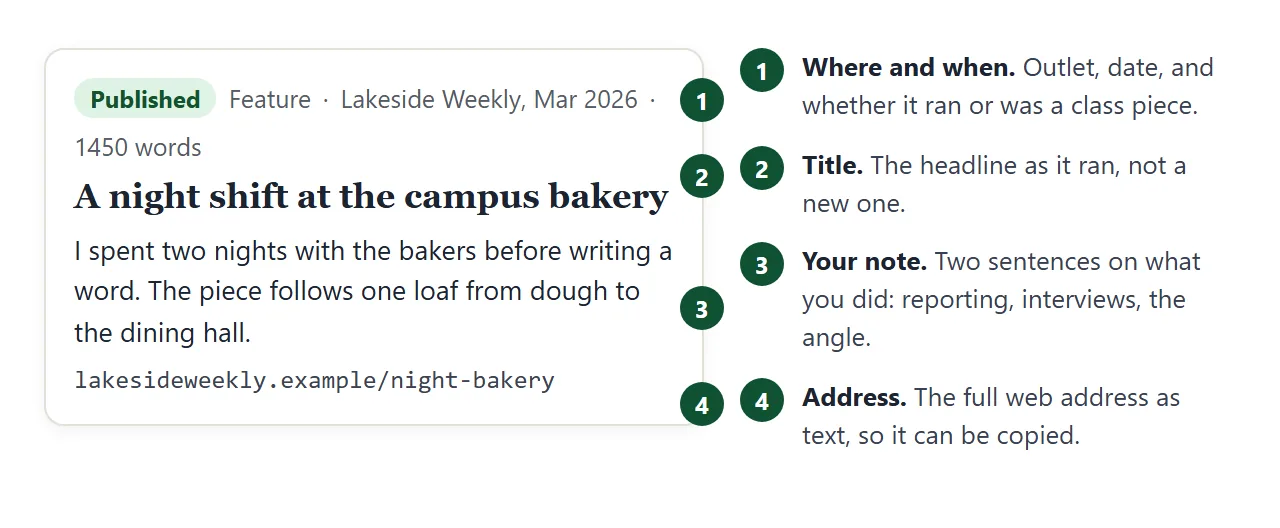
Each card has the same four parts. The picture shows what each one is for.
Send it as a link
- Copy all of the code the AI returned.
- Paste it into a NOS document. The page renders as written and its scripts run, so test the filters yourself.
- Choose Create share link and copy the address. HTML to link walks through it.
- Paste that address into your email.
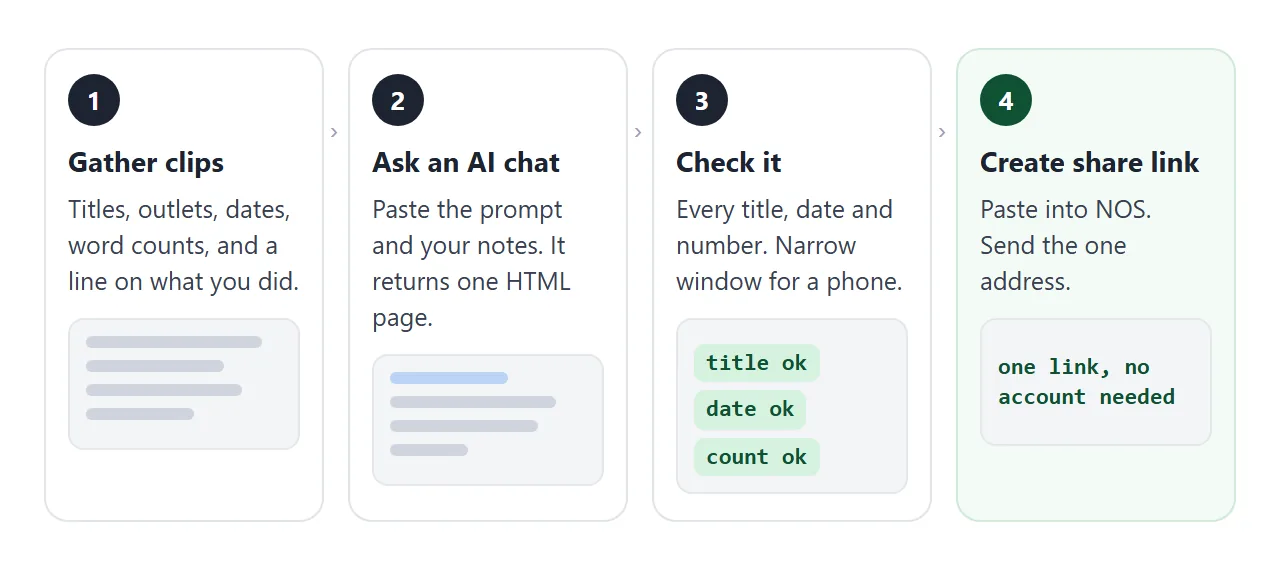
Anyone with the link can open the page in a browser, on a phone or a laptop, without an account. They cannot edit it.
If you add a clip later and paste the new code into the same document, the same link shows the new version.
Images from other websites are blocked on the page, so do not ask for thumbnails of your articles. Plain text and simple shapes work.
Put the link in the email
The email is the part the editor reads first, so make it short. Pick the two or three samples you want read first and name them under the link.
This page builds that text for you. Type a name, tick the samples, paste your link and copy the result.
<!doctype html>
<html lang="en">
<head>
<meta charset="utf-8">
<meta name="viewport" content="width=device-width, initial-scale=1">
<title>Email to an editor</title>
<style>
  * { box-sizing: border-box; }
  body { margin: 0; padding: 18px 16px 26px; background: #f3f5f8; color: #1f2430; font-family: system-ui, sans-serif; line-height: 1.5; }
  main { max-width: 680px; margin: 0 auto; }
  h1 { margin: 0 0 4px; font-size: 22px; }
  .sub { margin: 0 0 14px; color: #566; font-size: 14px; }
  label { display: block; margin: 10px 0 4px; font-weight: 600; font-size: 14px; }
  input[type="text"] { width: 100%; padding: 9px 10px; border: 1px solid #c6cbd5; border-radius: 8px; font: 15px system-ui, sans-serif; }
  fieldset { margin: 14px 0 0; padding: 8px 12px 6px; border: 1px solid #d4d8e0; border-radius: 10px; background: #fff; }
  legend { padding: 0 6px; font-weight: 700; font-size: 14px; }
  .pick { display: flex; gap: 10px; align-items: flex-start; margin: 0; padding: 7px 0; font-weight: 400; font-size: 14.5px; }
  .pick input { margin-top: 4px; width: 18px; height: 18px; flex: none; }
  .pick small { display: block; color: #667; font-size: 12.5px; }
  .status { margin: 10px 0 6px; font-size: 13px; color: #566; }
  textarea { width: 100%; height: 250px; padding: 10px; border: 1px solid #c6cbd5; border-radius: 8px; background: #fff; font: 14px/1.5 ui-monospace, Consolas, monospace; resize: vertical; }
  button { margin-top: 8px; padding: 9px 16px; border: 0; border-radius: 8px; background: #1f2430; color: #fff; font: 600 14px system-ui, sans-serif; cursor: pointer; }
  .hint { margin: 8px 0 0; font-size: 13px; color: #566; }
</style>
</head>
<body>
<main>
  <h1>Email to an editor</h1>
  <p class="sub">Fill in two names, tick the samples to point to, and copy the text into your email.</p>

  <label for="ed">Editor's name</label>
  <input type="text" id="ed" value="Dana Whitlock">
  <label for="out">Publication</label>
  <input type="text" id="out" value="Harbor Review">
  <label for="url">Your portfolio link</label>
  <input type="text" id="url" placeholder="Paste your share link here">

  <fieldset>
    <legend>Samples to point out</legend>
    <div id="picks"></div>
  </fieldset>

  <p class="status" id="status"></p>
  <label for="mail">Your email text</label>
  <textarea id="mail" readonly></textarea>
  <button id="sel" type="button">Select all text</button>
  <p class="hint">After you select it, copy with Ctrl+C (Command+C on a Mac) and paste into a new message.</p>
</main>

<script>
  const samples = [
    { t: 'Why the library closes at six', d: 'News, Eastfield Courier', on: true },
    { t: 'A night shift at the campus bakery', d: 'Feature, Lakeside Weekly', on: true },
    { t: 'Fix the bus loop before the snow', d: 'Opinion, Eastfield Courier', on: true },
    { t: 'The sound of an empty stadium', d: 'Feature, class assignment', on: false },
    { t: 'Three lines from a council meeting', d: 'News, class assignment', on: false }
  ];
  const $ = id => document.getElementById(id);
  const picks = $('picks');

  samples.forEach((s, i) => {
    const row = document.createElement('label');
    row.className = 'pick';
    row.innerHTML = '<input type="checkbox"' + (s.on ? ' checked' : '') + '><span>' + s.t + '<small>' + s.d + '</small></span>';
    row.querySelector('input').addEventListener('change', e => { s.on = e.target.checked; build(); });
    picks.appendChild(row);
  });

  function build() {
    const chosen = samples.filter(s => s.on);
    const link = $('url').value.trim() || '[paste your link here]';
    const lines = [
      'Hi ' + ($('ed').value.trim() || 'there') + ',',
      '',
      'I am a journalism student and I would like to write for ' + ($('out').value.trim() || 'your publication') + '. My writing samples are on one page:',
      link,
      ''
    ];
    if (chosen.length) {
      lines.push('If you only have a minute, start with:');
      chosen.forEach(s => lines.push('- ' + s.t + ' (' + s.d + ')'));
      lines.push('');
    }
    lines.push('Thank you for reading.', 'Mara Ellison');
    $('mail').value = lines.join('\n');
    $('status').textContent = chosen.length + ' of ' + samples.length + ' samples ticked. A short list is quicker to scan.';
  }

  ['ed', 'out', 'url'].forEach(id => $(id).addEventListener('input', build));
  $('sel').addEventListener('click', () => { $('mail').focus(); $('mail').select(); });
  build();
</script>
</body>
</html>
To add the link in Gmail on a computer, Gmail Help says to highlight the text, choose Insert link at the bottom of the message (or press Ctrl + K), paste the address and choose Apply.
Outlook also uses Ctrl + K, and Command + K on a Mac. Menu names can change, so check the current help page if a button has moved.
For a printed handout, such as one for a career fair, a QR code for the link saves the reader typing it.
One link or a pile of attachments
You can send samples in several ways. They differ in what the editor has to open and what you have to redo.
| Files attached | A link to each piece | One page with one link | |
|---|---|---|---|
| What the editor opens | One file per sample | One page per sample | One page with every sample |
| Your note on each piece | In the email text | In the email text | On the page, beside the piece |
| When you add a new clip | New email with the files | New email with the links | Add one card, same link |
| Good for | One sample that was asked for | Pieces already online | A short set shown together |
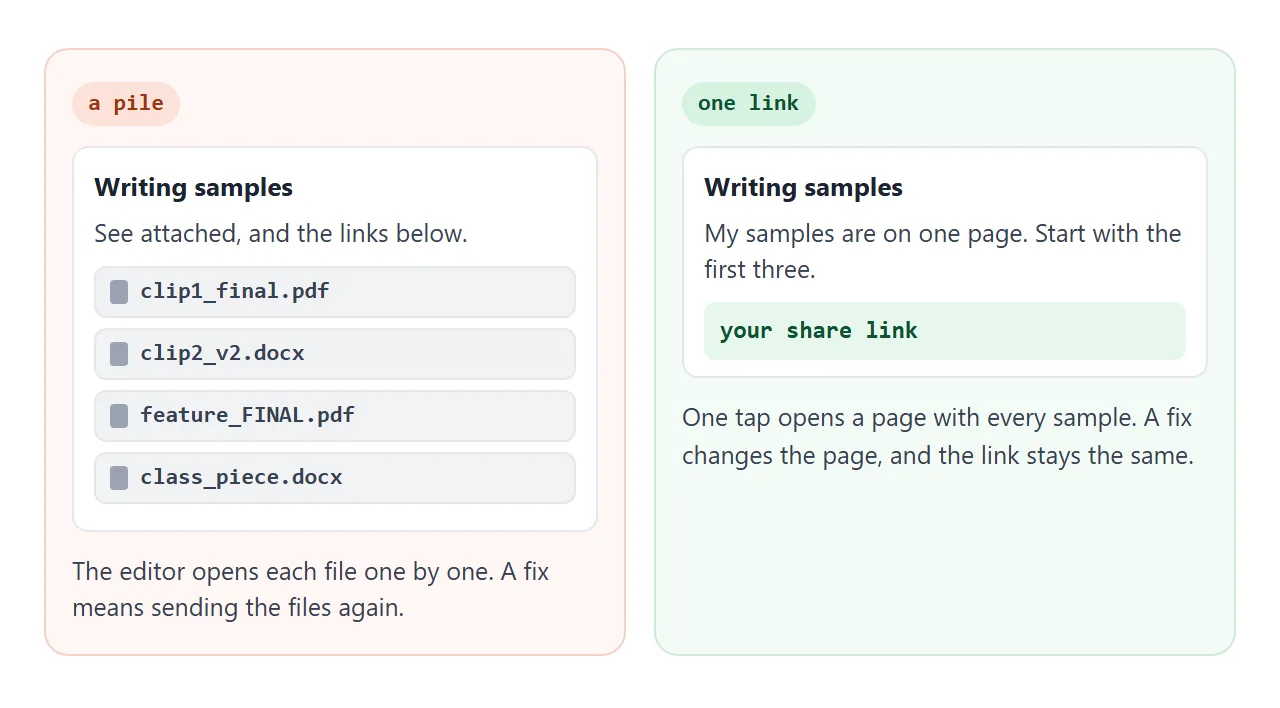
These do not exclude each other. If an editor asks for one specific piece, send that piece. The page is for the first email, when you do not yet know which piece they will want. Why links beat attachments goes into the reasons.
Keep it short and honest
The page is a shop window, not an archive. Start with the work closest to the assignment you want next. A news student chasing a reporting job leads with reporting, and a features writer leads with features.
Say what you did on each piece. For a reported story, name the sources you found and the records you read. For a column, say what the argument is. A copywriter portfolio uses the same idea of showing the brief next to the words.
Put long essays on their own page. An essay link covers that. For the wider question of what to show with no clients yet, see student portfolio, and to put the address on a resume, see linking a portfolio in a resume.
When it does not work
| Symptom | Cause | Fix |
|---|---|---|
| The page opens as plain code | An .html file was attached instead of a link | Send the share link, see opening HTML on a phone |
| The page looks tiny on a phone | The page has no viewport meta tag | Ask the AI to add a viewport tag, see MDN |
| Thumbnails or logos are missing | Images from other websites are blocked | Ask for text only, or simple shapes |
| The filter buttons do nothing | A line was lost when copying | Copy all of the AI's code again, or see fixing AI-generated HTML |
| A sample you did not write appears | The AI filled a gap in your notes | Say "use only my details" and compare every card with your notes |
| The old version still shows | The new code went into a different document | Paste it into the original NOS document |
Before you send the first email, read sharing AI-generated HTML, which covers what to check on any page an AI wrote.